

Key Takeaways:
- Manual data collection raises costs far more than wages, adding rework from errors, delayed decisions, and friction from CAPTCHAs and inconsistent formats.
- Automation drives measurable savings across labor, data processing, infrastructure, and regulatory compliance.
- Web scrapers with NLP and OCR suit unstructured data outside the business, while robotic process automation (RPA) suits structured, rule-based data inside business applications.
- A simple ROI estimate weighs the value of hours saved and rework avoided against tool, build, and maintenance costs.
- Site redesigns, anti-bot defenses, legal exposure, data quality drift, and maintenance overhead can erode savings unless they are planned for and monitored.
- An in-house build suits a few stable, low-risk sources; a specialist partner suits high volumes, volatile sources, or heavy compliance demands.
Every Monday morning, a pricing analyst at a major online store sets out to track 40 competitor websites. She copies prices into a spreadsheet, solves CAPTCHA after CAPTCHA, and fixes each site’s format by hand. By Thursday, her tracking file is complete, and many of the prices in it have already changed.
Automated data collection services can save the day for her. It is a process that involves the use of software, such as web scrapers, OCR and NLP tools, and robotic process automation (RPA) bots, to gather, validate, and deliver data from websites, documents, and business systems without manual effort. It turns work that takes people days into a scheduled process that runs in minutes.
The analyst’s lost workweek is only the visible part of the bill. Behind it sit hours of rework from typing errors, decisions made on outdated numbers, and compliance risk created whenever someone stores personal data on local drives. In an environment where market conditions move within hours, reliance on manual data assembly slows decision-making and affects competitiveness.

This blog talks about the costs manual data collection creates and how automation reduces them. It also shows how to estimate your return before you invest in automated web data collection, and helps you decide whether to build the capability yourself or bring in a partner.
What Does Manual Data Collection Really Cost a Business?
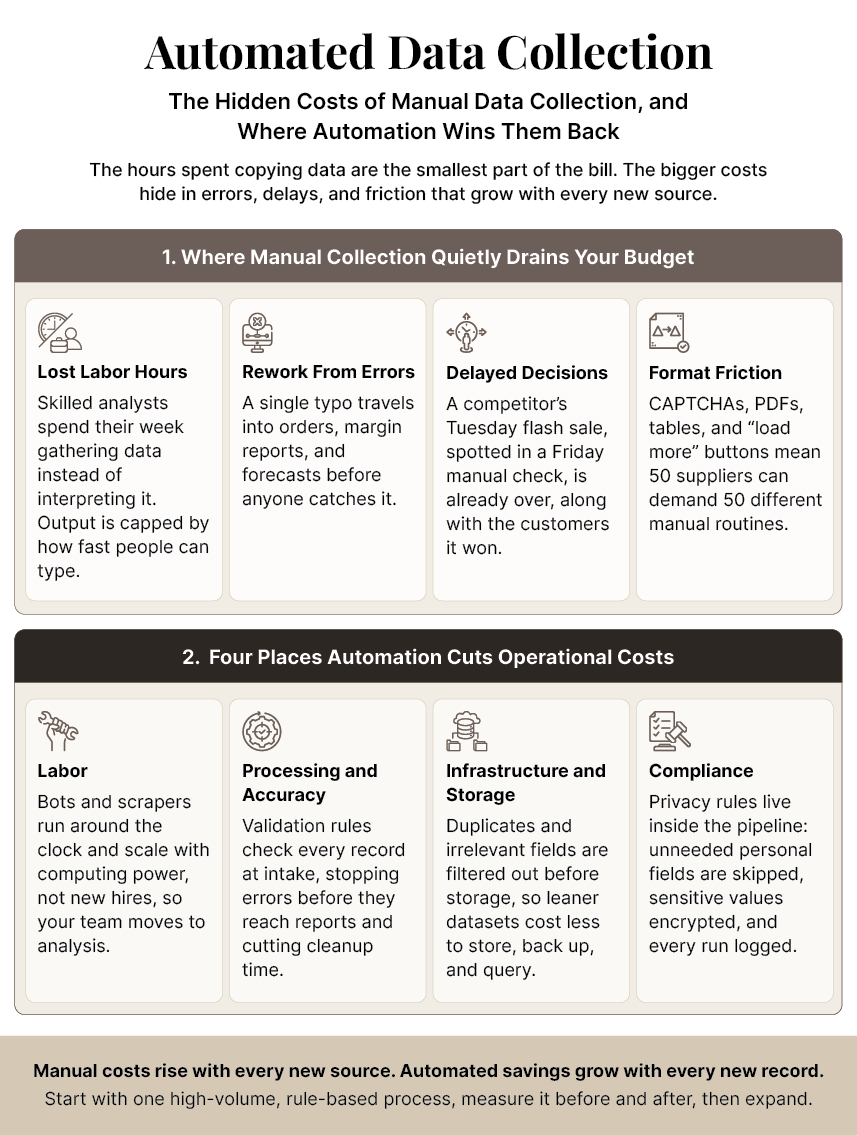
Manual data collection costs far more than wages. It adds rework from errors, delays decisions, and stalls on CAPTCHAs and inconsistent source formats. Most teams measure manual collection by the hours it takes. That number matters, but it is the smallest part of the cost.
The higher costs build up in four places:
- Labor Hours: Analysts hired to interpret data spend much of their time gathering it. If an analyst spends 15 hours a week copying supplier prices into spreadsheets, that is almost two working days lost every week. For one person, it adds up to more than 700 hours a year. Every one of those hours could have gone to analysis, pricing, or planning. Output is also capped by how fast people can work, so covering more sources means hiring more people.
- Rework from Errors: Repetitive data entry invites human error. Picture a unit price of $12.50 typed as $1,250. The mistake moves into the purchase order, the margin report, and the next quarter’s forecast before someone spots it. The later an error is caught, the more systems it has reached and the more it costs to fix.
- Delayed Decisions: Web data changes constantly, but manual checks run on a fixed cycle. Say a competitor starts a flash sale on Tuesday, and a weekly manual check records it on Friday. By then the sale is over, and the customers it pulled away are also gone. When collection runs on a weekly cycle, pricing, stocking, and marketing decisions rest on last week’s reality.
- CAPTCHAs and Inconsistent Formats: Websites protect themselves with CAPTCHAs and rate limits, and every source structures its data differently. One lists prices in a table, another behind a “load more” button. A team tracking 50 suppliers may need 50 slightly different routines, and each one has to be worked through manually. People deal with this friction one page at a time, and the effort grows with every new source.
Put these hidden costs next to what automation offers, and the gap becomes much easier to see.
How Do Manual and Automated Data Collection Compare?
Automated collection costs more to set up, but it runs much faster, makes fewer errors, scales without extra staff, and applies compliance rules consistently. Manual collection is cheaper to start, but its costs climb with every new source and record.
The table below sets out the differences.
| Factor | Manual Collection | Automated Collection |
|---|---|---|
| Cost | Low setup cost, but labor costs rise with every new source and record | Upfront build or tool cost, then a low cost for each additional record |
| Speed | Hours or days for each data refresh | Minutes; runs on a schedule or in near real time |
| Error rate | Rises with volume, fatigue, and repetition | Low when monitored; validation rules flag outliers, though a broken extractor can repeat one error across many records |
| Scalability | Needs more people to be hired and trained | Handles more volume with computing power; new sources need engineering setup, not new hires |
| Compliance exposure | Depends on each person following the rules; hard to audit | Rules are built into the pipeline, and every run is logged |
For high-volume work, the table makes automation look like the obvious choice, and it usually is. But the size of the gains depends on how the system is built, so it helps to understand what happens under the hood.
How Does Automated Data Collection Work?
Automated collection of data follows four steps: identify the right sources, extract the data, validate it against quality rules, and deliver it to the systems that need it.
Whatever tools are involved, most pipelines follow the process described below:
- Identify sources: Decide which websites, documents, databases, or applications hold the data, which fields you need, and how often those sources change, and whether their terms allow collection. A retailer tracking competitor prices, for example, might list 40 websites, five fields per product, and a daily refresh. Getting this right at the outset stops the system from collecting data nobody uses.
- Extract: Software pulls the target fields. That might mean scraping a product page or copying a record from one system to another with an RPA bot. Advanced tools also handle pages that load as you scroll, documents in different layouts, and sites that limit how fast they can be accessed.
- Validate: Rules check every record for missing values, wrong formats, duplicates, and outliers. A well-built system captures values within acceptable ranges and flags anything outside them for review.
- Deliver: Clean data flows into a database, dashboard, CRM, or data warehouse in a consistent structure. Delivery can run on a schedule, such as overnight, or almost instantly when a source changes. Because every record arrives in the same format, teams can start analyzing it right away.
The extraction step is where approaches differ, and two technologies do most of the work.
1. NLP- and OCR-Based Web Scraping for Unstructured Data
Much of the useful data on the web was never designed to be collected. Product descriptions, customer reviews, news articles, PDFs, and images that contain text all fall outside the tidy structures software prefers. Web scraping tools crawl these pages and pull out the required information.
OCR (optical character recognition) turns images and scanned documents into readable text. NLP (natural language processing) then reads that text well enough to pick out a price, a product name, or the sentiment behind a review. Modern scrapers also handle dynamic pages, pace their requests to respect rate limits, and adjust to layout differences across sources. This combination sits at the core of web scraping services.
2. RPA for Structured, Rule-Based Data Collection Automation
Robotic process automation works differently. Instead of reading the open web, software bots repeat the clicks and keystrokes a person would make inside business applications. That covers tasks like logging into a supplier portal or moving order data from an ERP into a CRM. RPA is rule- and process-driven, so it captures data in the same format each time.
Consider an ecommerce retailer. An RPA bot can gather customer touchpoint data from the store platform: purchase history, cart activity, and shopping preferences. It then compares that data with current inventory and shares the results with marketing and sales teams, so promotions match what is in stock. Damco’s intelligent automation services build bots like this for workflows across finance, operations, and customer service.
Where Each Approach Fits
A simple rule applies. Use scraping with NLP and OCR when the data is unstructured and lives outside your business, such as on competitor websites, marketplaces, and public filings. Use RPA when the data is structured and transactional, and lives inside applications you already use. Many businesses combine both. Scrapers collect competitor prices, and RPA bots load them into the pricing system.
With the mechanics clear, the next question is where the money is actually saved.
Boost Your Business Potential with These Data Collection Tips and Strategies
Where Does Automated Web Data Collection Reduce Operational Costs?
Automated data collection helps reduce operational costs in four places: labor, processing and error correction, infrastructure and storage, and compliance. These savings grow larger as data volume increases.
I. Lower Labor Costs
Automation removes the need for staff whose main job is manual entry and copying. Scrapers and bots run around the clock, without demanding overtime. And when data needs grow, from 10 sources to 100 or from weekly to hourly updates, the system scales with more computing power rather than more hiring. Meanwhile, the people already on your team can move to work that needs human judgment, such as analysis and customer strategy.
II. Faster and More Accurate Processing
Faster processing shortens turnaround times, so reports and price changes go out much sooner. Besides, higher data accuracy prevents the downstream errors that lead to rework or poor decisions. Because automation formats and structures data consistently, teams spend far less time cleaning it before they can use it.
III. Reduced Infrastructure and Storage Costs
Cleaner data also lowers infrastructure bills. Many data collection tools run in the cloud or on infrastructure a business already owns, so they need little new hardware. Further savings come from what never gets stored. Because validation happens at the point of collection, duplicates and irrelevant fields are filtered out before they reach the warehouse. Smaller and cleaner datasets cost less to store, back up, and query.
IV. Lower Compliance Costs
Laws such as the GDPR in Europe and the CCPA in California set strict limits on how personal data is collected and used. When people gather data by hand, compliance depends on every individual remembering every rule. An automated pipeline builds those rules straight into the workflow, due to which it can skip personal fields that are not needed, encrypt sensitive values, and keep an audit trail of what was collected and when.
This matters because gaps in data protection are still common. According to IBM1, only 37% of breached organizations encrypt sensitive data both at rest and in transit. An automated pipeline can apply that protection by default and keep sensitive data out of human hands. This lowers security risks and cuts the cost of compliance.
Knowing where savings come from is useful. But knowing how much they will be worth to your business is what gets a project approved.
How Do You Estimate the ROI of Automation Before You Invest?
To estimate your return on investment, add up the value of the hours you save and the rework you avoid. Then, subtract your tool, setup, and maintenance costs. Divide the result by those costs to get your return. If the result is positive, the automation project should pay off.
Before running any numbers, keep this principle in mind:
“The first rule of any technology used in a business is that automation applied to an efficient operation will magnify the efficiency. The second is that automation applied to an inefficient operation will magnify the inefficiency.”
– Bill Gates, Co-founder of Microsoft, in The Road Ahead
In short, you should map out and fix a workflow before you automate it. Once the process works smoothly, measure how long it takes today and use this formula:
Annual net benefit = (hours saved × loaded hourly rate) + cost of rework avoided ? (tool + build + maintenance costs)
The loaded hourly rate includes salary plus benefits, taxes, and overhead, not just the base wage. Rework avoided is the time your team currently spends finding and fixing data errors.
Worked example (illustrative figures only):
| Item | Assumption | Annual Value |
|---|---|---|
| Current manual effort | 4 analysts × 25 hours/week × 50 weeks | 5,000 hours |
| Hours saved | Automation handles 80% of the work (4,000 hours × $45 loaded rate) | $180,000 |
| Rework avoided | 500 hours of error correction × $45 | $22,500 |
| Year-one costs | $60,000 build or license + $25,000 maintenance and monitoring | ?$85,000 |
| Net benefit | $180,000 + $22,500 ? $85,000 | $117,500 |
In this example, the project pays for itself in about five months and returns roughly 138% in its first year. Your actual figures will differ, so replace these assumptions with your real hours, pay rates, and quotes. Note that this formula leaves out the value of making faster decisions. Doing so keeps your estimate safe and conservative.
What Strategic Benefits Does Automation Offer Beyond Cost Savings?
In addition to cost savings, automation gives businesses timely customer feedback, daily competitor tracking, live market trends, and clean data for artificial intelligence. All of it supports faster, data-driven decision-making.
1. Deeper Customer Insight
Reviews, social posts, and support tickets can be collected at scale and analyzed for recurring complaints, feature requests, and shifts in sentiment, long before they show up in sales figures. For example, if a batch of reviews mentions a loose lid on a popular bottle, product teams can fix it in the first week instead of waiting for a pile of returns at the end of the quarter. Because data flows continuously from all channels, one can see what customers actually experience rather than what a survey remembers.
2. Continuous Competitive Intelligence
Instead of looking at a monthly snapshot, businesses can track competitor pricing, product launches, and stock availability every day and respond while it still matters. To give an example, when a rival runs out of a popular item, a retailer can spot it and increase ad spend on their inventory that same afternoon. Likewise, when a competitor cuts prices, pricing teams can see it the same day and decide whether to match them, hold steady, or add extra value.
3. Real-Time Market Trends
Market monitoring shifts from a periodic report to a live feed, so emerging trends surface in days rather than quarters. Rising search interest, new product categories on marketplaces, or a jump in raw material prices become visible while there is still time to act. This gives planning, buying, and marketing teams an early warning system, so they are not left explaining last quarter’s results.
4. A Foundation for AI
AI models are only as good as the data they learn from. In fact, Gartner2 research has found that organizations with successful AI initiatives invest up to four times more, as a share of revenue, in foundations such as data quality than those with poor AI outcomes. Automated collection with validation built in is an easy way to create that foundation.
These benefits look different in every industry. Next, let us look at how they play out in practice.
Here’s How You Can Improve Decision-Making with Automated Data Capture
Which Industries Benefit Most from Automating Data Collection?
Industries that run on high-volume, fast-changing data benefit most, because manual errors and delays cost them money directly. Manufacturing, finance, healthcare, retail, and ecommerce are five clear examples.
I. Manufacturing
Automated tools track supplier stock levels, raw material prices, and lead times across vendor portals. Because of this, procurement teams can buy supplies at the right moment to avoid both overstocking and production delays.
Also, when a key supplier’s lead time slips from two weeks to five, the system flags the issue immediately. This gives planners enough time to find a new source before the production line stops. The same data also improves supplier negotiations, because buyers can point to actual price and delivery history instead of relying on memory.
II. Finance
Analysts use automation to gather market data, company filings, news, and alternative data sources for research and trend tracking. Due to this, they react to market shifts faster and avoid the typing errors that often slip into manual spreadsheets. A new earnings filing or regulatory notice, for example, can be captured and summarized within minutes of its release while a manual team might still be downloading the file. Plus, every figure can be traced back to its source, which makes audits much simpler.
III. Healthcare
In healthcare data collection, optical character recognition pulls text from patient intake forms, lab reports, and insurance documents, while automation speeds up claims processing. Because there are fewer data mistakes, fewer claims get denied. At the same time, sensitive patient records remain secure and auditable. All this allows front-desk and billing staff to spend less time retyping paper forms and more time helping patients. Built-in access controls and activity logs make it simple to prove compliance with privacy laws.
IV. Retail
Retailers use automated web data collection to monitor inventory across channels, customer buying behavior, and competitor pricing in order to plan restocking and promotions. If a product sells out quickly online but sits on shelves in physical stores, the business can shift stock before it has to offer clearance discounts. Pricing teams can also time promotions around real competitor actions instead of following a rigid calendar. Dependable retail data collection keeps this feed accurate and current.
V. Ecommerce
Online sellers watch competitor prices, product availability, and reviews across marketplaces and adjust their own prices daily. Using RPA bots, those insights move straight into inventory planning and marketing campaigns. As a result, sellers can spot when a competitor goes out of stock and adjust prices to capture that demand. Review data also surfaces product complaints early, letting them fix listings before low ratings hurt sales.
Across these industries, the savings are real, but they are not guaranteed. A few predictable risks can wear them down if nobody plans for them.
Turn Hours of Manual Data Gathering into Accurate, Automated Delivery
What Risks Can Erode Your Automation Savings?
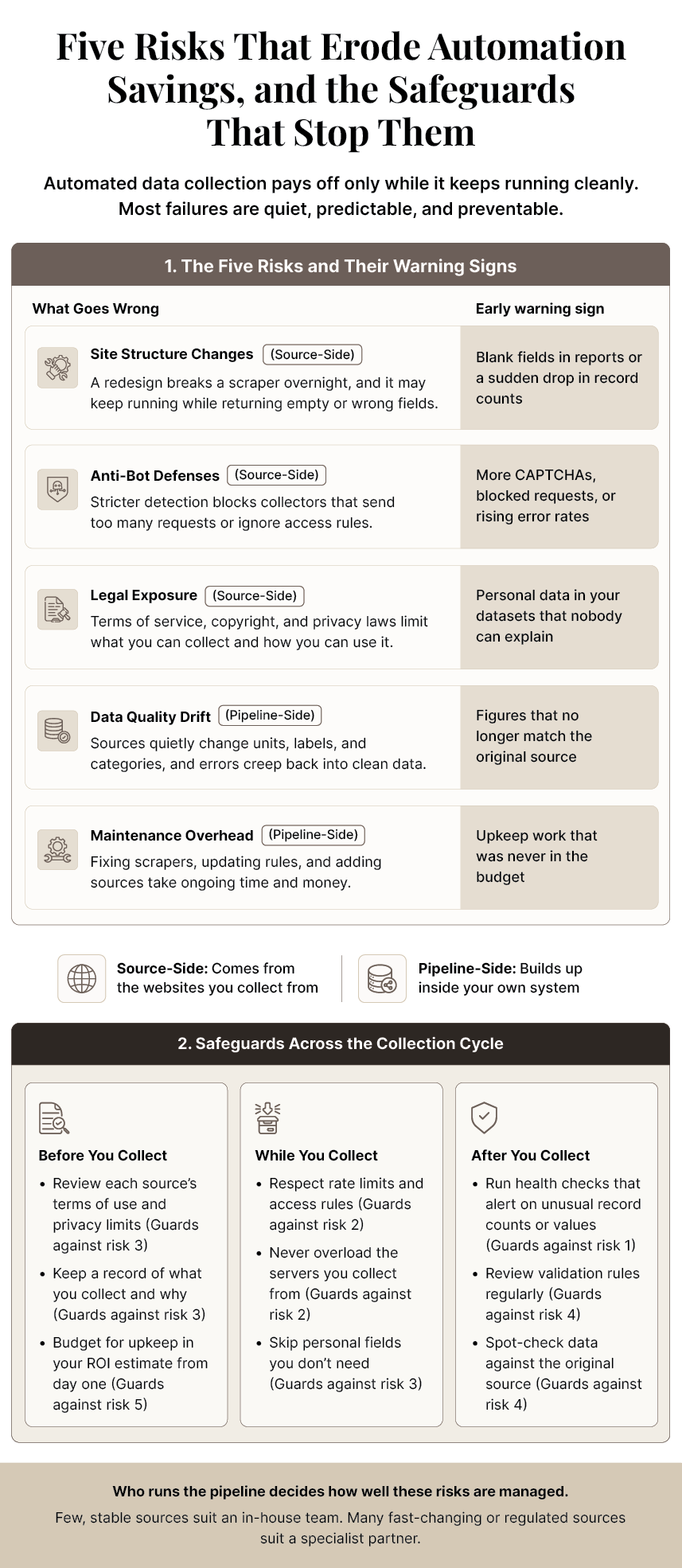
Five main risks can erode your cost savings: site structure changes, anti-bot defenses, legal exposure, data quality drift, and maintenance costs. It is possible to keep them under control with careful planning and monitoring.
1. Site Structure Changes
A website redesign can break a scraper overnight. Without monitoring, the scraper might keep running while returning empty or incorrect fields, and nobody will notice until a report looks strange. Even a minor change, like a renamed price field, can ruin the extraction process. The solution is health checks that alert your teams the moment a source returns fewer records or unusual values.
2. Anti-Bot Measures
Websites are tightening their defenses for good reasons. According to Imperva’s3 2026 Bad Bot Report, automated traffic made up more than 53% of all web traffic in 2025, up from 51% the year before, with malicious bots alone accounting for 40%. As websites use stricter detection tools, legitimate data collectors need to behave properly. That means respecting rate limits, following access rules, and avoiding overloading servers.
3. Terms of Service and Legal Exposure
Public data is not automatically free for everyone to use. Terms of service, copyright rules, and privacy laws limit what you can collect and how you can use it. Because of this, it is vital to review every source before gathering data. Also, public prices carry very different risks than personal names or contact details, which privacy laws protect strictly. Keeping a simple record of each data source, what you collect, and why you collect it makes it easier to answer questions from legal teams or regulators later.
4. Data Quality Drift
Sources change their units, labels, and categories over time. If validation rules are not updated to match these changes, errors will creep into the data. For example, a supplier might switch from pounds to kilograms, or a marketplace might merge two product categories into one. Every record after that change will be wrong unless monitored. Regular reviews of validation rules and spot checks against the original sources can catch these shifts before they distort reports.
5. Maintenance Overhead
Scrapers and bots require ongoing upkeep. This cost must be included in your ROI formula from day one, so it doesn’t come as a surprise in year two. Upkeep involves fixing broken scrapers, updating rules, adding new sources, and keeping security patches current. Generally, the more sources a system covers, and the more often they change, the larger the share of the budget this work takes.
We cover how to detect and fix these problems in more depth in our article on how AI helps overcome automated data collection failures. How well you handle these risks depends heavily on who runs your system. And that brings us to the final decision.
Should You Build Data Collection In-House or Work with a Partner?
Build data collection in-house when sources are few, stable, and low-risk. Work with a partner when volumes are large, sources change often, or compliance demands are heavy. The table below sets out the trade-offs.
| Decision Criterion | Build In-House If | Use a Partner If |
|---|---|---|
| Data volume | You have a few sources and modest, predictable volumes. | You have many sources, or volumes that spike or grow quickly. |
| Source volatility | Sources rarely change their layout or access rules. | Sources change often or use strong anti-bot defenses. |
| Compliance load | You handle little or no personal or regulated data. | You collect personal, health, or financial data under GDPR, CCPA, or HIPAA. |
| Internal skills | You have a data engineering team with time for upkeep. | Engineering capacity is limited or focused on other priorities. |
| Time to value | You can wait several months to build and test the system. | You need reliable data within weeks. |
Many businesses land somewhere in the middle. They keep simple, internal RPA workflows in-house and hand off volatile, high-volume web collection to a specialist.
If most of your answers fit the right-hand column, Damco can help. Our AI data collection services design, run, and maintain compliant pipelines across web, text, image, audio, and video sources. This ensures your team receives clean data without taking on the burden of maintenance.
Conclusion
Automated collection of data requires upfront spending. But over time, the savings and efficiency gains usually outweigh those costs, especially when you choose tools designed for your specific needs. The returns come from four areas: fewer hours spent copying data, fewer errors to fix, leaner storage, and tighter compliance. Apart from financial savings, businesses gain something harder to measure: decisions based on data that is updated and reliable.
The best way to begin is to start small. Pick one high-volume, rule-based process, measure its performance before and after automation, and then use those results to guide what you automate next.
References:
Frequently Asked Questions
Often, yes, but it depends on what you collect and how you collect it. Publicly available data is usually fair to gather, but a website's terms of use, copyright rules, and privacy laws can limit it. Avoid personal data unless you have a clear legal reason, and check each source before you start.
A simple project, such as pulling prices from a few stable websites, can be up and running within a few weeks. Larger projects with many sources, complex documents, or strict privacy rules can take two to three months. Most of that time goes into planning, testing, and checking data quality.
Usually not. Automation takes over the repetitive part of the job, like copying and pasting, so people can focus on checking results, spotting patterns, and making decisions. Someone still needs to choose the sources, review flagged records, and fix problems when a website changes. Most teams move their people into these roles.
Almost any data that exists in digital form. This includes prices and product details from websites, text from reviews and news stories, numbers from PDFs and scanned forms, records inside business software, and even images, audio, and video. If a person can find and copy it on a screen, software can usually collect it.
Look for a task your team repeats often, that follows clear rules, and that takes many hours each week. Tasks where mistakes are common are good candidates, too. Start with one such process, measure the time and errors before and after, and use the results to decide what to automate next.


