

Can retailers really innovate without massive technology investments? Power Platform proves they can by providing enterprise-grade tools at affordable costs. Retailers can build custom apps, automate processes, and analyze data using platforms they already own through Microsoft subscriptions that many businesses have.
With an impressive 140% ROI and 45% cost reduction in app development, businesses utilizing Power Platform have experienced tangible benefits. Capitalizing on these cost savings, we will explore how Power Platform serves as a comprehensive retail solution, examine key benefits for retailers, and discuss what retailers must get right for Power Platform success.

How Does Microsoft Power Platform Serve as a Comprehensive Solution for Retailers?
A low-code development platform, Power Platform comprises enterprise-grade tools and platforms such as Power Apps, Power Automate, Power BI, Pages, and Power Virtual Agents. Power Platform can also connect with Dynamics 365, Office 365, Azure Cloud, and even third-party applications. By synergistically combining these tools, retail organizations can elevate their productivity and take their business to a whole new level.
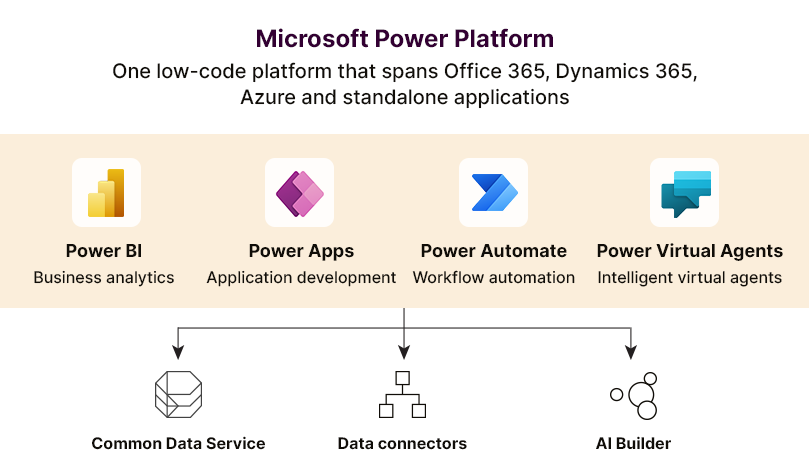
Let’s dive into the capabilities of each of these tools one by one.
Power BI: Generate Insights for Informed Decision-Making
A full-suite data intelligence platform, Power BI enables organizations to tap into various data sources and present real-time insights in the form of easily comprehensible charts, reports, and dashboards. With over 200 native connectors, the tool can be connected to platforms of various complexities, ranging from Microsoft Excel and SQL servers to Google Analytics. Decision-makers in the retail industry can leverage Power BI to identify market opportunities, monitor KPIs, spot industry trends, and more.
“These visuals weren’t just cosmetic upgrades—they helped us tell the right story faster and better. Even if someone has never used Power BI, they can still quickly pick it up and become experts if they want.”
– Pawel Raiter, Director of Global Marketing, Commercial & PACS Intelligence, Coca-Cola.
Case in Focus: Leading Retailer Optimized Inventory Management with Power BI-Driven Dashboards
A California-based multi-door retailer sought a powerful analytics and visualization solution to leverage massive volumes of data generated across various touchpoints. They wanted to eliminate their reliance on Excel spreadsheets and manual data handling.
Damco’s Power BI experts collaborated with the client to build a Power BI-driven solution for advanced reporting and visualization. The solution enabled the retailer to consolidate data from all sources (Excel sheets, POS, etc.), visually capture key metrics through custom reports and dashboards, and realize a whopping 30% reduction in inventory costs. Explore the complete case study.
Power Apps: Enhance Business Agility with Custom Applications
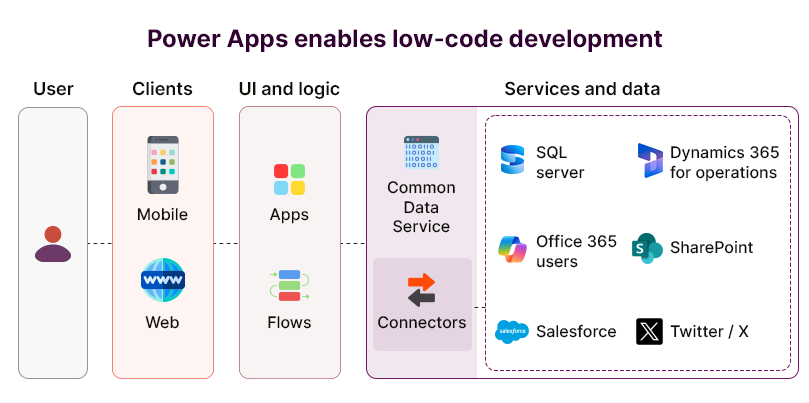
Diverse customer requirements and changing market conditions have accelerated the rise of bespoke applications built using drag-and-drop interfaces and pre-built templates, establishing a paradigm of low-code development. Microsoft Power Apps, built upon this concept, enables developers and non-developers to build and deploy custom applications in just a few weeks, not months, and that too with a minimum budget. According to Forrester Research, Power Apps enables 50% faster application development, with adoption driving a 206% return on investment (ROI) over three years.
Power Apps comes with infinite possibilities. From employee onboarding, inventory management, and order management, to supply chain management and POS, retailers can use its point-and-click approach to turn their business ideas into brilliant apps, really fast.
Here’s how Power Apps enables innovation:
- Customized, Role-Based Applications: Businesses can solve their most pressing operational challenges and clear development backlogs by building applications up to 10 times faster.
- Easy-to-Learn for Citizen Developers: With an intuitive point-and-click approach and a large range of ready-to-use templates, Power Apps empowers employees to become citizen coders and turn their ideas into value-driven apps.
- Single Source of Truth: By integrating data from 300+ different sources, users can make sure their organizational data always remains accurate and up-to-date.
How to Choose the Right Power Apps Solution for Your Business
Power Automate: Drive Productivity with Automated Workflows
Also known as Microsoft Flow, Power Automate enables business users to seamlessly incorporate automation into applications and services. In an era where retail organizations are constantly optimizing their environment for efficiency, Power Automate helps users automate simple, rule-based tasks, send automatic notifications, and schedule data movement between systems-all without writing any code.
For example, businesses can harness the platform to create workflows for extracting and transferring survey answers from questionnaires or for automatically saving email files to SharePoint.
Three kinds of workflows can be built using Power Automate:
- Automated: These workflows are triggered when a pre-defined condition is met. For instance, an email gets delivered once a task is finished.
- Scheduled: These workflows are scheduled to run at a particular time of the day, week, or month.
- Instant: These start at the click of a button and can be used across both desktop and mobile devices.
Power Virtual Agents: Create Intuitive Chatbots to Boost CX
Delivering top-notch customer support is non-negotiable and remains critical. Retailers can alleviate the burden on their support staff by building intelligent AI-powered chatbots using Microsoft’s Power Virtual Agents, a SaaS low-code platform.
Power Virtual Agents can also be integrated with other tools from the Power Platform suite, such as Power Automate, which means virtual agents can trigger a workflow based on users’ responses and complete a task as required.
Virtual assistants created through the platform can answer common customer queries, direct users to the right resources, or escalate the query to human agents if required. Retail organizations can harness the power of chatbots to boost customer service, shorten turnaround time (TAT), and free up human agents for business-critical tasks.
What Are the Key Benefits of Microsoft Power Platform for Retailers?
A holistic application suite, Microsoft Power Platform can empower retailers to ensure hassle-free operations and deliver client-centric solutions. While most of the organizations have invested individually in the core components, the latter can be integrated synergistically to improve business operations.

-
Holistically Managed Business Processes
Microsoft Power Platform provides an enterprise-grade platform where organizations can manage all kinds of data, maintain a single source of truth across all departments, and access actionable insights to gain an edge in an immensely competitive industry.
- Tailor-Made Solutions to Meet Customer Needs
Power Platform comes with a visual design approach, eliminating the need for hand-based coding and accelerating the development process to close the digital gaps in an organization’s transformation journey. Digitizing processes and operations helps retailers eliminate redundancies and deliver client-centric experiences.
- Reduced Reliance on Third-Party Tools
By combining the power of analytics, design, development, and automation on a single platform, Power Platform eradicates the need for recurring subscriptions and cost controls.
- Personalized Customer Experiences
With Power Apps, retailers can develop tailor-made applications that effectively capture customer behavior and preferences. These applications can be integrated with their existing data sources, including CRM systems, to get a 360-degree view of the customers. Enhanced insights into customer behavior help retailers deliver personalized offers, recommendations, and experiences.
- Data-Driven Decision-Making
In an industry that generates an overwhelmingly large amount of data, retailers often struggle to glean value-driven insights. Power BI enables businesses to combine and analyze data from various sources and convert raw data into informative visualizations and reports.
- Seamless Office 365 Integration
Power Platform can be easily integrated with Office 365, helping retail businesses effortlessly manage organizational data while simplifying complex business processes and tasks.
- Improved Data Security
Since retail businesses deal with sensitive customer data, they need to implement safeguards to keep cyberattacks at bay. Being a Microsoft offering, Power Platform comes with built-in security measures and access controls. Additionally, Power Platform runs on Azure, a robust cloud infrastructure that guarantees the highest degree of data security and compliance.
Boost Retail Success with Power Platform Solutions
What Must Retailers Get Right to Succeed with Power Platform?
Retail moves fast, and mistakes show up quickly. Getting Power Platform right means building on the correct foundations from the start, not fixing problems after they grow.
1. Connect Your Retail Data Sources First
Retail businesses collect data from stores, websites, stock systems, and loyalty programs scattered across multiple locations. If Power Platform cannot access that data, every app or report built on top of it will give an incomplete or wrong picture.
Before building anything, map out where all your retail data exists and set up proper connections into Power Platform. When the data flows smoothly from all the right places, every tool built on it becomes genuinely useful for store managers and head office teams alike.
2. Automate Repetitive Store Operations Early
Store staff spend chunks of their day on repetitive tasks, like stock requests, shift reports, supplier emails, and daily checklists. Doing these manually wastes time that could go toward serving customers or managing the shop floor better.
Power Platform’s automation tools can handle these repeated tasks without staff having to do them manually. When retailers automate the routine work early in the rollout, teams quickly see the value and become more willing to adopt new tools across the business.
3. Build Apps Around How Staff Actually Work
Many retail technology projects fail because the tools are built around what looks good in a demo rather than what staff actually need on a busy shop floor. An app that takes too many steps to use will simply get ignored by frontline teams.
Spend time with store staff before building anything. Watch how they handle tasks during peak hours and build apps that fit into those real moments. Simple, fast, and focused apps get used, unlike overcomplicated ones, no matter how many resources were spent building them.
4. Keep Inventory Visibility at the Centre
For any retailer, knowing stock availability, location, and replenishment needs is essential since it drives core operations. When inventory data is unclear or delayed, shelves go empty, and customers leave empty-handed.
Microsoft Power Platform in the retail industry setups should prioritize live inventory tracking from day one. When store managers can see real stock levels on their phone or screen without calling the warehouse, they make faster, better decisions that directly affect sales and customer satisfaction.
5. Set Clear Roles for Who Builds What
Power Platform lets people without a coding background build their own apps and automations. In retail, this is useful but also risky if there are no rules about who is allowed to build what and where those tools can be used.
Set up a clear structure early with a small central team that sets standards, and store-level staff who can build within those boundaries. This keeps things moving without ending up with dozens of conflicting tools that nobody can maintain or trust over time.
6. Make Supplier and Partner Workflows Part of the Plan
Retail does not run in isolation. Suppliers, logistics partners, and third-party service providers all need to share information regularly. When that sharing still happens over email threads and phone calls, delays and errors are almost guaranteed.
Microsoft Power Platform for retail allows businesses to build shared workflows that connect internal teams with external partners. When a supplier receives an automated stock alert or submits delivery updates directly into the system, the whole supply chain runs with fewer holdups and fewer mistakes.
7. Train Store Managers, Not Just Head Office Teams
Technology rollouts in retail often focus training efforts on head office staff who sit at desks all day. But the people who will use these tools most are store managers and frontline staff who work in fast, unpredictable environments.
Keep training short, practical, and based on real store scenarios. Show a manager how to check live stock levels or raise a supplier query in under two minutes. When training feels relevant to the actual job, people hold on to it and use it properly.
8. Measure Results at the Store Level, Not Just Overall
Many retail businesses track success at the company level and never look at how individual stores or departments are performing with new tools. This makes it hard to spot where things are working well and where they are falling flat.
Set up simple performance dashboards for each store from early on. Track things like time saved on daily tasks, stock accuracy improvements, or how quickly issues get resolved. Store-level data gives managers ownership of results and gives leadership a clear view of where to focus next.
The Final Word
Power Platform is not just a set of tools; it is a catalyst for transformation in the retail industry. By unifying data, streamlining processes, and enhancing customer engagement, Microsoft Power Platform solutions empower retailers to successfully overcome the challenges of the modern marketplace. As the retail landscape continues to evolve, embracing the capabilities of Power Platform is a strategic imperative for those looking to thrive in the digital age.
Frequently Asked Questions
Power Automate can automate inventory reorder alerts when stock runs low, employee shift notifications, customer order confirmations, and daily sales report generation. It handles approval workflows for discounts or returns, sends promotional emails based on customer behavior, and updates inventory across systems automatically when sales occur.
Power BI helps retailers analyze sales trends, track inventory performance, monitor customer buying patterns, and measure store productivity. Dashboards show which products sell best, identify slow-moving items, compare store performance, and reveal peak shopping times. These insights guide decisions about stocking, pricing, and staffing effectively.
Yes, Power Platform connects with most POS systems through built-in connectors and custom APIs. Integration allows automatic data flow between POS and other business systems, eliminating manual data entry. Retailers access sales information in real-time, sync inventory levels, and combine POS data with other sources for comprehensive analytics.
Yes, Power Platform reduces errors by automating data entry, validating information automatically, and eliminating paper forms. Digital workflows ensure consistent processes, automated calculations prevent math mistakes, and integrated systems avoid discrepancies from duplicate entry. Staff spend less time on repetitive tasks prone to human error.


