

Key Takeaways:
- Legacy systems and data silos raise operating costs and Errors & Omissions (E&O) exposure.
- Effective technology solutions for insurance brokers are built around a broker management system that serves as the brokerage’s single source of truth.
- Integrations built on APIs and ACORD standards remove repetitive data entry between carrier portals and the brokerage system.
- Rule-based workflow automation accelerates renewals, COIs, and endorsements without increasing headcount.
- AI delivers the highest value on narrow, targeted tasks when a licensed professional reviews its output.
- Tech implementation succeeds through hands-on training, dedicated internal champions, and clear performance metrics.
Most brokerage leadership conversations heading into 2027 come back to one question: “How do we scale revenue without proportionally expanding headcount?” Much of that pressure comes from clients. They increasingly expect proactive renewal options and self-service access to their policies, without having to call the office. But meeting those expectations with spreadsheets and decade-old agency software gets harder each year, and hiring alone can’t keep pace. For insurance brokers, technology is the only viable answer.
Technology solutions for insurance brokers comprise software systems that manage clients, policies, carrier data, documents, compliance, and reporting on a single platform. At the center of this stack, there is usually an insurance broker management system, supported by CRM, carrier integrations, workflow automation, and analytics. The value comes from connecting these tools, so data moves freely between them.
Many brokerages already know this. Yet, they are held back by their existing systems. In the 2026 Big “I” ACT Tech Trends Report[1], independent agencies named keeping pace with technology change as their top tech challenge, followed by too many disconnected systems and a lack of automation. This disparity between where agencies want to be and what their systems allow usually comes from legacy infrastructure and the absence of a clear implementation strategy.

This guide closes that execution gap. Learn why delaying upgrades exposes your firm to growing risk, explore the digital tools for insurance brokers that make up a high-performing stack, and discover how to deploy AI safely and drive lasting team adoption.
Why Insurance Brokerages Can’t Afford to Delay Technology Upgrades
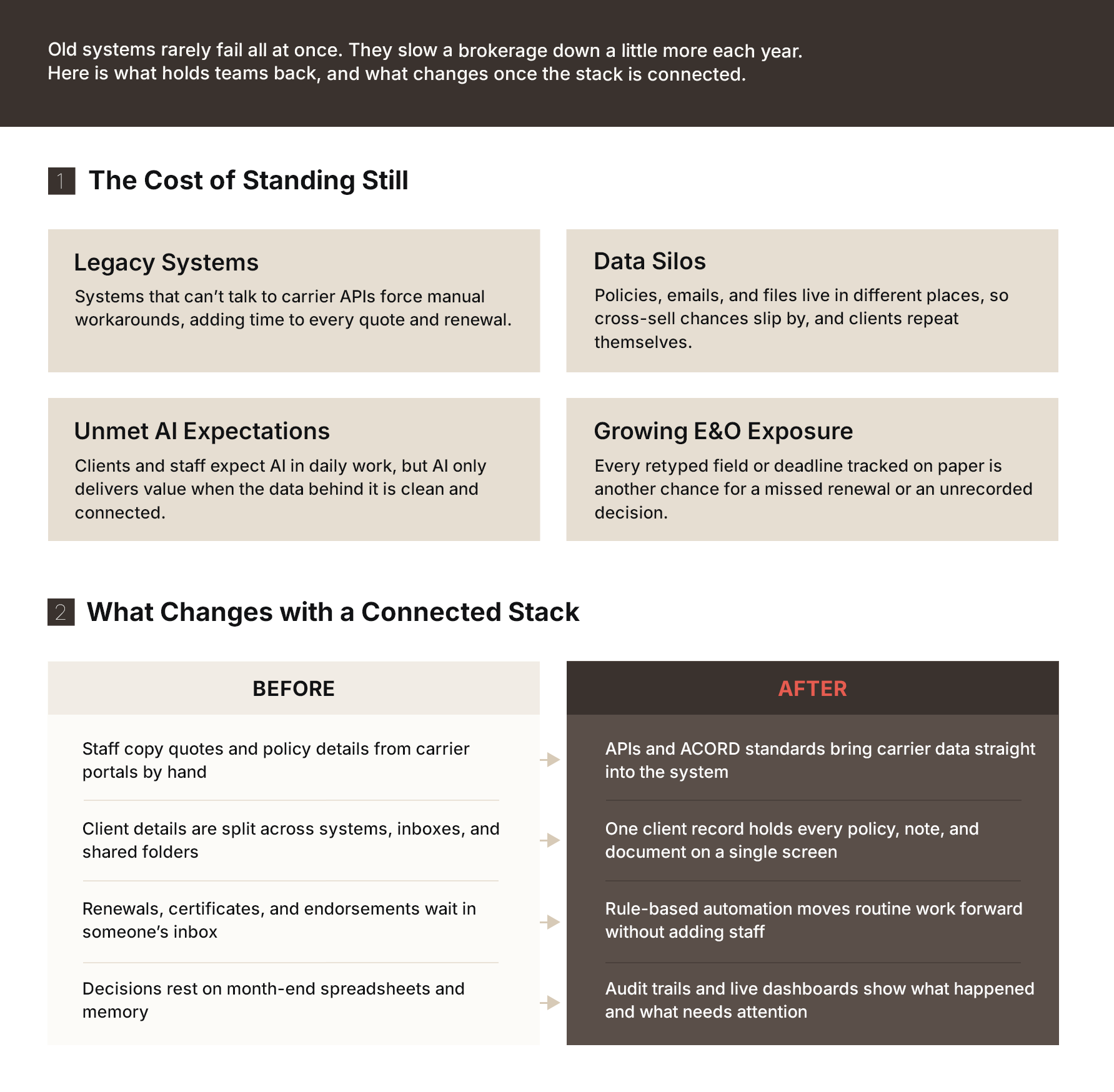
Delaying technology upgrades gets more expensive every year. Legacy systems slow every quote and renewal, scattered data hides cross-sell opportunities, competitors are already using AI, manual steps raise errors and omissions (E&O) risk, and a softening market means rate increases no longer lift commissions.
Old technology seldom breaks all at once. Instead, it drains productivity year after year. This pushes account managers to spend more time moving data between different screens rather than talking to clients.
Four major pressures are making this slowdown difficult to ignore.
I. Legacy Systems Hinder Growth
Many older brokerage systems were built before carrier APIs existed and have no easy way to connect to them. Staff fill the gaps with manual workarounds for tasks that new platforms usually automate. Each workaround adds precious time to quotes and renewals. These delays multiply as the brokerage takes on new clients.
II. Data Silos Hide the Full Client Picture
When policy details sit in one system, emails in another, and documents in shared folders, sales teams miss cross-selling opportunities. Staff also waste time answering repeat questions. And clients notice these gaps, especially during renewals.
III. Competitors Are Already Putting AI to Work
The 2026 Agency Universe Study[2] from the Big “I” and Future One found that 46% of independent agencies used AI in 2026, up from 15% in 2024. Adoption tripled in two years. But AI tools only work well when data is clean and connected. Brokerages with fragmented systems find it difficult to use AI safely or gain real value from it.
IV. Manual Steps Increase E&O Exposure
A missed renewal date or unrecorded advice can turn into an E&O claim. The chance of a serious mistake goes up whenever someone retypes data or tracks a deadline on paper. Modern systems reduce that risk by recording each action and flagging problems before they reach the client.
Brokers face extra urgency from shifting market conditions. Swiss Re Institute’s[3] World Insurance Sigma Report expects total global premium growth to slow to 1.3% in real terms in 2026, down from 3.9% in 2025, as non-life lines enter a soft market.
When rate increases stop driving up commissions, growth must come from other sources. Brokerages need to serve more clients with the same team, retain more business at renewal time, and sell additional coverage. Achieving these goals depends on having the right technology solutions for insurance brokers in place.
How Does a Modern Tech Stack Change Insurance Brokerage Work?
What Are the Seven Core Technology Solutions Every Brokerage Needs?
A complete brokerage tech stack covers seven areas: broker management, CRM and client portals, carrier connectivity, documents, workflow automation, compliance and security, and analytics.
No single tool fixes every problem. The digital tools for insurance brokers work best when they share data as one connected system, with each layer building on the one before it. The table below summarizes all seven, and the sections that follow explain each in turn.
| Solution | What It Does | Main Benefit |
|---|---|---|
| Insurance broker management system | Runs quoting, binding, policies, billing, and commissions from one record | A single source of truth for the brokerage |
| CRM and client self-service portal | Tracks relationships and leads while letting clients manage their own needs | Better client retention and fewer routine calls |
| Carrier connectivity and integrations | Exchanges data with carriers using APIs and ACORD standards | Cuts manual data re-entry and speeds up quotes |
| Document management and intelligent processing | Stores documents centrally and automatically extracts key data | Allows quick file retrieval and less manual typing |
| Workflow automation | Handles renewals, certificates, and reminders based on preset rules | Gets more work done without adding staff |
| Compliance, security, and audit trails | Controls access, records every action, and supports AI governance | Lowers E&O and regulatory risk |
| Analytics and reporting | Measures client retention, cross-selling, and team performance | Drives decisions using data instead of guesswork |
1. Insurance Broker Management System
An insurance brokerage management system forms the foundation of the entire tech stack. This system ties client and policy records together so that quoting, billing, and commission tracking all draw from the same data source. When this core is weak, all other tools inherit its gaps.
BrokerEdge by Damco is built to be that core. It manages the full policy lifecycle, from onboarding and submissions to quoting, binding, billing, and claims. A single customer record keeps data consistent, while plug-and-play APIs connect it to insurer systems. We will cover this platform in more detail later in this guide.
2. CRM and Client Self-Service Portal
Once policy data lives in one place, an insurance broker CRM uses it to build stronger client relationships. It offers tools to streamline customer service, improve lead tracking, and uncover cross-selling opportunities. Teams get a 360-degree customer view, with every policy, claim, note, and email on a single screen.
A client portal and mobile app extend this visibility to the policyholder. Policyholders can download ID cards, request certificates, and check coverage on their own schedule. When the insurance broker CRM and the portal share the same data, clients and staff always see the same information. This cuts routine phone calls and frees account managers to focus on advisory work.
Here’s What AI-Powered CRM for Insurance Does and How to Test It
3. Carrier Connectivity and Integrations
A CRM and a management system only help if data can move freely between them and the insurance carriers. Carrier integrations use APIs and industry standards such as ACORD forms and data formats to pull quotes, policy downloads, and billing updates into the brokerage system. In their absence, staff copy the same details from carrier portals into internal screens. This wastes time and leads to errors.
Integrations also link internal tools. Connecting the brokerage platform to Microsoft Teams or Slack for internal messages and to Mailchimp for client campaigns keeps conversations tied to client records.
Many brokerages still run core systems on IBM i architecture. Replacing them outright can be risky, so a common approach is to wrap the existing core with APIs that let modern tools read and write its data. Damco’s IBM i development and modernization services help firms take this route without disrupting operations.
4. Document Management and Intelligent Processing
Brokerages handle a large volume of paperwork, including applications, declarations pages, and certificates. A digital document repository stores these files securely against the correct client and policy. A good one also keeps version history and retention rules, so staff can find the current document in seconds and show exactly what was on file at any point, which matters in an E&O dispute.
Intelligent document processing goes a step further. It reads applications, loss runs, and schedules, extracts key fields, and enters them into the system for review. This transforms hours of data entry into a brief verification step.
5. Workflow Automation
Insurance broker automation software can take over repetitive tasks after data and documents are in place. Reliable automation runs on the rules your team defines, so it follows your process instead of forcing a new one.
These three areas deliver quick results:
- Renewals: The system flags upcoming expirations, sends reminders to clients, and requests remarketing quotes. Account managers start each renewal with the groundwork already done, getting more time to review coverage and talk to the client.
- Certificates of Insurance: Clients usually want COIs the same day to start a job or meet a contract requirement. Automation generates standard certificates from policy data and delivers them through the self-service portal. Our blog on why clients now expect instant COIs talks about this in detail.
- Endorsements and Policy Changes: When a client adds a vehicle or a location, automation routes the request, pre-fills forms, and tracks the update until the carrier confirms. All steps are recorded for later reference.
Advanced insurance broker automation software systems also send claim status updates and payment reminders. This helps clients stay informed without anyone having to pick up the phone.
5. Compliance, Security, and Audit Trails
Automation moves work faster, which makes controls even more important. Modern brokerage platforms offer encryption and role-based access to protect sensitive data. In addition, there are audit trails to record who viewed or changed a record and when. These trails protect a brokerage during disputes and make regulatory reviews simpler.
Compliance now covers AI, too. In the US, many states have adopted the National Association of Insurance Commissioners (NAIC) model bulletin on AI. Carriers increasingly expect their distribution partners to follow similar standards.
Brokers in Europe must also meet the General Data Protection Regulation (GDPR) and the EU AI Act, while UK brokers must show good client outcomes under the Financial Conduct Authority’s Consumer Duty. Your software should make it easy to show how data was used and who approved each decision.
6. Analytics and Reporting
With every action logged, historical data becomes a source of insight. Modern platforms help brokers identify emerging risks and renewal opportunities. Dashboards show retention rates by line and producer, single-policy clients who are strong cross-sell candidates, and accounts at risk of leaving.
Producer KPIs such as new business written, hit ratios, and revenue per account help leaders coach their teams with facts. Commission reports that compare carrier statements with expected revenue help catch money that might otherwise slip away. Our blog on whether your brokerage is losing commission revenue explains where these gaps usually hide.
How Can Brokerages Use AI Without Adding Risk?
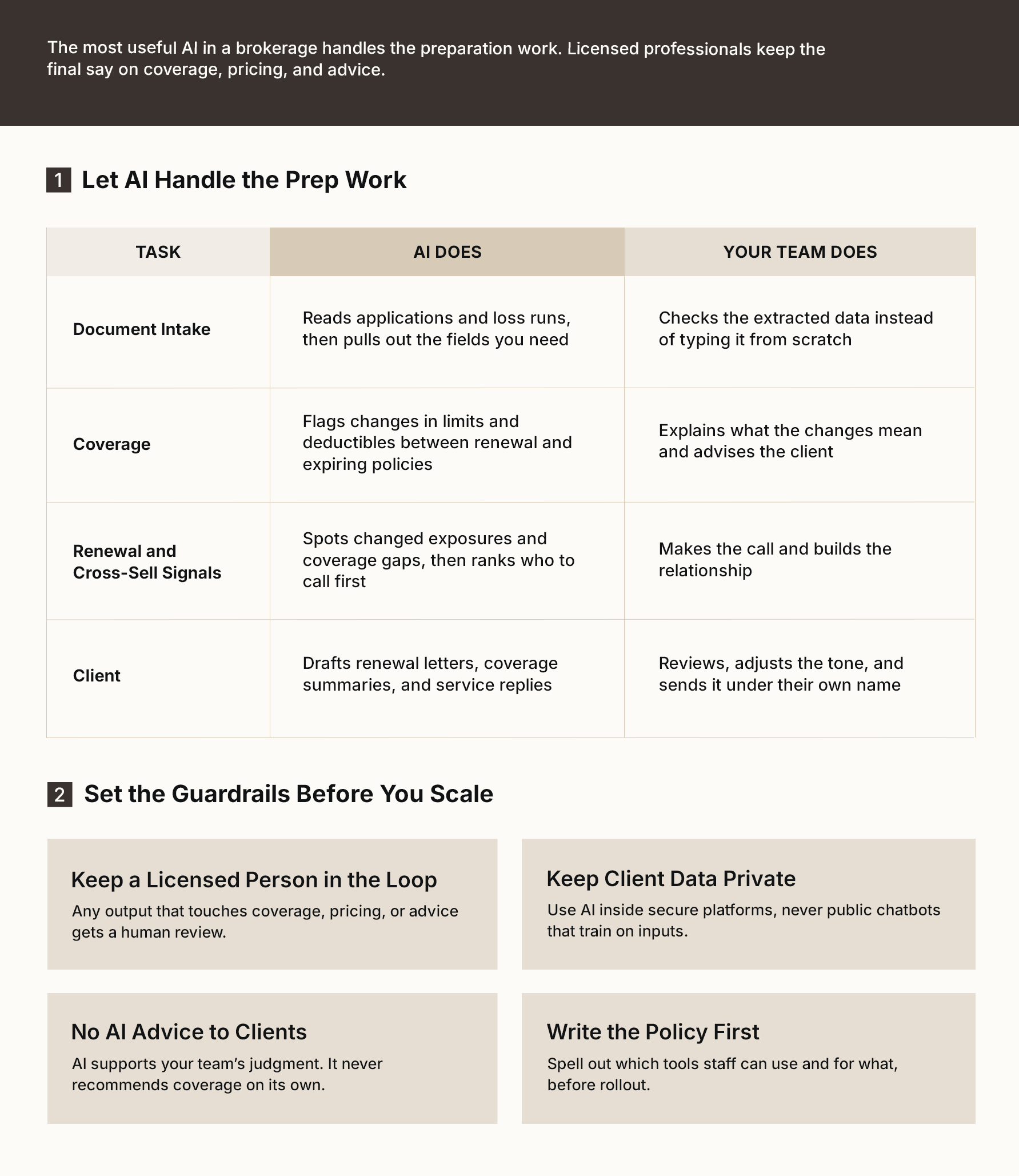
Start with narrow, high-volume tasks like document extraction, summaries, and renewal prep. Have a licensed person review every output that touches coverage, pricing, or advice, keep client data out of public AI tools, and put a written AI policy in place before rollout.
The solutions described above give AI the clean and connected data it needs. The next question is where to use it first. The most useful AI in a brokerage today handles preparation work and leaves judgment to people.
I. Document Intake and Data Extraction
Most of a brokerage’s useful information sits in unstructured files: scanned applications, loss runs in each carrier’s format, and schedules sent by email. AI can read these files, extract the fields your team needs, and normalize them, so the same data point means the same thing across carriers. Staff members can just verify information instead of typing everything on their own. This cuts data entry time and reduces copying errors across the book of business.
II. Coverage Comparison and Submission Preparation
AI can compare a renewal quote against an expiring policy and highlight changes in limits or deductibles. It can also assemble a draft submission package and consolidate overlapping supplemental questions from several carriers into one shorter set. Producers can focus on market conversations instead of paperwork.
III. Renewal and Cross-Sell Signals
Dashboards show what has already happened. AI looks for what is likely to happen next. It can flag clients whose exposures have changed, accounts showing signs they may shop their coverage elsewhere, and clients missing coverage that is standard for their industry. Producers get a short, ranked list of who to call first.
IV. Client Communication Drafts
AI can create drafts for renewal letters, coverage summaries, and common service questions. Account managers just check and tweak these drafts before sending, so clients hear from someone they trust.
A human-in-the-loop approach keeps these tools safe and effective. A licensed expert must review any AI output that touches coverage, pricing, or client advice. As Kasey Connors, Executive Director of the Big “I” Agents Council for Technology, puts it:“What we hear consistently is that agents aren’t worried about the price of AI; they’re worried about the cost of getting it wrong.”
That concern points to a few clear things to avoid. Do not paste client data into public chatbots that train on your inputs. Do not let AI make coverage recommendations directly to clients. And do not roll out AI tools before establishing a written policy that lists what your staff can and cannot use them for. For more practical examples, read our guide on simplifying brokerage operations with AI insurance broker software.
Where AI Helps and Where People Decide: An AI Playbook for Insurance Brokerages
How Do You Choose the Right Insurance Broker Software?
Match the software to your core lines of business, then test integrations, data migration, AI readiness, scalability, and long-term vendor support.
The best software for insurance brokers is not the one with the most features. It is the one that fits how you work, connects to your carriers, and offers reliable support.
Integration and data migration are critical aspects of the selection process. The new system must work well with your existing tools. It should transfer client history, notes, and documents cleanly. If records get lost during the move, your team will lose trust in the software on day one.
Use the checklist below when evaluating any insurance brokerage management system.
| Criterion | Questions to Ask |
|---|---|
| Core business fit | Does the software support your specific insurance lines and workflows without requiring heavy customization? |
| Carrier integrations | Does it connect to your main carriers using APIs or ACORD standards, and which connections are already built? |
| Data migration | How will client, policy, and document history move over? Who cleans up the data, and how long will the process take? |
| Client and producer access | Does the platform have a client portal, producer portal, and mobile app, or do those cost extra? |
| AI readiness | What AI features are available today? How are the results reviewed, and how is client data protected? |
| Compliance and security | Does the system offer audit trails, role-based access, encryption, and support for your local regulations? |
| Scalability and cost | Can the software grow as you add new offices, staff, and lines? What setup, training, and user fees apply? |
| Vendor support | What does onboarding include? How fast does the vendor respond to questions? How often do they release updates? |
For a side-by-side comparison of the leading platforms, see our list of the seven best insurance broker software options for 2026.
Why Does BrokerEdge Fit Midsize Brokerages?
BrokerEdge combines policy administration, CRM, carrier connectivity, portals, and reporting in one modular cloud platform that grows with your business.
Midsize brokerages often find themselves in a difficult position. They have outgrown basic tools, but large enterprise platforms are usually too expensive and too slow to set up. BrokerEdge is built for this middle ground. Its features cover the full brokerage workflow, including:
1. Product and Policy Administration
BrokerEdge manages the full policy lifecycle in one system, from client onboarding and submissions to quoting, binding, billing, and claims. It supports P&C, life, and group benefits, so brokerages working across lines don’t need a separate tool for each. Plus, all teams work from the same up-to-date policy data.
2. Pre-Configured Product Templates
Setting up products often slows down a new system. BrokerEdge comes with ready-made templates for P&C and employee benefits, so you don’t have to build every product from scratch. This lets your teams go live sooner, start quoting faster, and adjust the templates to fit your processes.
3. Insurer Connectivity
Once quoting begins, data must move smoothly between the brokerage and its carriers. Plug-and-play APIs and electronic data interchange (EDI) connections let BrokerEdge exchange quotes, policy details, and billing data with insurers. This removes manual rekeying, a common source of errors.
4. Built-In CRM
All policy and carrier data comes together into a single, reliable customer record. Producers and account managers can view every policy, interaction, and note for a client on one screen. This makes it easy to spot cross-selling opportunities and answer client questions.
5. Digital Document Repository
All paperwork associated with a client stays in one place. Applications, policy documents, endorsements, and certificates are stored against the right client and policy, so staff can find them in seconds. Audits and E&O reviews also become much simpler.
6. Customer Portal, Producer Portal, and Mobile App
With records and documents organized, BrokerEdge opens them up to the people who need them. Clients can view policies, download documents, and send service requests without calling your office. Producers also get their own portal and mobile access. They can check accounts and tasks while they are out meeting clients.
7. AI-Driven Validations and Audit Trails
More access calls for stronger controls. Built-in validation rules and AI-driven reconciliations catch errors before they reach the client or the carrier. On top of that, there is an audit trail that records who changed what and when. These features lower your E&O exposure and make compliance reviews easier to pass.
8. Dashboards and Reporting
Because every action is recorded, BrokerEdge turns daily activity into insight. Real-time dashboards track retention, revenue, and producer performance across the brokerage. Leaders can see which insurance lines are growing, and which accounts need attention without waiting for month-end spreadsheets.
9. Cloud-Based, Modular SaaS
BrokerEdge runs in the cloud, with access controls, encryption, regular backups, and compliance features built in. Because the platform is modular, you can start with the features you need most and add more later without replacing the system.
This modular design makes BrokerEdge a practical choice for a growing brokerage. You can begin with policy administration and CRM, then add portals, automation, and analytics as your team gets comfortable. To see how this insurance broker software would work with your carriers and lines of business, explore BrokerEdge and book a demo.
How Do You Get Brokers to Actually Use New Technology?
Address motivation, time, and training gaps early. Appoint a change champion, set a written AI policy, and track adoption with clear outcome metrics.
Even the best software fails if the team keeps using old habits. Technology adoption is a people project as much as a software project, and it helps to know where resistance usually comes from.
Common Adoption Challenges
- Low Motivation: Brokers will not feel motivated if they do not see the value of a new tool. A producer who has closed business the same way for twenty years needs to see how the system saves time or wins accounts. Simply telling them that the system is modern is not enough.
- Limited Time: Brokerages are always busy, and policy renewals do not pause for a software rollout. New tools almost always disrupt daily routines. If staff feel they have no time to learn, they will drift back to spreadsheets and email.
- Lack of Training: Brokers need proper training to navigate new digital tools, analytics systems, or AI applications. The 2026 Agency Universe Study4 found that 60% of agencies cite a lack of AI knowledge as a barrier, which shows how much structured training still matters.
Steps for Smoother Technology Adoption
- Appoint a Change Champion: Every successful initiative needs a leader, and technology adoption is no exception. Choose someone respected on the floor, not only in management, who can answer questions, share quick wins, and report problems back to the vendor early.
- Define the Benefits for Each Role: Explain how the tool helps producers, account managers, and support staff. A producer wants faster quotes and better leads, whereas an account manager wants fewer manual tasks. Specific benefits win more support than general claims about efficiency.
- Write an AI Policy Before Rollout: Set clear rules on which AI tools staff can use. Define what client data they can enter and which outputs need a licensed review. A written policy gives people confidence and protects the brokerage if something goes wrong.
- Track Progress with Outcome Metrics: Start with a clear goal to measure the value of the change. Measure system log-ins, COI turnaround time, renewal retention, time per submission, and E&O incidents before and after launch, and share these results openly with the team.
Conclusion
The right technology solutions for insurance brokers do more than replace old software. They give a brokerage one accurate view of every client, free staff from repetitive work, lower E&O risk, and make room for growth.
Start with a strong management system, connect it to your carriers and documents, automate the tasks your team repeats often, and then add AI while keeping a human in charge to review the results. Businesses that combine these technology solutions for insurance brokers with a solid adoption plan will be well-placed to serve more clients without needing to hire staff at the same pace.
References:
- 1. Independent Insurance Agents & Brokers of America
- 2. Insurance Business America
- 3. Swiss Re
- 4. Insurance Business America
Frequently Asked Questions
Most brokerages should start with an insurance broker management system, because it holds client, policy, and commission data in one place. Then add a CRM, carrier integrations, document management, and workflow automation. The best software for insurance brokers covers these core needs first. Analytics and AI come last, since they depend on clean data.
An insurance broker management system runs the business side: policies, quotes, billing, commissions, and carrier data. A CRM focuses on relationships: contacts, leads, notes, and follow-ups. Many brokerages struggle when the two are separate and data does not match. Platforms that combine both give staff a single, reliable view of each client.
It can track renewal dates and send reminders, create certificates of insurance, route endorsement requests, and update clients on claims or payments. It can also pull data from documents into the system for review. The aim is to remove repetitive work, so account managers spend more of their day advising clients instead of typing.
It can be, if you set rules first. Use AI tools inside secure platforms rather than public chatbots, limit what client data staff may enter, and have a licensed person review anything that affects coverage or advice. A written AI policy, access controls, and audit trails make AI use much safer and easier to defend.
Show each role how the new system helps them personally, and give people protected time to learn it. Pick a respected team member to champion the change and answer questions. Offer structured training rather than leaving it to peers. Then measure results, like faster renewals or fewer errors, and share progress openly.


