

Executive Summary:
- IBM i earns its security reputation through its architecture and loses it through configuration. Object-level security, exit points and the audit journal are building blocks that someone has to configure, check and own.
- Much of the work takes configuration time, not new licenses. IBM’s hardening guidance, native MFA in IBM i 7.6 and the built-in audit journal cover much of the baseline. The payoff is a platform your board can stand behind and audits with fewer surprises.
- Close the open routes first, set IBM’s baseline next, then put governance in place to keep it that way.
- Ask two questions and get the answers in writing: who owns IBM i security, and who audits that owner? Then commission an IBM i security assessment that meets the five-part specification in this guide.
IBM i security is a posture because the platform ships strong primitives, not finished protection. Object-level security, exit points and the audit journal must be configured, verified and owned. Enterprises secure IBM i by fixing in order: containment, foundation, then governance.
Most IBM i systems don’t look like a risk. They run the policy administration system, the general ledger, or the warehouse, often for years without incident. Then an auditor, a regulator, or a new board member asks a simple question: how secure is it?
The honest answer depends on how the system has been configured, and few teams can prove how theirs has been.
This is the tension at the center of IBM i security. The architecture is strong, with object-level security, an integrated audit journal and exit points that let administrators intercept network requests. IBM calls it robust, but adds that a hardened environment depends on deliberate configuration, continuous auditing, and adherence to IBM’s published practices.1

Industry data suggests that this configuration is often missing. Fortra2 reports that unsecured exit points are still the most common vulnerability it finds. Because the sample comes from Fortra’s own engagements, it reflects the systems Fortra examined rather than every installation, so treat it as a signal, not a census.
“Specifically, for IBM i it’s the misperception that it’s already a secure platform.”
– Sandi Moore, Principal Solutions Engineer, Fortra
The system value is a floor, not a fence. A system can run at the recommended security level and still leave network routes open, dormant profiles enabled, and powerful authorities with people who no longer need them. What looks fine on paper may not hold up in an audit.
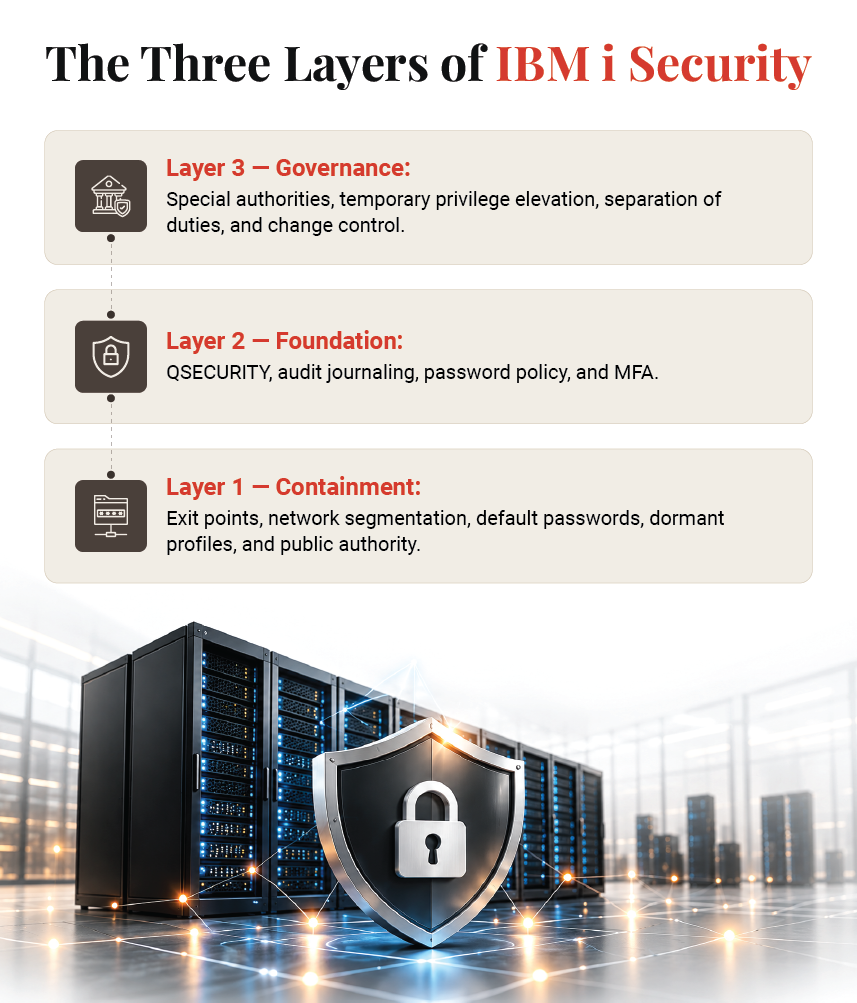
That is why this guide approaches security as a sequence of three layers:
- Containment: Close the routes that are open now (exit points, network exposure, default and dormant profiles).
- Foundation: Set the baseline IBM recommends (security level, auditing, password level and MFA).
- Governance: Build the controls that keep it set (special authorities, elevated access, separation of duties and change control).
The order matters. A team that tightens password rules while FTP and ODBC access remain uncontrolled has done useful work, just in the wrong order.
A note on terminology: IBM i descends from the AS/400, and many people still use the older name. This guide uses IBM i throughout and focuses on securing the system you run today. If you are weighing whether to stay on the platform, our guide to IBM i modernization is a better starting point. Migration is a strategic decision rather than a security fix, and this guide doesn’t treat it as one.
Containment: Which Open Routes Into IBM i Should You Close First?
Close network routes before tuning anything else. Register exit programs over the exit points for file serving, database access, FTP, and remote command, disable non-secure host connections, then remove default passwords, dormant profiles, and excess *PUBLIC authority on every partition.
Containment comes first because it deals with exposure that exists right now; every later control assumes these doors are closed.
Why Menu Security No Longer Protects the Data?
Older IBM i applications controlled users through menus, but modern clients bypass them entirely: ODBC, JDBC, FTP, file serving, and remote command connect directly to the database and objects. Unless something else is in place, the only check on such a request is object authority, which is rarely as strict as the menus implied.
IBM’s answer is the exit point. Programs registered through the registration facility (WRKREGINF) are called whenever a network request arrives, and they can log the request, allow it, or reject it.3
Having exit programs is not the same as having control, though. An exit program enforces only the rules written into it, on the exit points where it is registered. One that allows everything simply keeps a record.
Network Exposure
Pair exit programs with network segmentation, so IBM i can’t be reached from networks with no reason to connect. On IBM i 7.6, the CFGHOSTSVR command lets administrators individually enable, disable, or allow loopback for non-secure host server connections.4 Whatever the release, IBM’s NetServer guidance is direct: disable guest access, review every share, and treat a read/write share over the IFS root as a significant risk.
“Unfortunately, traditional logging methods do not adequately record activity from these types of interfaces.”
– Amy Williams, Principal Security Services Consultant, Fortra
The Integrated File System
The IFS is another route in, because file shares expose it to every connected workstation. IBM provides the QIBM_QP0L_SCAN_OPEN and QIBM_QP0L_SCAN_CLOSE exit points, which are governed by the QSCANFS and QSCANFSCTL system values. These system values only call a scanner, so without a registered scan program, they protect nothing.
-
Profiles and public authority
Next come user identities. IBM provides tools to find and disable profiles that still use default passwords (ANZDFTPWD) and to disable inactive profiles automatically (ANZPRFACT). Review group profiles for sprawl too, since authority granted to a group passes to every member.
Finally, review *PUBLIC authority. IBM supplies queries to find publicly accessible user profiles and database files that PUBLIC authority leaves open to deletion. Excess public authority creates gaps even at security levels 40 and 50, because the system enforces object authority exactly as it is set. An object open to *PUBLIC is open to every user.
Foundation: Which Security Level, Auditing, Password and MFA Settings Should IBM i Run?
Run production at QSECURITY 40 or 50, as IBM recommends, and test any move with the audit journal first. Activate QAUDJRN with *AUTFAIL and *SECURITY, raise the password level deliberately, and enable MFA, which is native to IBM i 7.6.
Once the open routes are closed, you can set the baseline. Every control in this section is based on IBM’s own hardening guidance.
1. Security level
IBM recommends running production systems at security level 40 or 50 to enforce object-level security and prevent unsafe behavior. Level 40 adds operating-system integrity protection on top of resource security, and level 50 extends that protection further for organizations with the strictest requirements.
Treat raising the level as a project, not a weekend change. IBM’s guidance is to set QAUDCTL to *AUDLVL first, add *AUTFAIL and *PGMFAIL to QAUDLVL, and run a representative business cycle. You can then analyze the authority-failure entries to find programs that would break at the higher level. The same approach applies when moving from 40 to 50.
2. Auditing
IBM is specific about what needs to be in place: the QAUDJRN audit journal must be active, QAUDLVL or QAUDLVL2 must include *AUTFAIL and *SECURITY, and journal receivers must be kept for the full reporting period. Check QAUDCTL too. A journal that isn’t switched on records nothing, and teams usually discover this just when they need the evidence. For privileged profiles, IBM documents command-level auditing through CHGUSRAUD.
3. Passwords
QPWDLVL determines how passwords are stored and validated, and higher levels close weaknesses in older mechanisms. IBM publishes a recommended path for moving to password level 2, along with QPWDRULES for composition rules and QPWDVLDPGM for custom validation. Plan the change with care, because IBM notes that the password level affects password length, character complexity, and compatibility with legacy applications.
4. Multi-Factor Authentication
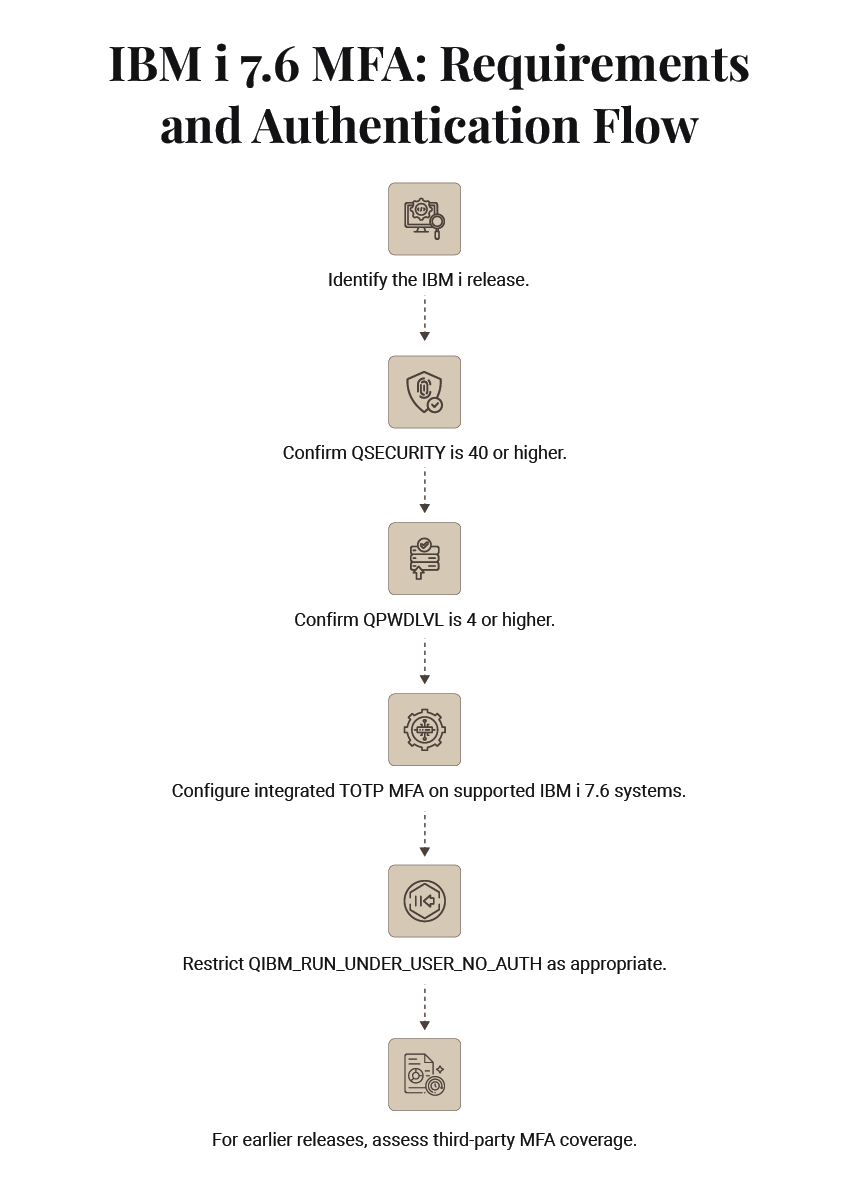
This is where sequencing matters most. IBM i’s integrated MFA requires QSECURITY of 40 or higher and QPWDLVL of 4 or higher. That makes the password-level project the critical path to native MFA, not a separate initiative.
IBM also points out a gap that MFA alone doesn’t close. Applications can run work under another profile using only authority to that profile, without needing its credentials. To complete the control, IBM recommends restricting the QIBM_RUN_UNDER_USER_NO_AUTH function ID.
On releases earlier than 7.6, you will need a third-party product. Judge it on coverage: it should protect 5250 sign-on as well as the network access paths discussed under containment, and any change to its own configuration should be audited like any other security change.
4. Beyond the Headline Value
QSECURITY is only one of several dozen security-relevant system values. Fortra2 advises reviewing all of them, setting a baseline, and keeping it consistent. IBM’s own list includes QMAXSIGN, QLMTSECOFR, QINACTITV, QUSEADPAUT and QVFYOBJRST. A single weak setting can undo the benefit of a strong one.
What Do IBM i 7.6 and Power11 Change for Security?
IBM i 7.6, generally available since April 2025 on selected Power10 and Power11 servers, adds integrated TOTP multi-factor authentication, the QIBM_QSY_AUTH authentication exit point and native control of non-secure host connections. On Power11, IBM i Secure Boot verifies the boot chain.
The details below come from IBM’s release documentation and are current as of 7 October 2026.12
| Change | What it does | Where it applies |
|---|---|---|
| Integrated MFA | Adds a time-based one-time password (RFC 6238) to sign-on, managed through IBM Navigator for i | IBM i 7.6; needs QSECURITY 40+ and QPWDLVL 4+ |
| QIBM_QSY_AUTH exit point | Calls a registered program during authentication, for example to require an out-of-band approval from high-privilege users | IBM i 7.6; works with or without MFA |
| QIBM_RUN_UNDER_USER_NO_AUTH | Function ID that blocks applications from running as a profile without its credentials | IBM i 7.6 |
| CFGHOSTSVR | Enables, disables or limits non-secure host server connections server by server | IBM i 7.6 |
| ASP 1 encryption | Encrypts user data in the system storage pool | IBM i 7.6 on Power10 and Power11 |
| IBM i Secure Boot | Extends signature verification of the boot chain to the IBM i Licensed Internal Code; set through the HMC to disabled or enforce | IBM i 7.6 on Power11 only |
With Technology Refresh 2 for 7.6, IBM added cluster support for MFA-enabled user profiles, stronger master key protection, and external key management with IBM Key Protect. Any new release or Technology Refresh with security changes is a cue to revisit this section and the foundation section.
On an earlier release, the native options aren’t available, so the third-party route described under foundation applies. This guide makes no predictions about future releases or support dates; IBM’s published documentation is the only reference.
Governance: Who Should Hold Special Authorities, Elevated Access, and Audit Duties on IBM i?
Restrict special authorities such as *ALLOBJ, *SECADM, *JOBCTL, *SAVSYS, and *SERVICE to named administrators, grant elevated access temporarily and with full auditing, and separate those who administer security, change applications, and review audit data. Then document who owns IBM i security.
Containment and foundation make a system secure on the day the work is done. Governance keeps it secure afterward, yet most checklists give it the least attention.
I. Special Authorities
Start by taking stock of who holds each special authority, either directly or through a group profile. IBM publishes a report that lists users with *ALLOBJ by route, along with a strategy for removing it.
Don’t stop at *ALLOBJ, though. IBM documents that *SAVSYS lets a user save, restore, and free storage for every object on the system, whether or not they have existence authority to it. *JOBCTL lets a user change and end other users’ jobs. Neither is a minor privilege, and both are easy to inherit through group profiles.
Review adopted authority too. Programs that adopt their owner’s authority can grant power quietly; IBM documents QUSEADPAUT and a way to list the programs that adopt.
II. Elevated Access
The approach that holds up over time is temporary elevation. Administrators work from an everyday profile, check out elevated authority for a specific task, and every action taken under that authority is audited. The security officer profile should be used sparingly, and QLMTSECOFR can restrict which workstations powerful profiles are allowed to sign on to.
III. Separation of Duties and Change Control
Three responsibilities should never rest with one person: administering security, changing applications, and reviewing audit data. Changes to system values, authorities, and function usage should go through change control. Because the audit journal records each of these changes, reviewers can reconcile journal entries against approved tickets. Sensitive database files should be journaled as well.
IV. Governance That Survives a Resignation
Many IBM i environments rely on a small number of long-serving specialists. If the security baseline exists only in one administrator’s head, it leaves when they do. Write it down, script the checks, and make the reviews routine.
Every enterprise should be able to answer, in writing: who owns IBM i security, and who audits the owner? If one person can both change the rules and approve the change, the rules offer little protection.
Strengthen IBM i Security by Closing Configuration Gaps Before Adding More Tools
What Belongs on an IBM i Security Best Practices Checklist?
An IBM i security best practices checklist should follow this order: containment controls first, foundation settings second, governance third. Each row needs a named control, an IBM documentation reference, and a verification method an auditor can repeat independently.
The checklist below turns the IBM i security best practices for enterprises in this guide into eighteen controls you can verify. Every reference points to IBM documentation rather than to a vendor.
| Layer | Control | How to Verify |
|---|---|---|
| Containment | Exit programs registered over network server exit points (file serving, database, FTP, remote command) | WRKREGINF shows a program on each in-scope exit point; a test request is logged and, where policy says, rejected |
| Containment | Non-secure host server connections disabled | Network connection monitoring shows no clear-text host server sessions |
| Containment | NetServer hardened: guest profile *NONE, no read/write share over the IFS root | GO NETS options 10 and 11 |
| Containment | IFS scanning with a registered scan program | QSCANFS set to scan, and a program registered on QIBM_QP0L_SCAN_OPEN |
| Containment | No enabled profiles with default passwords | ANZDFTPWD report returns no enabled profiles |
| Containment | Dormant profiles disabled automatically | ANZPRFACT configured; last sign-on dates reviewed |
| Containment | *PUBLIC authority reviewed on profiles, libraries and sensitive files | IBM’s public-authority queries return no sensitive object exposed |
| Foundation | Security level 40 minimum, 50 as a tested target | Value confirmed; authority-failure entries reviewed before any change |
| Foundation | Audit journal active with *AUTFAIL and *SECURITY | QAUDJRN active, QAUDCTL set, QAUDLVL values present, receivers retained |
| Foundation | Command auditing on privileged profiles | User audit settings shown for each privileged profile |
| Foundation | Password level and rules match policy | QPWDLVL and QPWDRULES compared with the written policy |
| Foundation | Sign-on values set: QMAXSIGN, QINACTITV, QLMTSECOFR | Values match the documented baseline |
| Foundation | MFA: native on 7.6 and above, third-party below | Privileged profiles require an additional factor; coverage of network access confirmed |
| Foundation | QIBM_RUN_UNDER_USER_NO_AUTH restricted (7.6) | Function usage shows default denied, named exceptions only |
| Governance | Special authorities inventoried and reconciled to roles | Report reconciled to the role list each quarter |
| Governance | Adopted authority and elevated access controlled | Adopting programs reviewed; every elevation has a ticket and audit entries |
| Governance | Change control on system values, authorities, and function usage | Audit journal entries reconcile to approved changes |
| Governance | Recovery: replication plus immutable, offline backups, restore tested; QVFYOBJRST set | Last restore test date and result on record |
Run the full checklist at least once a year and again after any major change, through an assessment that meets the specification described in the next section.
What Should an IBM i Security Assessment Cover?
An IBM i security assessment should state its scope, tie each finding to evidence from your configuration, explain its severity logic, order remediation by containment, foundation, and governance, and set a re-test cadence: at least annually, sooner after major change.
Whether your assessor is internal or external, hold them to these five parts:
| Part | What it must include | Question to put to the assessor |
|---|---|---|
| Scope | System values, profiles and authorities, exit points and network services, the IFS, audit configuration, release and PTF currency, backup and recovery posture | Which partitions and which of these areas did you examine, and which did you leave out? |
| Evidence | Findings tied to your actual configuration, with the value or object observed | Can you show me the setting behind this finding? |
| Severity logic | A stated method for ranking findings by exposure and exploitability | Why does this finding outrank that one? |
| Remediation order | Actions sequenced as containment, then foundation, then governance | What do we fix this month, this quarter, this year? |
| Re-test cadence | A date to verify fixes and repeat the review | When do you come back, and what triggers an earlier visit? |
On frequency, Fortra2 recommends an assessment at least once a year, and more often in some cases. Review sooner after a release upgrade, a hardware refresh, an acquisition, or a change of administrator, since each can quietly reset settings. It also advises choosing an assessor who knows the platform well, which matters on a system with its own security model.
For release and PTF currency, there is no need for guesswork. IBM publishes SQL-based analysis of known CVEs against installed fixes, and 7.6 Technology Refresh 2 adds a dedicated SYSTOOLS.CVE_INFO service.
A free scan can be a useful starting point, but it only counts as an assessment if it meets this specification.
What Does Each Category of IBM i Security Tooling Control?
IBM i security tooling falls into six categories: exit point control, MFA, elevated access management, audit journal monitoring, IFS antivirus, and encryption. Buy tools for the controls you cannot configure natively, not for the ones you have not configured yet.
This guide doesn’t name products or rank vendors. Categories are more useful than brands, because each maps to a layer and to a gap in what the operating system provides.
| Category | Layer | What IBM i provides natively | When a third-party product is added |
|---|---|---|---|
| Exit point control and network access monitoring | Containment | The exit points and the registration facility; no ready-made rules | When writing and maintaining exit programs in-house is not realistic, or auditors expect rule-based logging across every network server |
| IFS antivirus scanning | Containment | Scan exit points and the QSCANFS and QSCANFSCTL system values; no scanning engine | Always, if on-open scanning is required, since the operating system does not supply the engine |
| Multi-factor authentication | Foundation | Integrated TOTP MFA from IBM i 7.6 | On earlier releases, or where push-based or federated factors are required |
| Database and field-level encryption | Foundation | Cryptographic services APIs; ASP 1 encryption on 7.6 | Where field-level encryption and masking must work without application rewrites |
| Privileged and elevated access management | Governance | Special authorities, adopted authority and function usage controls | When temporary, ticketed elevation with full session audit must run at scale |
| Audit journal monitoring and forwarding | Governance | The QAUDJRN audit journal and SQL services to query it | When entries must be filtered, alerted on, and forwarded to enterprise security monitoring in real time |
The same sequence should guide spending. A product bought before the native baseline is in place tends to automate a gap rather than close it. Configure what you can first, then buy for what remains.
Let Professionals Help You Assess Your IBM i Security Posture
How Does Damco’s IBM i Practice Meet the Same Specification?
Damco holds its own IBM i assessment to the five-part specification above: a stated scope, findings tied to configuration evidence, explicit severity logic, remediation in a fix order, and an agreed re-test date. The test works on every assessor, including us.
Publishing a standard is easy; holding yourself to it is what counts. Damco’s IBM i practice secures the platform our clients run, and we describe our assessment in the same five parts we ask readers to expect from anyone else.
- Scope: System values, profiles and special authorities, exit points and network services, the IFS, audit configuration, release and PTF currency, and backup and recovery posture, agreed for each partition before work starts.
- Evidence: Each finding cites the observed setting or object, so your team can reproduce it.
- Severity Logic: Our ranking method is written into the report rather than left to judgment on the day.
- Remediation Order: Findings are sequenced as containment, foundation, and governance, with owners named.
- Re-Test Cadence: A follow-up review is scheduled at delivery, with earlier triggers agreed for upgrades and major changes.
Where a gap can be closed natively, we say so before recommending any product. Our IBM i consulting services cover assessment and remediation, and any IBM i security solutions we recommend are chosen by control gap, not by vendor.
References:
- 1. IBM, IBM i Security Hardening Best Practices
- 2. Fortra
- 3. IBM, Using security exit programs
- 4. IBM, IBM i 7.6 Base Enhancements
- 5. IBM, Hardening IBM i NetServer
Frequently Asked Questions
IBM i has strong security architecture but is not fully secure by default; it must be configured. Object-level security, exit points, and the audit journal are capabilities that need deliberate settings, monitoring, and ownership.
IBM’s own hardening guidance says a hardened environment requires deliberate configuration and continuous auditing. It also names the values to set, including QSECURITY, QPWDLVL and the audit-level values. The system value is a floor, not a fence: the right security level does not close open network routes, remove default passwords, or limit powerful authorities.
IBM recommends running production IBM i systems at security level 40 or 50. Level 40 adds operating-system integrity protection to resource security, and level 50 extends it. Move up as a tested project, not a weekend switch.
IBM’s guidance is to turn on auditing of authority and program failures first, run a representative business cycle, and fix the programs the audit journal shows would fail. Level 40 or higher is also a prerequisite for IBM i’s integrated multi-factor authentication.
Yes. IBM i 7.6 and later include integrated multi-factor authentication based on time-based one-time passwords. IBM requires security level 40 or higher and password level 4 or higher to use it, and recommends restricting the QIBM_RUN_UNDER_USER_NO_AUTH function ID to stop applications bypassing credentials. IBM i 7.6 also adds the QIBM_QSY_AUTH exit point for custom authentication steps. Systems on earlier releases need a third-party product covering both 5250 sign-on and network access paths.
Run an IBM i security assessment at least once a year, and sooner after major change. Fortra, which publishes the annual State of IBM i Security Study, recommends at least annual assessment and more frequent reviews in some cases.
Sensible triggers for an earlier review include a release upgrade, a hardware refresh, an acquisition that adds IBM i partitions, or the departure of a key administrator. Each can reset or orphan security settings without anyone noticing.
A credible IBM i security assessment includes five parts: scope, evidence, severity logic, remediation order and re-test cadence. Scope should cover system values, profiles and authorities, exit points and network services, the IFS, audit configuration, release currency and backup posture.
Every finding should cite the observed setting. The assessor should explain why one finding outranks another, sequence fixes as containment, foundation and governance, and schedule a re-test. A scan without these is a starting signal, not an assessment.


