

Executive Summary:
- IBM i cloud vs on-premises is not one enterprise-wide choice. It’s a per-workload hosting decision, separate from any decision about the code itself.
- IBM i cloud means Power infrastructure as a service, chiefly IBM Power Virtual Server, not a move to generic x86 cloud.
- Load shape, not list price, decides the cost question: flat base load favors owned hardware; variable, idle, or bursty load favors consumption.
- The lowest-risk first move for most estates: disaster recovery in the cloud, proven before any production workload follows.
Search “IBM i cloud vs on-premises” and every top result was written by someone who benefits from the answer. IBM sells the destination. Managed service providers sell the journey. High-availability vendors sell the replication that makes the trip feel safe.
Damco sells none of it, no hardware, no cloud capacity, which is the only reason this piece can afford to say the sentence the rest of the shelf won’t print: for a workload running flat, predictable, around-the-clock load on owned hardware inside a fresh refresh cycle, on-premises is often still the cheaper answer. Consumption pricing wins elsewhere, but not everywhere, and the honest version of this decision gets made once per workload, not once per enterprise.
So this piece makes two moves. It separates two decisions the market sells as one: where an IBM i workload runs, and what its application is written in. Then it answers the hosting question workload by workload. The IBM i cloud vs on premises question also has a clock on it: IBM ended standard support for the original Power9 scale-out servers on January 31, 2026, and IBM i 7.4, the last release Power8 can run, left standard support on September 30, 2026.1

What Does “IBM i Cloud” Mean?
IBM i cloud means IBM Power infrastructure delivered as a service, most commonly IBM Power Virtual Server, not a move to standard x86 cloud instances. IBM positions PowerVS as architecturally identical to on-premises Power, down to the microprocessor, firmware, and VIOS layer, which is why the operating system, applications, and database typically move without modification.
Many buyers researching this question arrive with the wrong mental model, and correcting it is this piece’s first job. IBM i does not run on x86. It runs on IBM’s Power architecture, and “moving IBM i to the cloud” does not mean an EC2-style lift onto commodity infrastructure. It means renting Power infrastructure instead of owning it.
The primary vehicle is IBM Power Virtual Server2. IBM’s own positioning describes PowerVS as running on infrastructure with an identical architecture to enterprise Power systems on-premises, including the same microprocessors, firmware, PowerVM, PowerVC, dual VIOS, and SAN storage layer reached over the network rather than installed in a rack.
IBM states this is what allows migration without application changes or refactoring. Power-capable capacity from specialized providers and hosted-Power arrangements from managed service providers offer variations on the same idea: the workload’s world stays the same; only where it physically runs changes.
“The key here is that you have a choice in how you want to run your IBM i infrastructure: all on your own, all running on Power Systems owned by someone else, or in a hybrid model.”
– Steve Will, Chief Architect, IBM
What this is not: a replatforming project, a code rewrite, or a move to a different operating system. What typically stays intact: the OS, the applications, the database, and largely the operational model your team already knows. PowerVS runs across IBM’s global data center footprint on current Power10 and Power11 infrastructure. Power11 has been available on PowerVS from its first day of general availability and supports AIX, IBM i, and Linux on the same underlying platform. Capabilities, regions, and naming evolve. The specifics here were verified in September 2026; check IBM’s own PowerVS documentation3 before acting on them.
With the destination understood, the real question splits in two and both halves of it are covered from here forward without assuming your Power estate has already decided anything.
Are Hosting and Modernization the Same Decision?
No, and the market persistently treats them as one. Where a workload runs (on-premises Power versus Power cloud) is a hosting decision. What the application is written in (RPG and COBOL preserved versus re-engineered) is a modernization decision. The two are independent, and conflating them is how organizations end up buying migrations they didn’t need or postponing modernizations they did.
Every vendor on the shelf has a reason to blur this line. “Migration as part of your modernization journey” is standard framing including, at times, IBM’s own and it isn’t wrong so much as incomplete: it lets two decisions get sold as one when they aren’t.
Drawn as a 2×2, four strategies are legitimate, each with real adopters:
| Preserve the code | Modernize the code | |
|---|---|---|
| Stay on-premises | Steady state; defensible inside a fresh hardware cycle | Modernization without a hosting event; the quadrant the cloud-equals-modern fusion erases |
| Move to cloud | Rehosting; refresh avoidance and DR value; nothing about the application changes | Both moves, sequenced deliberately; rarely simultaneous, rarely the fastest path to either goal |
Stay-and-preserve is not inertia; it’s a legitimate choice for an estate that just completed a Power10 or Power11 refresh with years of useful life left. Move-and-preserve is the refresh-avoidance and disaster-recovery play; the code doesn’t change, only its address does.
- Stay-and-modernize is the quadrant the market erases by assuming “modern” requires “cloud”: application re-engineering, RPG free-form conversion, and API-enabling an IBM i estate all happen routinely without a hosting event.
- Move-and-modernize combines both, but doing them simultaneously multiplies risk for both projects; sequencing is almost always the better path.
The application axis has its own decision tree, and you can access this information through an IBM i and AS400 modernization guide.
From here forward, this piece owns hosting only. The cost of the fusion is real either way: a hosting decision sold as a modernization project, or a modernization shelved because the hosting answer alone was no.
What’s the Honest Case for Cloud and for On-Premises?
IBM i cloud vs on-premises benefits split cleanly once conditions are attached. Cloud wins on refresh avoidance, DR and HA capacity without a second data center, dev/test elasticity, and reduced dependence on a thinning IBM i talent bench. On-premises wins on base-load economics, latency to co-located plant and warehouse systems, control, and any Power10/11 refresh already sunk. Neither column is universal; both carry real conditions.
The starting point is worth knowing. Fortra’s 2026 IBM i Marketplace Survey4 found 77% of organizations plan to run IBM i on-premises only, while cloud-only use reached a record 13%. Fortra adds that cloud use may be underreported, because many shops run HA/DR in the cloud without calling their estate hybrid.
Where cloud wins:
- 1. Refresh avoidance. Consumption pricing converts a capital cliff, i.e., the next hardware refresh, into an operating expense, which matters most to an estate already near end of hardware life.
- 2. DR and HA without a second facility. Standing up disaster-recovery capacity in PowerVS avoids the capital and footprint of a second physical site.
- 3. Dev/test elasticity. Environments that idle nights and weekends are the textbook case for consumption pricing over owned, always-on hardware.
- 4. The talent calculus, named plainly. IBM i skills are concentrated in an aging workforce. Managed infrastructure reduces dependence on a thin internal bench. That’s a real, practical driver, not a scare tactic.
- 5. OPEX conversion and datacenter exits. Organizations under a mandate to shrink owned data center footprint get a clean lever.
Where on-premises wins:
- 1. Base-load economics. A flat, 24/7, predictable workload on owned, depreciating hardware amortizes in a way consumption pricing structurally can’t match.
- 2. Latency and data gravity. IBM i frequently sits beside plant, warehouse, and store systems it talks to constantly; physical proximity has a cost when it’s removed.
- 3. Control and sovereignty. Regulatory, contractual, or data-residency requirements that call for on-premises or in-country infrastructure keep some workloads anchored by definition.
- 4. A recent refresh. An estate that just completed a Power10 or Power11 cycle is comparing cloud against sunk cost where the calculus resets for years.
- 5. Licensing that prices by environment. Some third-party software re-prices on a hosting move; check the software line, not just the hardware line, before assuming cloud is cheaper.
Neither list gets adjectives. Both get conditions, because the honest answer to “which side wins” is: it depends which workload you’re asking about. A CEO reading this section for a single verdict will not find one here, which is the whole point.
IBM i Cloud vs On-Premises Cost: What Actually Moves the Math?
The honest answer to IBM i cloud vs on-premises cost starts with a disclaimer. No article can print your number, including this one. But the drivers that move it are the same for every estate: load shape, position in the hardware refresh cycle, the full cost of each stack honestly counted, and licensing. As per a report on cross-industry cloud spend, after five years of decline, wasted cloud spend increased slightly to 29%,2 reflecting growing cost complexity from AI and new IaaS and PaaS services.
Most IBM i estates run both shapes at once, which is why the IBM i cloud vs on-premises cost answer is set workload by workload rather than across the whole estate. The drivers below decide how big that idle gap really is for each one.
Model 12 months of actual load both ways before trusting any comparison. This is the section where a generic vendor comparison would hand you a chart with a dollar sign on it. This one won’t. And that’s not because precision is impossible in principle, but because every real IBM i estate has a different load profile, refresh position, and licensing footprint, and a fabricated number would be worse than no number at all.
Here’s what moves the math:
- Load shape is the single most decisive driver. A workload that runs flat and heavy around the clock amortizes owned hardware efficiently; consumption pricing has no idle time to save you money on. A workload that’s variable, bursty, or idle outside business hours flips the calculus. You’re paying for unused capacity on-premises, and paying only for what you use in the cloud. Model actual load, not assumed load, before deciding.
- Picture the same owned Power capacity running two very different workloads through one week. The difference that shows up is the idle capacity you pay for and never use, and it is what moves the math.
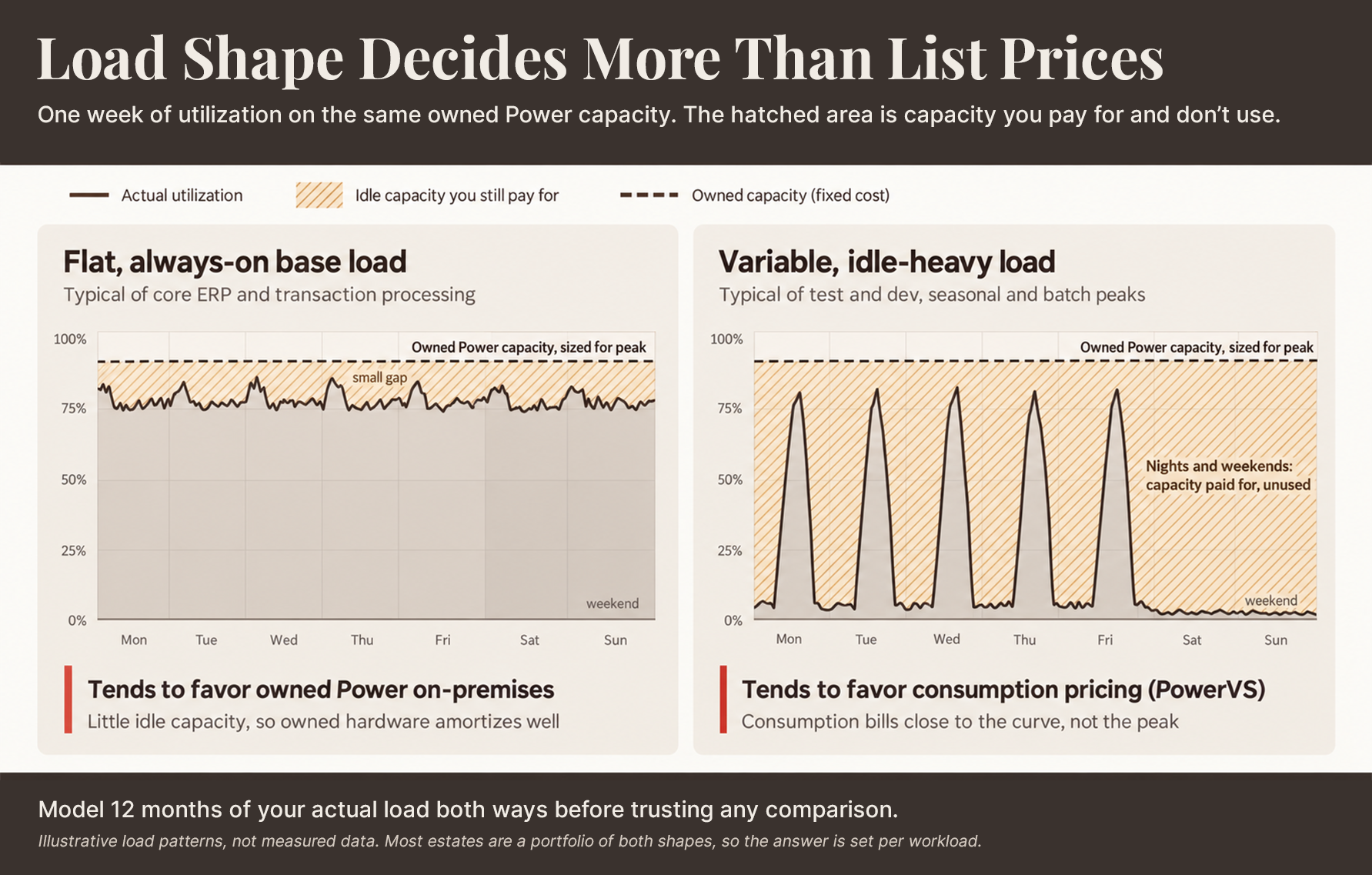
Most IBM i estates run both shapes at once, which is why the IBM i cloud vs on-premises cost answer is set workload by workload rather than across the whole estate. The drivers below decide how big that idle gap really is for each one.
- The refresh clock changes what you’re comparing against. An estate approaching a hardware refresh is comparing PowerVS against a capital outlay it hasn’t made yet. An estate that just completed a Power10 or Power11 refresh is comparing PowerVS against sunk cost it’s already carrying, and usually less favorable comparison for cloud.
- The full on-premises stack, honestly counted, includes more than the hardware line: maintenance contracts, power and cooling, floor space, and the line that rarely makes the spreadsheet, that is the operations hours spent keeping the estate running. That underweighting is common: Flexera’s 2026 State of the Cloud Report5 puts estimated wasted IaaS and PaaS spend at 29%, the first increase in five years.
- The full cloud stack, honestly counted, includes more than the consumption rate: storage tiers, network and egress charges, and the managed-services layer that often rides along with a PowerVS deployment. Egress in particular is easy to underweight at entry and expensive to discover at exit.
- Software and licensing frequently re-price on a hosting move. Environment-based licensing and third-party tools tied to physical or logical environment counts can change the total cost picture independent of infrastructure pricing.
- Migration cost itself is a real, one-time line item, particularly for estates with substantial data volumes or complex integration points.
None of these drivers resolve to a single number that applies across estates, which is precisely why a generic percentage-savings claim should be read skeptically wherever it appears, including on vendor sites arguing either direction. The estates that get burned are the ones that compare list price to list price instead of load shape to load shape.
“Cloud is very different. For most customers in a Power-based cloud, they are going to buy capacity on a shared environment.”
– Jeff Swartz, VP of Sales, Fresche Cloud
The instruction that closes this section is the only honest output it can give: model 12 months of actual load, both ways, before believing any comparison, including the directional claims made here. For current rates, IBM’s PowerVS pricing pages and provider documentation are the canonical source; no figure in this article should substitute for them.
What Are the Risks of IBM i Cloud vs On-Premises in Both Directions?
IBM i cloud vs on-premises risks run in both directions, and each has a mitigation. Cloud-side risks include latency to on-site systems, egress and repatriation cost, migration cutover risk, and provider dependency. On-premises-side risks include the refresh capital cliff, aging-hardware failure exposure, single-site DR gaps, and talent single-points-of-failure. Both columns are manageable; unmanaged is the only losing posture.
Cloud-Side:
- i. Latency to on-site systems. Some workloads are physically anchored. Assess this before migration, not after. Physics doesn’t negotiate.
- ii. Egress and repatriation economics. The cost of leaving is priced at the moment of entry; understand it before you need it.
- iii. Migration cutover risk. Rehearsal and rollback discipline matter more than migration speed. IBM’s own migration tutorials are the canonical reference for the mechanics; the “under five days” framing is IBM’s attributed positioning on a well-rehearsed, prescriptive path, not a guarantee for every estate’s complexity.
- iv. Provider and contract dependency. A hosting decision is also a vendor relationship decision, with the usual dependency considerations any managed infrastructure carries. Mitigation: settle exit terms, data-return formats, and SLAs before signing.
- v. Co-existence complexity. Running a long split estate, i.e., some workloads on-premises, some in the cloud, carries real operational overhead a single-environment estate doesn’t. Mitigation: date an end state for each workload class so the split is a phase.
On-Premises-Side:
- i. The refresh capital cliff. Deferred refreshes don’t disappear; they compound, and eventually land as a large, undeferrable capital request. Mitigation: map the refresh calendar per system now, so capital arrives as a plan.
- ii. Aging-hardware failure risk. Systems past standard support carry increasing exposure with every deferred decision parts and expert support both become harder to source. Mitigation: price extended or third-party support as a bridge with an end date.
- iii. Single-site DR gaps. Many IBM i estates quietly run without a real disaster-recovery site. This is common, rarely stated in an RFP, and a genuine risk on its own terms. Mitigation: DR in the cloud often closes this gap cheapest, and doubles as the first migration step.
- iv. The talent single point of failure. The administrator whose retirement date functions as the estate’s real migration deadline is a familiar figure in this world. Mitigation: document runbooks and line up IBM i support services before that date, not after.
- v. Compliance pressure on aging OS levels. Running past a support boundary carries audit and security exposure independent of any hosting decision. Mitigation: stay on a supported release or paid Service Extension, and document the plan for auditors.
Both columns are manageable with planning. Neither is manageable by default and the estates that get hurt are rarely the ones that picked the “wrong” side of this comparison. They’re the ones that picked either side and then didn’t plan for the risks that came with it.
Run a Risk Read Against Your Specific Estate, On-premises Or Cloud-side, Before Deciding
How Do You Decide, Workload by Workload?
Run five tests per workload: the anchor test (is it physically tied to local systems), load-shape economics, the refresh clock, who operates it today, and any sovereignty or compliance constraint. The output is a placement table that most estates land as a portfolio, not an all-or-nothing move.
The framework, run in order, per workload:
- I. The Anchor Test: Is this workload physically tied to local systems such as a warehouse floor, a plant, or a point of sale by latency or data gravity? If yes, that’s a strong pull toward staying put, regardless of what the cost model says.
- II. Load-Shape Economics: Apply the cost section above to this specific workload’s actual usage pattern, not the estate’s average.
- III. The Refresh Clock: What does the calendar force? A workload on hardware approaching end of support faces a decision with or without a cloud conversation.
- IV. Operational and Talent Reality: Who runs this workload today, and for how much longer will that stay true?
- V. Sovereignty and Compliance Constraints: Does this workload carry a residency, regulatory, or contractual requirement that settles the question independent of everything else?
Applied across a typical estate, the tendencies look roughly like this:
| Workload type | Deciding force | Likely home |
|---|---|---|
| Core ERP base load | Load-shape economics; often flat, heavy | On-premises, especially inside a fresh refresh |
| DR capacity | Avoided capital, low-risk on-ramp | Cloud |
| Test and dev | Idle time; elasticity | Cloud |
| Seasonal and batch peaks | Variable load | Cloud |
| Anchored shop-floor / warehouse workloads | The anchor test; data gravity | On-premises |
| End-of-life applications awaiting retirement | Minimal further investment justified | Whichever costs less to leave alone |
This is stated as tendencies. Every estate has exceptions the framework should surface, not overrule. It’s also the same conclusion this practice has reached for cloud platforms generally, and for AI platform placement specifically: the unit of decision is the workload, and the enterprise answer is a portfolio, not a migration event. Hybrid cloud vs. Multicloud addresses this concern more effectively.
For estates still on aging hardware, this framework has a deadline attached, and it is worth stating precisely rather than gesturing at it. The original Power9 scale-out servers left IBM’s standard support on January 31, 2026; the Power9 E980 follows on December 31, 2027.1 IBM i 7.4, the last release Power8 hardware can run, left standard support on September 30, 2026, and now runs on paid Service Extension through September 30, 2029.1 For any estate on Power8 or unextended Power9, the placement decision for at least some workloads is no longer optional; it’s already on the clock IBM set, whether or not a cloud conversation has started.
How Does the Co-Existence Move Actually Gets Done?
For workloads the framework sends cloudward, the standard architecture is co-existence: both environments run simultaneously while each workload proves itself before the next one moves. Disaster recovery in the cloud is the common, lowest-risk starting point.
Co-existence, not a single cutover weekend, is the normal shape of this move. It is the same architecture this practice’s migration work already runs on. Both environments operate in parallel while each workload migrates and proves itself before the next one follows. Damco’s AS400 migration services are built on this same co-existence model.
The common on-ramp is disaster recovery in the cloud: it delivers immediate resilience value, carries the lowest risk of the available starting points, and functions as a rehearsal for whatever moves after it. Organizations that begin here get a genuine deliverable while learning the mechanics on a workload that isn’t customer-facing production.
For IBM i cloud migration vs on-premises, the question is rarely whether to move everything; it is what moves first and what never needs to. In practice, the sequence tends to look like this.
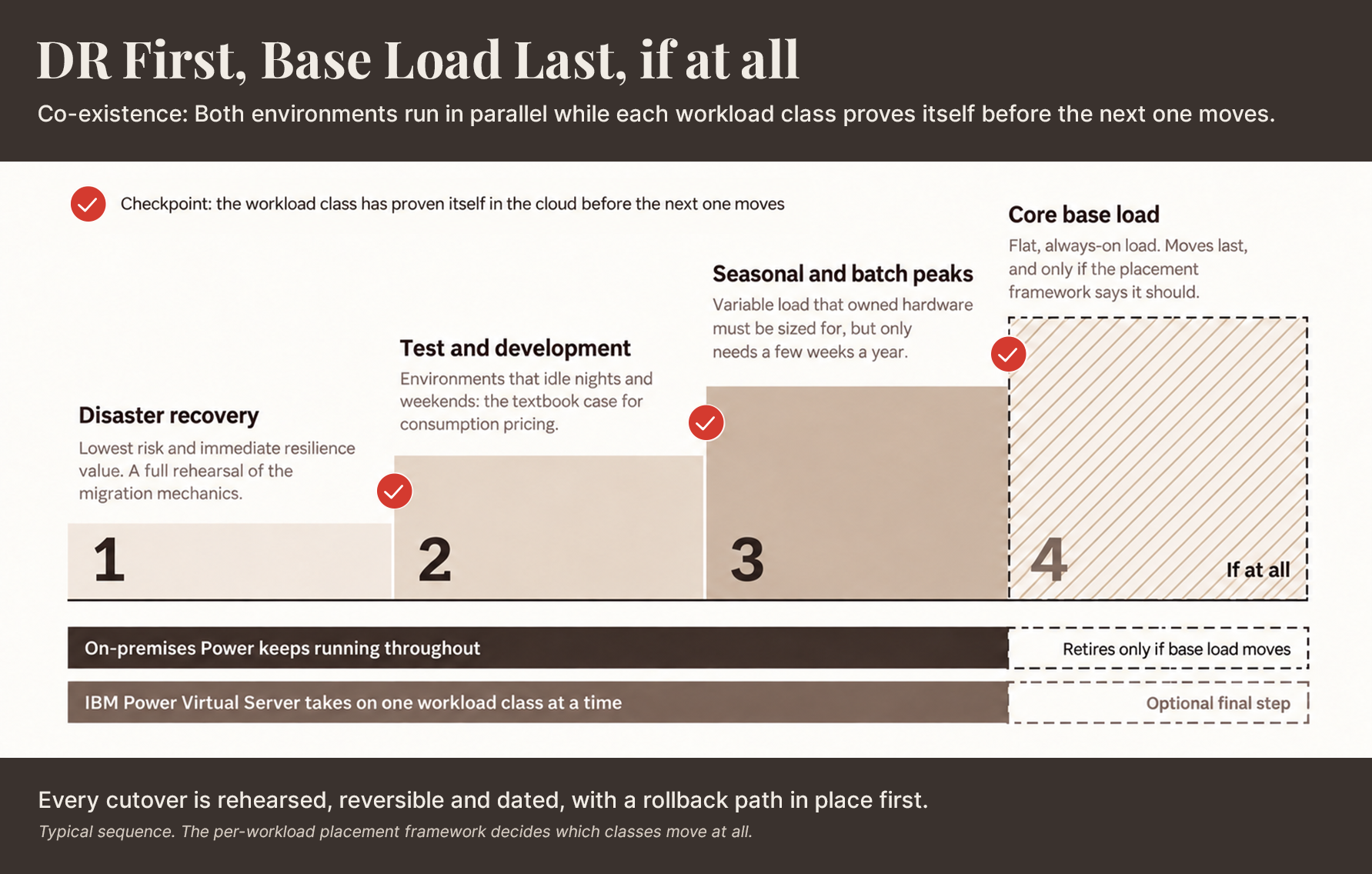
Each step earns the next one, and the on-premises estate keeps running until it does. That leaves the mechanics of each move, which IBM documents in detail.
At buyer altitude, the migration mechanics IBM publishes cover the save-transfer-restore path and, for suitable estates, PowerVC image capture; network and bandwidth are the practical constraint that usually determines timeline more than anything else. These are IBM’s own canonical tutorials, and the “under five days” framing IBM applies to a well-rehearsed migration should be read as attributed vendor positioning on a prescriptive path; a useful target, not a promise, for every estate’s specific complexity.
Cutover discipline follows standard practice regardless of vendor: rehearsed, reversible, and dated, with a defined rollback path before anything moves in production. The sequencing instruction that closes this section is also the simplest one: move one workload class at a time, and move base load last, if base load moves at all.
Deciding Between IBM i Migration with Co-Existence or Modernization?
Where Does Damco Fit?
Damco’s IBM i practice operates from the position this piece has argued throughout: placement assessments run workload by workload, using the same framework above as the engagement’s literal structure, not a marketing overlay on a predetermined answer. When the answer for a given workload is move, migration and co-existence delivery follow industry-vetted best practices for AS400 migration services.
When the fused hosting-and-modernization question comes apart and the real answer is modernize, a hosting engagement never quietly becomes a re-platforming one by default. When the answer is stay, but the operational bench running the estate is thin, AS400 managed services close that gap without forcing a hosting decision nobody asked for.
AI-enabled modernization capability applies at the application layer once the hosting question is settled; a separate axis, not a reason to answer this one differently, and not a claim this piece expands on beyond naming it.
The neutrality is structural, not promotional: Damco sells no hardware and no cloud capacity, so the recommendation changes per workload, the way it should.
References:
- 1. IBM
- 2. IBM Power VS Positioning
- 3. IBM Power VS Documentation
- 4. Fortra 2026 IBM i Marketplace Survey
- 5. Flexera 2026 State of the Cloud Report
Frequently Asked Questions
There's no universal answer. Run the per-workload framework above, including anchor, load shape, refresh clock, talent reality, and compliance, and expect the result to be a portfolio, not a single verdict for the whole estate.
Refresh-cliff avoidance, DR and HA capacity without a second data center, dev/test elasticity, reduced dependence on a thin IBM i talent bench, and OPEX conversion, each with real conditions attached, not as universal wins.
It depends almost entirely on load shape. Flat, predictable, 24/7 workloads tend to favor owned hardware; variable, idle-heavy, or bursty workloads tend to favor consumption pricing. Model twelve months of actual load both ways rather than trusting a generic comparison.
In both directions: cloud carries latency, egress, cutover, and provider-dependency risk; staying on-premises carries refresh-cliff, aging-hardware, DR-gap, and talent-continuity risk. Both are manageable with planning; neither is manageable by default.
IBM Power Virtual Server (PowerVS) is IBM's Power infrastructure delivered as a service; architecturally the same Power platform used on-premises, per IBM's own positioning, reached over a network rather than installed in a rack, so IBM i, AIX, and Linux workloads typically move without application changes.


