

Key Takeaways:
- VMware migration is a workload-placement decision, not simply a decision to leave VMware.
- Renewal timelines create urgency, but workload characteristics should determine the migration path.
- Azure and AWS offer different migration options, while staying on VMware can remain viable for workloads that are difficult or uneconomical to move.
- Workload dependencies, licensing, migration effort, operating requirements, and long-term costs should shape migration sequencing.
- A workload-by-workload assessment can help enterprises avoid treating the entire VMware estate as a single migration program.
- The right strategy may combine multiple destinations rather than moving every workload to one cloud platform.
A VMware renewal date can quickly turn an infrastructure discussion into a board-level question: what moves, where does it go, and what needs to happen before the next contract cycle? That makes VMware to cloud migration a sequencing exercise shaped by workload dependencies, licensing, migration effort, and time.
Broadcom’s changes to VMware’s licensing model, including the shift from perpetual licenses to subscription offerings, have made renewal planning a key consideration for enterprises reassessing their VMware estates. The question is not simply whether to leave VMware. It is which workloads should move, which should stay, and where each should land.
This VMware to Azure and AWS migration guide takes that workload-level view. It maps the four cloud paths, examines the cost and operational trade-offs between them, and keeps staying on VMware on the table where it remains appropriate.
The central idea is simple: the renewal date determines when you need to act; the workload determines where it should go.
What Are the Four VMware Migration Destinations?
A VMware estate can move to four main destinations: Azure VMware Solution (AVS), native Azure, Amazon Elastic VMware Service (EVS), or native AWS. Each path offers a different balance of VMware continuity, migration effort, licensing, and modernization. These options form the foundation of a practical VMware to cloud migration strategy.
“At this point, cloud adoption is mainstream.”
– Sid Nag, Founder and CEO of Tekonyx
1. Azure VMware Solution
AVS preserves the VMware operating model while moving the infrastructure to Azure. Microsoft states that new AVS deployments require portable VMware Cloud Foundation (VCF) licensing purchased from Broadcom. AVS also has a three-host minimum.
2. Native Azure
Native Azure removes VMware from the target environment. Azure Migrate provides assessment and migration capabilities for VMware workloads, making this path more suitable when workloads can move without retaining VMware-specific dependencies.
3. Amazon Elastic VMware Service
EVS provides a VMware-based environment within AWS. AWS made EVS generally available in August 2025 and has continued expanding its regional availability and capabilities through 2026.
4. Native AWS
Native AWS moves workloads away from VMware and onto Amazon EC2 and other AWS services. AWS MGN uses replication to support phased migration, allowing organizations to test and validate workloads before cutover.
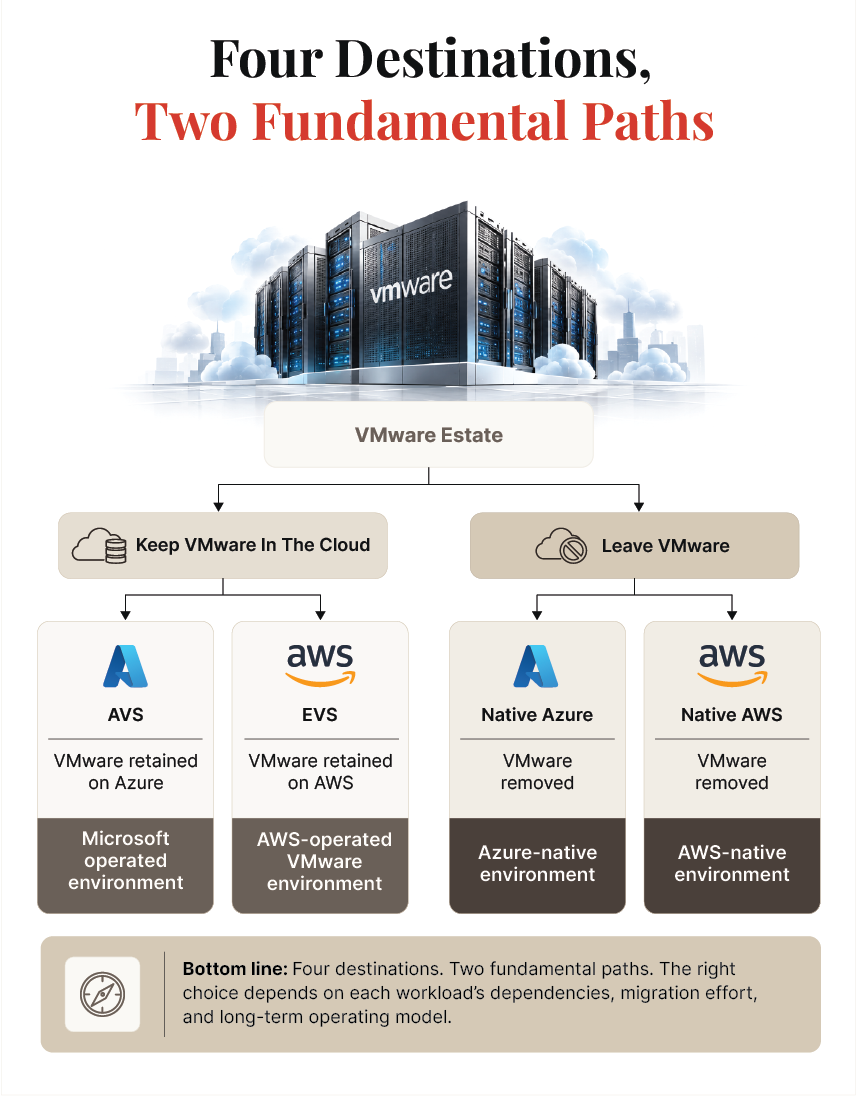
The four destinations therefore represent two fundamental migration choices: preserve the VMware stack in the cloud or move beyond it. The next section examines what that distinction means for cost, migration speed, and the possibility of a second migration later.
Should You Keep VMware in the Cloud or Leave It?
The real fork is not Azure versus AWS. It is whether you preserve the VMware operating model or use the migration to leave it behind. AVS and EVS can shorten the migration because they retain familiar VMware processes and dependencies. Native Azure and AWS generally require more conversion work, but can reduce long-term dependence on the VMware stack.
The trade-off can be reduced to two cost structures:
| Consideration | Keep VMware in the Cloud | Leave VMware |
|---|---|---|
| Examples | AVS, EVS | Native Azure, native AWS |
| Migration Effort | Lower | Higher |
| Time to Move | Generally faster | Generally slower |
| Operating Model | VMware retained | Cloud-native target |
| Long-Term Consideration | VMware licensing and infrastructure remain | Greater migration and modernization effort upfront |
Here’s an example that illustrates the difference. For a hypothetical 200-VM estate, it models approximately $25 million in three-year TCO for a VMware-in-cloud route versus $15.5 million for native cloud. The example assumes different migration and operating costs, so treat the figures as an illustration rather than a universal benchmark.
The Second-Migration Problem
Another cost a three-year spreadsheet can miss is the second migration. A VMware-stack destination may solve the immediate renewal deadline without removing VMware dependencies. If those workloads later need to move to native Azure or AWS, the organization has effectively created a second migration.
That creates two clocks.
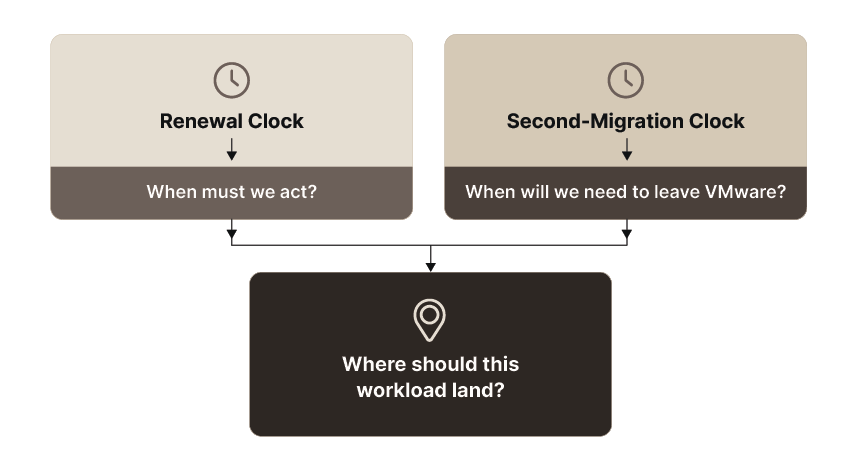
The first clock determines when the estate needs a decision. The second determines whether the convenient landing zone becomes a long-term destination or simply a waypoint.
That distinction matters because not every workload should leave VMware. Applications with deep NSX-T or vSAN dependencies, specialized operational requirements, or limited modernization value may have a rational case for remaining on the VMware stack. For those workloads, the waypoint may genuinely be the destination.
Should You Stay on VMware Instead?
Yes, for some estates, staying can remain a defensible path. A credible migration strategy should compare the cost and risk of moving against the cost and risk of renewing, rather than assuming that every workload must exit VMware.
I. Start With the Renewal, Not the Migration
A renewal quote is not necessarily the only scenario worth modeling. Organizations can assess host consolidation, right-size their VMware footprint, remove unused capacity, and examine the economics of a longer commitment. The negotiation becomes more meaningful when the organization has a documented alternative rather than treating migration as an abstract possibility.
Broadcom’s current licensing documentation confirms the continuing transition toward subscription-based licensing, including subscription-based licensing for VCF and VVF 9.
II. Alternative Hypervisors Are Another Path
Some organizations may instead re-platform their VMware estate onto another virtualization stack. Options being evaluated in 2026 include Nutanix AHV, Microsoft Hyper-V, Proxmox/KVM, and OpenShift Virtualization. Each introduces its own migration, skills, support, and operational considerations, so the choice belongs in workload assessment rather than a generic vendor ranking.
When Does Staying Make Sense?
Staying can be reasonable when an organization has recently invested in owned infrastructure, has deep VMware operational expertise, runs strongly VMware-dependent workloads, or has an estate where migration costs materially outweigh the expected savings. The answer may also differ across the estate: some workloads can leave while others remain.
That is why a genuine referee guide must be willing to reach “do not move” for the right workload. Otherwise, the framework is simply an exit strategy dressed as neutral advice.
AWS Bedrock vs Azure OpenAI vs Vertex AI: Which AI Platform Fits Your Workloads?
How Does VMware to Azure Migration Work?
VMware to Azure migration guides generally follow two paths: keep the VMware environment through Azure VMware Solution (AVS), or move workloads to native Azure. The right route depends on how quickly the organization needs to move, how closely workloads depend on VMware, and whether the goal is relocation or broader modernization.
“Cloud migration isn’t just about upgrading systems—it’s about unlocking new possibilities for your business. The right migration strategy empowers innovation while reducing risk.”
– Rekha Raj, Chief Operating Officer at Everforth Quinnox.
Azure VMware Solution: Keep the VMware Environment
AVS moves the VMware environment onto Microsoft-managed Azure infrastructure, allowing teams to retain familiar VMware tools and processes. It can therefore reduce migration effort for large estates facing a tight renewal deadline or workloads with strong VMware dependencies.
There is an important licensing change to account for. Since November 1, 20252, new AVS deployments require portable VMware Cloud Foundation (VCF) licensing purchased from Broadcom. AVS also requires at least three hosts.
The migration can use VMware HCX capabilities such as vMotion and bulk migration, depending on the workload and network setup. The result is a faster move with less application change, but VMware remains part of the target environment.
Native Azure: Leave VMware Behind
Native Azure takes a different approach. Azure Migrate can discover VMware workloads, assess them, replicate them, run test migrations, and complete the move to Azure VMs. Microsoft currently recommends its agentless method for most VMware scenarios.
Scale is also less of a constraint than it once was. Azure Migrate can schedule replication for up to 500 VMware VMs concurrently using a primary appliance and a scale-out appliance, although actual replication capacity depends on disk throughput.
This path makes more sense for commodity workloads, cost-focused estates, and organizations that want to standardize on Azure rather than carry VMware dependencies forward.
Which Azure Path Fits?
| Consideration | AVS | Native Azure |
|---|---|---|
| Migration Speed | Generally faster | Generally slower |
| VMware Dependencies | Retained | Reduced or removed |
| Application Changes | Lower | Potentially higher |
| Best Fit | Tight timelines and complex VMware estates | Commodity workloads and modernization |
| Long-Term Model | VMware on Azure | Azure-native |
Azure may also be the natural destination where an organization already has significant Enterprise Agreement or Microsoft Azure Consumption Commitment (MACC) commitments, Microsoft 365 usage, or identity and application dependencies around Microsoft services. AVS also has a longer operating history than the newer AWS VMware option.
Microsoft migration incentives change over time, so current programs should be verified at publication rather than relying on older offers or credits.
What Does VMware to AWS Migration Look Like Today?
VMware to AWS migration now has two distinct paths: Amazon Elastic VMware Service (EVS) for organizations that want to retain VMware, and native AWS for those ready to move beyond it. The AWS VMware story has changed significantly since VMware Cloud on AWS stopped accepting new customers in 2024.
1. Amazon EVS: The VMware Path
Amazon Elastic VMware Service provides VMware Cloud Foundation within an AWS VPC on EC2 bare-metal infrastructure. AWS made EVS generally available in 2025 and has continued expanding it.
The service is also maturing quickly. In September 2026, AWS added EVS to four more regions: Osaka, Taipei, Spain, and Tel Aviv. In July, AWS added support for VCF 9.0 and 9.1.
EVS therefore suits organizations that want AWS infrastructure while retaining VMware tools, skills, and operating practices. Its relative newness should still be a planning consideration compared with the more established AVS path.
2. Native AWS: Move Beyond VMware
Native AWS moves workloads to Amazon EC2 rather than recreating the VMware environment. AWS Transform MGN uses block-level replication to copy VMware workloads to EC2, supports testing, and lets the source environment keep running during replication.
A practical migration program typically starts with discovery and the AWS landing zone, followed by workload waves, testing, validation, and cutover. Databases and applications with complex dependencies may need their own migration streams.
Which AWS Path Fits?
| Consideration | EVS | Native AWS |
|---|---|---|
| Migration Speed | Generally faster | Generally slower |
| VMware Dependencies | Retained | Reduced or removed |
| Best Fit | VMware-dependent workloads | Modernization and native AWS adoption |
| Key Consideration | EVS maturity and regional coverage | Application conversion effort |
Existing AWS commitments or Enterprise Discount Program agreements can influence the economics. Data-platform dependencies and the organization’s existing AWS skills also matter.
The broader point is the same as with Azure: the VMware-stack option solves a migration problem; the native option can also solve a platform problem. The right choice depends on what each workload needs after the renewal date, not simply which cloud the organization already uses.
How Should You Split a VMware Estate Before Migration?
A VMware estate does not need one migration destination. The more practical approach is to assign each workload a path based on its dependencies, business value, migration effort, and renewal deadline. That turns migration from an estate-wide decision into a workload placement exercise.
This approach also reflects where the market is heading. 57%1 of IT leaders expect to reduce VMware usage within the next 12 months, while 92% said they are acting within their current renewal cycle. That makes sequencing important, especially when hundreds of workloads cannot move at once.
Assess, Assign, Then Sequence
Start by grouping workloads into practical tiers:
| Workload Profile | Possible Path | Why |
|---|---|---|
| Regulated or deeply dependent workloads | Stay or AVS/EVS | Minimize disruption and preserve critical dependencies. |
| Commodity or stateless workloads | Native Azure/AWS | Reduce VMware dependence and simplify the target environment. |
| Idle, duplicate, or end-of-life VMs | Retire | Avoid migration costs for workloads that no longer provide value. |
| VMware-dependent workloads | AVS/EVS or Stay | Preserve applications that rely heavily on VMware. |
| Workloads ready for modernization | Native Azure/AWS | Use migration as an opportunity to adopt a modern operating model. |
Then work backward from the renewal date. Identify which workloads must leave VMware before renewal, which can move later, and which should never move.
The paths should therefore run at the same time, rather than as fixed phases.
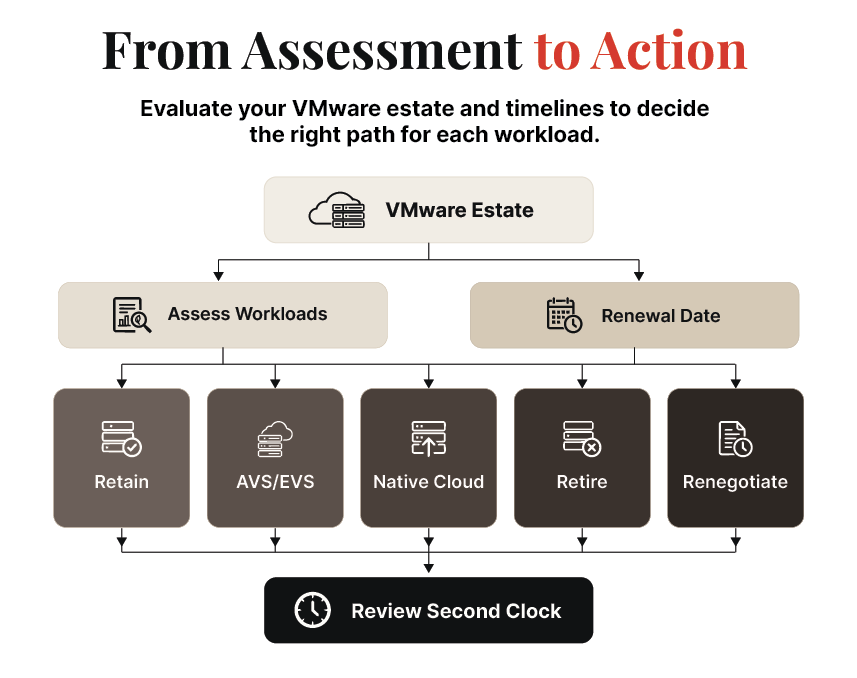
This is the portfolio approach Damco has published elsewhere: assess, assign, and sequence. Here, the same method is applied specifically to a VMware estate, with workload placement driven by the renewal date.
For example, a 500-VM estate might contain regulated workloads that stay, VMware-dependent applications that move to AVS or EVS, commodity workloads that move natively, obsolete VMs that are retired, and a final group that remains temporarily while its renewal economics are renegotiated.
VMware-stack assignments should also have a review date. That is the second clock: if AVS or EVS is being used as a bridge, the organization should know when it will reassess whether those workloads should eventually move to native cloud.
How to Evaluate Azure Consulting Companies Beyond Certifications
What Migration Costs Are Easy to Miss?
The migration project is only part of the cost. Organizations also need to budget for the environment around the migration: connectivity, parallel operations, backup changes, skills, testing, and eventual decommissioning. These costs become particularly important when workloads move in waves.
Build the Landing Zone First
The landing zone should be ready before workloads start moving. Identity, networking, security, monitoring, backup, and governance decisions made here will affect every subsequent migration wave.
Practitioner reports cited in the brief highlight several recurring HCX challenges: network policies may need manual recreation, Layer 2 extension versus re-IP requires an explicit decision, and production HCX deployments can remain in use for months. One 2026 practitioner report describes three-to-six-month HCX production periods and migration waves of 20 to 100 VMs.
That means migration planning should separate databases and other complex application components from straightforward VM waves rather than treating everything as the same workload.
The Costs That Need Their Own Budget Lines
| Cost | Why It Matters |
|---|---|
| Dual Running | Source and destination environments may need to operate simultaneously during migration. |
| Connectivity and Egress | Data transfer, network redesign, and connectivity changes can add unexpected charges. |
| Backup and DR | Existing backup and disaster recovery setups may require redesign or new tools. |
| Skills | Teams may need cloud training or additional expertise to operate the target environment. |
| Testing and Cutover | Each migration wave requires validation, rollback planning, and business testing. |
| Decommissioning | Hardware, licenses, contracts, and legacy infrastructure need formal |
Dual running deserves particular attention. Every month the old VMware environment remains active while the new environment is being tested or stabilized means paying to operate two environments. MigrationCost’s 2026 analysis3 estimates parallel running can add 1.5 to 2.5 times a month’s infrastructure spend during the overlap period, although actual costs vary significantly by estate.
The migration budget should therefore include the full path from assessment to decommissioning, rather than stopping at the cloud cutover.
Finally, migration funding programs from Microsoft and AWS can change by region, date, and customer eligibility. Current programs should be verified directly at publication rather than relying on older program lists or third-party summaries.
How Can Damco Help with VMware to Cloud Migration?
Damco approaches VMware migration as a workload-placement and execution problem, rather than assuming every workload needs the same destination. With no cloud platform or hypervisor to sell, the focus can remain on assessing the estate, assigning each workload a path, and sequencing the work around the renewal date.
That can include VMware to Azure migration through AVS or native Azure, VMware to AWS migration through EVS or native AWS, and workloads that should remain on VMware. Damco can support estate assessment, workload grouping, migration planning, landing-zone engineering, migration waves, testing, and cutover. For workloads moving to native cloud platforms, the work can also extend into application modernization.
The same approach applies to the stay path. Where migration does not make operational or financial sense, Damco supports VMware estate optimization and renewal planning. Where workloads are ready for modernization, its cloud engineering practice can help redesign them for their target platform.
This extends Damco’s published workload-placement approach across multiple cloud and modernization scenarios. The objective is to assess, assign, and sequence rather than force an estate-wide migration decision.
For organizations preparing for a VMware renewal, the practical starting point is assessing the current estate. That creates a workload-level view of what should move, where it should go, what should stay, and what can be retired.
References:
- 1. Veeam
- 2. Microsoft
- 3. MigrationCost
Frequently Asked Questions
Not necessarily. Make the decision workload by workload. Some applications may benefit from native Azure or AWS, others may move more easily to AVS or EVS, while deeply dependent or recently refreshed workloads may remain on VMware.
The renewal date should establish the timeline, but workload dependencies, migration effort, operating costs, and long-term requirements should determine the destination.
AVS moves VMware workloads to Microsoft-managed Azure infrastructure while retaining the VMware operating model. Native Azure migration moves workloads to Azure VMs and services without retaining that VMware layer.
There is also a licensing distinction. Since November 1, 2025, new AVS deployments require portable VMware Cloud Foundation licensing purchased from Broadcom.
VMware Cloud on AWS is no longer available for new customers. AWS wound down the service for new customer acquisition in 2024. Amazon Elastic VMware Service (EVS) is the current AWS option for organizations that want to retain VMware while using AWS infrastructure.
EVS became generally available in August 2025 and has continued expanding its regional availability and capabilities through 2026.
There is no single migration timeline. A relatively straightforward VMware-to-cloud move can progress through assessment, testing, and migration waves faster than a large estate with complex networking, databases, and application dependencies.
AVS or EVS can generally reduce application change because VMware remains part of the target environment. Native Azure or AWS may require more assessment and remediation. In every case, plan for testing and dual running before decommissioning the source environment.
It depends on the workload and the assumptions in the business case. VMware-stack destinations can reduce migration effort and shorten the path to the cloud, while native cloud can require more work upfront but remove VMware-related costs from the target environment.


