

Key Takeaways:
- UiPath intelligent automation combines RPA, AI, document processing, and workflow orchestration to automate business processes.
- Organizations can use it to reduce repetitive work, improve processing consistency, accelerate workflows, and increase operational visibility.
- Finance, banking, HR, and logistics offer practical opportunities for intelligent automation.
- Process selection, exception handling, human oversight, and governance are essential for successful implementation.
- Businesses should measure automation performance through processing time, error rates, cost per transaction, and employee hours saved.
- A phased implementation approach helps organizations validate results before scaling automation across departments.
Businesses spend significant time processing invoices, reconciling financial records, updating enterprise systems, and handling repetitive customer requests. These activities consume employee hours, increase processing costs, and create operational bottlenecks when transaction volumes rise.
UiPath intelligent automation helps organizations streamline these activities by combining robotic process automation (RPA) with capabilities such as artificial intelligence (AI), document understanding, and workflow orchestration. It enables software robots to execute repetitive tasks while AI capabilities help interpret information and manage workflows involving varied inputs. Employees can oversee exceptions and handle decisions that require human judgment.
The business opportunity is significant. According to UiPath’s 2026 global enterprise survey1, only 31% of respondents said AI was fully embedded in their organizations. Data readiness, system integration, and governance remained key challenges to scaling AI deployments. These findings highlight the importance of connecting automation capabilities with existing business processes and enterprise controls.

This guide explores the business benefits of UiPath intelligent automation, practical applications across industries, and best practices for successful implementation. It also explains how to identify suitable automation opportunities and measure their business value through a real-world invoice-processing example.
What is UiPath Intelligent Automation and How Does it Work?
UiPath intelligent automation combines software robots with AI-powered capabilities to automate business processes involving structured tasks, documents, data, and multiple applications.
Traditional RPA executes predefined instructions to perform repetitive tasks. Intelligent automation extends these capabilities by incorporating AI and document understanding to process information, interpret inputs, and support more complex workflows.
The UiPath automation platform provides tools to design, execute, manage, and monitor these workflows. Its capabilities can be grouped into four functional areas:
- 1. Automation Development: UiPath Studio enables developers and automation teams to design workflows and build software robots.
- 2. Task Execution: UiPath Robots execute automated tasks across enterprise applications, websites, and systems.
- 3. Automation Management: UiPath Orchestrator helps teams deploy, schedule, manage, and monitor automation processes.
- 4. AI-Powered Processing and Orchestration: Capabilities such as Document Understanding and workflow orchestration help process documents, connect activities, and coordinate automated workflows.
The exact components depend on the organization’s requirements, deployment architecture, and automation use cases.
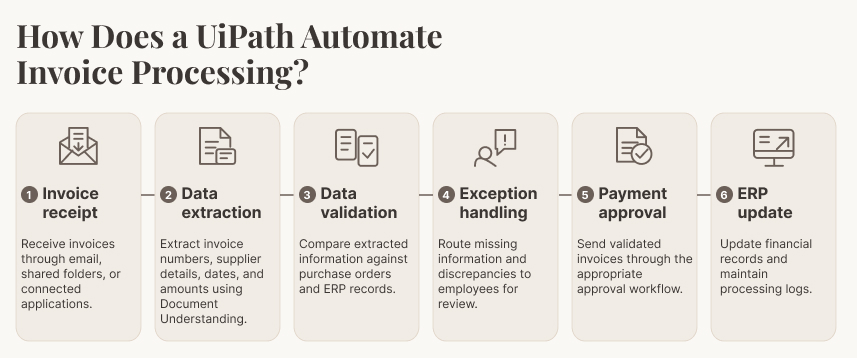
This workflow reduces repetitive data entry and helps finance teams manage invoice volumes more consistently. Human reviewers remain involved when information is incomplete; discrepancies arise, or approval authority is required.
What are the Business Benefits of UiPath Intelligent Automation?
UiPath intelligent automation can improve operational performance by reducing repetitive work, accelerating transactions, and improving control over business workflows. The extent of these benefits depends on process suitability, implementation quality, integration requirements, and ongoing monitoring.
1. Improved Productivity and Lower Processing Costs
Software robots can execute repetitive, rule-based tasks across applications without requiring employees to perform every step manually.
For example, automating invoice entry, account reconciliation, and report generation reduces the time employees spend transferring information between systems. Teams can redirect their efforts towards financial analysis, exception resolution, and business planning.
Organizations can evaluate these improvements through:
- Employee hours saved per process.
- Cost per transaction.
- Transactions processed per employee.
- Average process completion time.
2. Faster and More Scalable Operations
Manual workflows often struggle when transaction volumes increase. Additional workload can create backlogs, longer processing cycles, and greater pressure on operational teams.
UiPath robots can execute multiple automation instances based on workload requirements and available infrastructure. Businesses can reuse automation components across departments and extend proven workflows to additional processes.
Useful performance indicators include:
- Daily transaction throughput.
- Average processing time during peak periods.
- Automation utilization rate.
- Backlog reduction.
3. Richer Customer and Employee Experiences
UiPath enables the automation of customer-centric processes, leading to faster response times and improved service quality. As such, businesses leveraging UiPath intelligent automation cloud ensure a smoother customer experience through rapid and efficient handling of inquiries and transactions. Further, by automating repetitive and complex tasks, cloud RPA reduces the workload of customer service and support teams. As a result, customer-facing employees have more time to focus on complex and crucial customer interactions, thereby improving service quality and customer satisfaction.
4. Improved Accuracy and Process Consistency
Manual data entry and repetitive system updates create opportunities for transcription errors, incomplete records, and inconsistent processing.
UiPath robots follow configured instructions and validation rules, helping standardize repetitive activities. Document processing capabilities can also extract and validate information from invoices, forms, and other business documents.
Organizations should track data-entry error rates, rework frequency, validation failures, and exception rates to assess accuracy improvements.
5. Greater Operational Visibility and Control
“The UiPath Platform brings together AI, automation, and orchestration so agencies can run workflows end-to-end, improve service delivery, and meet the security and compliance standards they operate under.”
– Chris Radich, Public Sector Chief Technology Officer at UiPath
Centralized automation management helps organizations monitor bot activity, workflow execution, and process exceptions.
Teams can use this visibility to identify recurring bottlenecks, investigate failed transactions, and assess whether automation is meeting its performance targets.
Useful indicators include automation success rates, exception volumes, workflow completion rates, and SLA adherence.
Business Challenges and UiPath Automation Outcomes
| Business Challenge | Potential Automation Outcome | KPI to Track |
|---|---|---|
| Manual invoice entry | Faster invoice processing | Average processing time |
| Reconciliation delays | Earlier discrepancy identification | Reconciliation cycle time |
| Customer email backlogs | Faster request classification and routing | First-response time |
| Repetitive data transfers | Reduced manual entry and rework | Error and rework rate |
| Employee onboarding delays | Consistent execution of onboarding tasks | Onboarding cycle time |
| Limited process visibility | Centralized workflow monitoring | Exception rate and completion rate |
These KPIs provide a practical starting point for evaluating automation. Organizations should establish baseline performance before implementation and compare results against the same indicators after deployment.
How UiPath SAP Automation Streamlines Enterprise Operations
How to Identify the Right Processes for UiPath Intelligent Automation?
Successful automation starts with selecting processes that offer measurable business value and can be automated reliably.
High-volume, repetitive, rules-based activities are generally suitable candidates. However, organizations should also evaluate process stability, input quality, system dependencies, exception frequency, and compliance requirements. The following six criteria provide a practical framework for identifying automation opportunities.
1. Transaction Volume and Frequency
Prioritize processes involving large numbers of recurring transactions. Invoice entry, employee record updates, account reconciliation, and customer data management are common examples.
Automating high-volume activities can generate cumulative time savings across daily operations.
2. Stability of Process Rules and Input Data
Evaluate whether the process follows clearly defined rules and procedures. Workflows with predictable steps and consistent inputs are generally easier to automate.
Also assess data quality. Incomplete records, inconsistent formats, and frequently changing inputs can affect automation reliability and increase exception volumes.
3. Number of Systems Involved
Identify the applications involved in completing the process. Determine whether the workflow requires interaction with ERP systems, CRM platforms, HRMS software, email applications, databases, or third-party portals.
Assess API availability, authentication requirements, application interfaces, and integration dependencies before selecting the automation approach.
4. Exception Rate and Need for Human Judgment
Examine how frequently the process encounters incomplete information, conflicting records, unusual transactions, or approval requirements.
Processes with frequent exceptions may still be suitable for partial automation. However, the workflow must define when execution should pause and route a transaction to an employee.
5. Compliance, Security, and Business Criticality
Assess the sensitivity of the information being processed and the potential consequences of an automation failure.
Financial transactions, employee records, customer information, and regulated workflows require appropriate access controls, audit trails, and approval mechanisms.
6. Expected Benefits Compared with Implementation Costs
Compare the expected operational benefits with the costs of developing and maintaining the automation.
Consider software licensing, infrastructure, integration, development, testing, monitoring, and employee training when estimating the total cost of ownership.
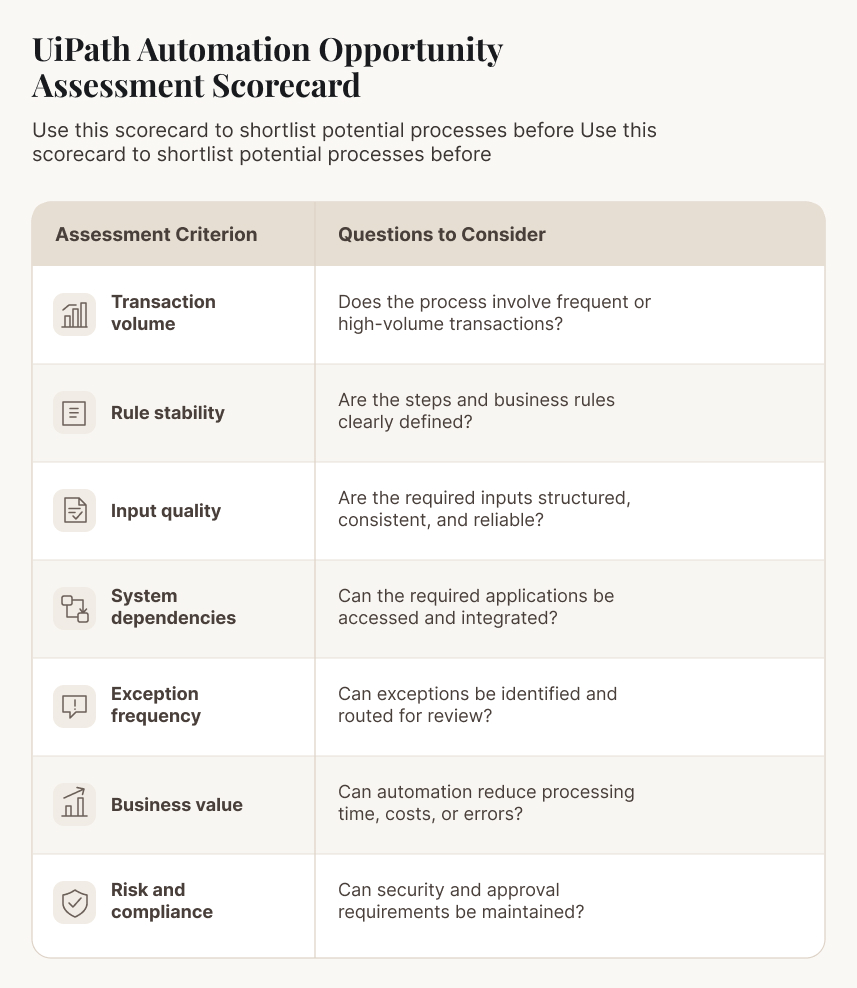
Prioritization approach: Start with processes that have high transaction volumes, stable rules, reliable inputs, manageable exceptions, and measurable business benefits. Processes involving sensitive decisions should undergo additional risk and compliance assessments.
For additional guidance, explore our blog on navigating process automation with UiPath.
What are the Real-World Use Cases of UiPath Intelligent Automation Across Industries?
UiPath intelligent automation supports business processes across finance, banking, human resources, logistics, retail, education, and government.
The most valuable applications combine automated task execution with document processing, system integration, and human review where necessary.
1. Finance and Accounting Automation
Finance departments handle recurring activities such as invoice processing, account reconciliation, payment verification, and financial reporting. These workflows often involve transferring information across multiple applications and validating records against predefined rules.
Example: Accounts payable automation
- Business problem: Finance teams spend considerable time extracting invoice information, checking purchase orders, and entering payment details into ERP systems.
- Automated workflow: UiPath Document Understanding extracts invoice data. Robots validate the information against purchase orders and ERP records, update relevant fields, and route invoices through the approval workflow.
- Human review points: Employees review mismatched amounts, missing information, duplicate invoices, and transactions requiring financial approval.
- Success metrics: Invoice processing time, cost per invoice, exception rate, duplicate payment rate, and first-pass validation rate.
RPA helps finance teams manage invoice volumes while improving process consistency and visibility.
2. Banking and Financial Services Automation
Banks process large volumes of customer applications, identity documents, account updates, and compliance-related records. Many activities involve multiple verification steps and interconnected systems.
Example: Customer onboarding and KYC support
- Business problem: Manual document verification and data entry can slow down customer onboarding and create processing backlogs.
- Automated workflow: UiPath robots collect application information, extract relevant details from identity documents, validate records against available systems, and update customer profiles.
- Human review points: Compliance teams review discrepancies, incomplete documents, suspicious indicators, and cases requiring additional verification.
- Success metrics: Customer onboarding cycle time, document verification time, incomplete application rate, and manual review volume.
Automation can help standardize administrative checks while keeping compliance decisions under appropriate human oversight.
3. Human Resources Automation
HR teams manage employee onboarding, attendance records, payroll inputs, leave requests, and employee documentation. These activities often require coordination between HRMS, payroll, identity management, and other enterprise applications.
Example: Employee onboarding
- Business problem: HR teams manually collect employee information, update records, initiate account requests, and coordinate onboarding activities across departments.
- Automated workflow: UiPath robots retrieve employee details, update HRMS records, initiate IT provisioning requests, generate notifications, and track pending onboarding tasks.
- Human review points: HR and IT teams validate employee information, authorize access permissions, and resolve incomplete documentation.
- Success metrics: Employee onboarding cycle time, record accuracy, provisioning turnaround time, and pending task volume.
This helps HR teams maintain consistent onboarding procedures and reduce administrative coordination.
4. Logistics and Supply Chain Automation
Logistics operations depend on timely information exchange between suppliers, warehouses, transport providers, and customers. Manual updates can create delays and reduce visibility across the supply chain.
Example: Shipment tracking and order reconciliation
- Business problem: Employees manually collect shipment updates, reconcile order information, and communicate delivery exceptions.
- Automated workflow: UiPath robots retrieve shipment information from connected systems, compare delivery records against orders, update tracking information, and notify relevant stakeholders about delays.
- Human review points: Employees investigate missing shipment data, delivery discrepancies, and exceptions requiring supplier or carrier intervention.
- Success metrics: Order processing time, shipment update accuracy, exception resolution time, and order reconciliation cycle time. This improves information availability and helps teams respond to supply chain disruptions more quickly.
Other Industry Applications of UiPath Automation
| Industry | Automation Opportunities | Potential Business Outcome |
|---|---|---|
| Retail | Inventory updates, purchase order processing, and sales reporting | Better inventory visibility and faster administrative processing |
| Education | Student enrollment, records management, and fee reconciliation | Reduced administrative workload |
| Government | Application processing, claims administration, and compliance documentation | More consistent public service workflows |
The automation approach depends on each organization’s operating model, technology environment, and regulatory requirements.
Case in Focus: How Has UiPath Document Understanding Improved Invoice Processing for a Manufacturing Company?
A large manufacturing company headquartered in Dubai faced operational challenges with payment processing and management. Manual invoice processing consumed employee time and slowed down the handling of invoice-related documents.
Damco implemented an automated solution using UiPath Document Understanding to address these challenges.
Challenge: The company needed to improve invoice processing efficiency and reduce the manual workload associated with payment management.
Solution: Damco implemented a UiPath Document Understanding-based solution to extract and process information from invoice-related documents.
Reported Outcomes
| 95%+ Accuracy |
75% Faster processing |
| When reading invoice-related documents. | Improvement in invoice processing time. |
The improvements helped the company process invoice documents more efficiently and reduce the administrative effort involved in payment management. Higher document-reading accuracy also supported more reliable information extraction.
These figures represent results reported for this specific client engagement. They are not guaranteed outcomes for every UiPath implementation.
How UiPath Automation Helped a Manufacturer Reduce Payment Processing Time by 75%
How to Implement UiPath Intelligent Automation Successfully?
Successful UiPath implementation requires a structured approach to process discovery, technical assessment, testing, governance, and scaling.
Organizations should establish a clear implementation roadmap and validate business outcomes at each stage before expanding automation across departments.
The following five phases provide a practical implementation framework.
Phase 1: Discover Business Processes and Identify Opportunities
Start by documenting existing workflows and identifying operational bottlenecks.
Work with process owners and employees to understand how transactions move between departments, systems, and approval points.
Key activities include:
- Mapping existing workflows and identifying repetitive activities.
- Documenting manual handoffs and recurring bottlenecks.
- Identifying high-volume processes with stable business rules.
- Understanding system dependencies and data requirements.
- Prioritizing opportunities based on business impact.
Process discovery tools and stakeholder interviews can help establish an accurate view of automation opportunities.
Phase 2: Assess Technical Feasibility, Value, and Risks
Evaluate shortlisted processes against technical, financial, and operational requirements.
Estimate expected benefits while accounting for development, licensing, integration, infrastructure, and maintenance costs.
Assess data quality, exception frequency, security requirements, and compliance obligations.
Define baseline KPIs before development begins. These may include average processing time, cost per transaction, error rate, and employee hours spent on the process.
This assessment helps organizations determine whether automation is technically feasible and financially worthwhile.
Phase 3: Pilot a Contained Workflow
Select a process with a manageable scope and clearly defined success criteria.
Develop the automation using appropriate UiPath components and test it against representative business scenarios.
The pilot should cover:
- Standard transactions and common exceptions.
- Integration with relevant enterprise applications.
- Authentication and access permissions.
- Error handling and recovery procedures.
- Human approval and escalation requirements.
Test both successful and unsuccessful scenarios before production deployment. A pilot helps identify configuration gaps and operational risks before automation expands to additional workflows.
Phase 4: Establish Governance and Operational Controls
Governance should be incorporated into the automation design from the beginning.
Define clear ownership across business teams, IT, security, and automation developers.
Important controls include:
- Access Management: Assign role-based permissions and protect credentials.
- Data Security: Apply appropriate encryption and data-handling controls.
- Human Oversight: Define transactions requiring employee validation or approval.
- Exception Management: Establish procedures for failed transactions and unusual inputs.
- Auditability: Maintain execution logs and records of important workflow activities.
- Performance Monitoring: Track bot availability, execution success, processing time, and exceptions.
Human approval is particularly important when workflows involve financial authorization, regulatory decisions, sensitive customer information, or significant business risks.
Exception handling must also be designed before deployment. Without clearly defined escalation procedures, an automated workflow may stop unexpectedly or process incomplete information incorrectly.
Organizations should provide training to employees who will operate, monitor, or work alongside automated processes. This supports adoption and clarifies responsibilities when automated activities require intervention.
“As businesses deploy AI agents throughout the enterprise, trust is fundamental, especially when used for sensitive workflows.”
– Scott Roberts, Chief Information Security Officer at UiPath.
Phase 5: Measure Results and Scale Automation
Evaluate the pilot against the baseline KPIs established during the assessment phase.
Identify which automation components can be reused and which workflows require additional development.
As automation expands:
- Create reusable workflow components.
- Standardize development and testing practices.
- Establish centralized monitoring and ownership.
- Review performance and maintenance requirements.
- Expand automation based on validated business outcomes.
- Scaling should follow evidence from completed implementations rather than assumptions about potential efficiency gains from UiPath automation.
What Does Recent Enterprise Research Say About Automation Governance?
UiPath’s September 2026 AI Adoption and Orchestration Survey2 provides useful context for organizations planning enterprise automation.
The survey covered 590 C-suite and IT practitioners at large companies across the US, UK, France, Germany, India, and Singapore.
Its findings highlight three important challenges:
- 38% identified data quality and readiness as a challenge to scaling agentic AI.
- 37% identified integration with existing workflows and systems as a challenge.
- 33% identified governance and compliance as a challenge.
Only 31% of respondents said AI was fully embedded in their businesses. Furthermore, among organizations reporting fully embedded orchestration capabilities, 89% said their agentic AI implementations had met or exceeded ROI expectations.
These findings highlight the importance of connecting automation with enterprise systems, establishing reliable data foundations, and incorporating governance into implementation plans. The ROI finding is a reported association, not proof that orchestration alone produces higher returns.
UiPath Intelligent Automation vs. Traditional RPA
Traditional robotic process automation and intelligent automation share the goal of reducing repetitive manual work. However, they differ in the processes they support and the capabilities they use.
Traditional RPA primarily follows predefined rules and instructions to execute repetitive tasks. Intelligent automation extends these capabilities by combining RPA with AI, document understanding, and workflow orchestration.
| Comparison Parameter | Traditional RPA | Intelligent Automation |
|---|---|---|
| Primary capability | Automates repetitive, rule-based tasks | Combines automation with AI-powered processing |
| Input handling | Best suited to structured inputs | Can process structured and unstructured inputs |
| Document processing | Uses predefined rules and templates | Can use intelligent document extraction |
| Decision support | Executes predefined decision rules | Can interpret information and support more complex workflows |
| Exception handling | Handles predefined exceptions | Supports more varied exceptions with human oversight |
| Workflow scope | Often focuses on individual tasks | Can coordinate multiple tasks and systems |
| Human involvement | Required for exceptions and approvals | Required for judgment-intensive and high-risk decisions |
When Should Businesses Use Traditional RPA?
Traditional RPA is suitable for predictable processes with structured inputs and clearly defined rules.
Examples include:
- Transferring data between applications.
- Generating recurring reports.
- Updating customer records.
- Processing standardized transactions.
- Reconciling information across business systems.
These activities follow established procedures and generally require limited interpretation.
When is Intelligent Automation a Better Fit?
Intelligent automation is useful when workflows involve different document formats, varied information sources, multiple systems, and more complex exception-handling requirements.
Examples include:
- Extracting and validating invoice information.
- Processing customer correspondence.
- Supporting document-intensive onboarding.
- Coordinating multi-step claims administration.
- Managing workflows involving both automated activities and employee approvals.
The choice depends on the complexity of the workflow. Organizations should retain human approval for decisions involving financial authority, regulatory interpretation, sensitive customer outcomes, or significant operational risk.
How is Agentic AI Extending Intelligent Automation?
The evolution of enterprise automation is bringing AI agents into business workflows.
UiPath’s January 2025 Agentic AI Report3 found that 90% of surveyed US IT executives believed their organizations had business processes that could benefit from agentic AI. Additionally, 77% said their organizations were prepared to invest in the technology during 2025.
The research surveyed 252 IT executives at US companies with annual revenue exceeding $1 billion.
Agentic automation introduces AI agents that can interpret goals, plan tasks, and take actions within defined boundaries. RPA robots execute structured activities, while AI agents can support more dynamic workflows. Orchestration coordinates these capabilities and helps ensure that people remain involved where oversight is necessary.
For businesses, this creates opportunities to automate broader processes while maintaining control over execution, permissions, and approvals.
Conclusion
UiPath intelligent automation can help organizations streamline repetitive work, improve process consistency, and free employees to focus on activities that require judgment and expertise. The best results start with selecting the right processes, establishing measurable baselines, and designing workflows that account for exceptions, security, and human oversight.
Begin by assessing one high-volume, rules-based process and measuring its performance before and after automation. For organizations planning a broader rollout, an experienced UiPath implementation partner can help evaluate feasibility, develop a pilot, and build a scalable automation roadmap.
External Links:
- 1. UiPath
- 2. UiPath
- 3. UiPath
- Processing time.
- Cost per transaction.
- Error and rework rates.
- Employee hours saved.
- Transaction throughput.
- Reduction in processing backlogs.
Frequently Asked Questions
UiPath intelligent automation combines robotic process automation (RPA) with capabilities such as AI, document understanding, and workflow orchestration to streamline business processes. It can automate repetitive tasks, extract information from documents, transfer data between systems, and route exceptions for human review. The capabilities used depend on process requirements and the UiPath components selected.
UiPath intelligent automation can help businesses reduce manual effort, improve process consistency, accelerate transaction processing, and scale repetitive workflows. It can also support better exception management and free employees to focus on higher-value work. Actual results depend on process suitability, implementation quality, operating costs, and ongoing monitoring.
Common candidates include invoice processing, financial reconciliation, employee onboarding, customer data entry, claims administration, report generation, and IT service requests. Processes with high transaction volumes, stable rules, and predictable inputs are often good starting points. Workflows involving complex exceptions or sensitive decisions may require human review.
Businesses should begin by mapping existing workflows and identifying suitable automation opportunities. Next, they should assess feasibility, expected value, security requirements, and exception handling before piloting a selected process. Measuring baseline performance, establishing governance, training employees, and monitoring results helps organizations improve the solution before expanding automation across other workflows.
Businesses can evaluate ROI by comparing the financial benefits of automation with implementation, licensing, infrastructure, maintenance, and operating costs.
Useful metrics include:
Establish a baseline before implementation and measure the same indicators afterward to assess actual business value.


