

On December 16, 2025, Microsoft released the Cross-Tenant Orchestrated User Data Migration in Public Preview. This single announcement changed the economics of Microsoft 365 tenant-to-tenant migration.
Teams data can now be migrated natively. For years, this workload was locked behind third-party tools. Exchange mailboxes, OneDrive, and Teams chats can operate through a unified workflow for the first time.
Because of these changes, the old question ‘Should we go native or third-party?’ has become irrelevant.
Today, CIOs face a more complex reality. They must define where native scope covers their workload, where third-party tools remain essential, and how to coordinate both without breaking the project. Most organizations will get this boundary wrong. They will either over-invest in tools for native workloads or under-invest in areas where Microsoft falls short.
This shift requires three core decisions: their specific migration scenario, the new native tooling boundary that determines their tool mix, and the governance reset opportunity that most projects miss.

Three M&A Scenarios That Shape Your Migration Strategy
Most organizations treat tenant-to-tenant projects as a single migration type with variable names. That assumption often breaks the project before it starts. M&A consolidation, carve-out divestiture, and rebranding are three fundamentally different migrations, with distinct risks, timeline pressures, and governance implications.
“The biggest thing going for the Migration Orchestrator is that the data it processes remains within Microsoft datacenters. There’s no need to move data out of a tenant to an intermediate location before moving the data back to the target tenant. Given the amount of information accumulated in mailboxes, OneDrive accounts, and Teams chat, the speed of migration is important, and you can’t go any faster than when information stays within Microsoft.”
– Tony Redmond, Office 365 MVP
I. M&A Consolidation: The Dominant Scenario
This is the most common enterprise move, where one company buys another, and the acquired company’s tenant disappears. Users, configurations, and data migrate to the acquiring company’s tenant. Sometimes, many acquired tenants move into one single target tenant over time.
Risks: The challenge extends far beyond moving mailboxes and files into a target tenant. Every acquired company arrives with its own security standards, admin model, naming logic, collaboration habits, and governance maturity.
With consolidation, control also changes hands. Admin roles are reduced, responsibilities shift, and long-standing ownership models disappear.
The target tenant often inherits users with potentially different security postures, identity configurations, and shadow IT footprints, creating compliance challenges. Many times, license cost balloons because legacy licenses in the source tenant never get reclaimed.
Timeline: Four to Nine months for 5,000+ users
Here’s What You Should Know Before Migrating from Google Workspace to Office 365
Here’s What You Should Know Before Migrating from Google Workspace to Office 365
II. Carve-Out Divestiture: The Highest-Risk Scenario
A business unit gets separated from its parent company. Users move out of the existing tenant into a new target tenant, under a Transitional Service Agreement (TSA) that defines how long the carved-out unit can keep operating in the source tenant.
Risks: Carve-outs require untangling shared operations. TSA contracts assume a clean separation, but digital environments are rarely organized that way. Teams, SharePoint sites, and workflows are often shared between units. When these connections are severed poorly, organizations face high operational costs and delayed business value.
When the migration takes too long, TSA costs skyrocket. To avoid these penalties, teams often rush the process, creating shadow IT in the new entity. Additionally, SharePoint and Teams collaboration data gets either over-migrated, carrying sensitive data into the new entity, or under-migrated, causing the new entity to lose operating context.
Timeline: Six to eighteen months with a hard end date
III. Rebranding or Domain Change: The Simplest Scenario
In this case, organizations change their primary domain after a corporate rename, an acquisition that is already legally complete, or a strategic positioning shift. Users stay in the same tenant. What changes are the primary domain, UPN suffix, and email routing. Strictly speaking, this is not always an M365 tenant-to-tenant migration. Sometimes, it requires only domain reconfiguration inside the existing tenant.
Risks: Costs and complexity are far less compared to M&A consolidation or carve-out scenarios. When rebranding does require a true tenant move, it becomes the closest to a fresh-start migration. There is less data to clean up and fewer identities to fix.
Timeline: Typically runs two to six months
The CIO Framework: Native Tools, Third-Party Tools, and the Governance Reset
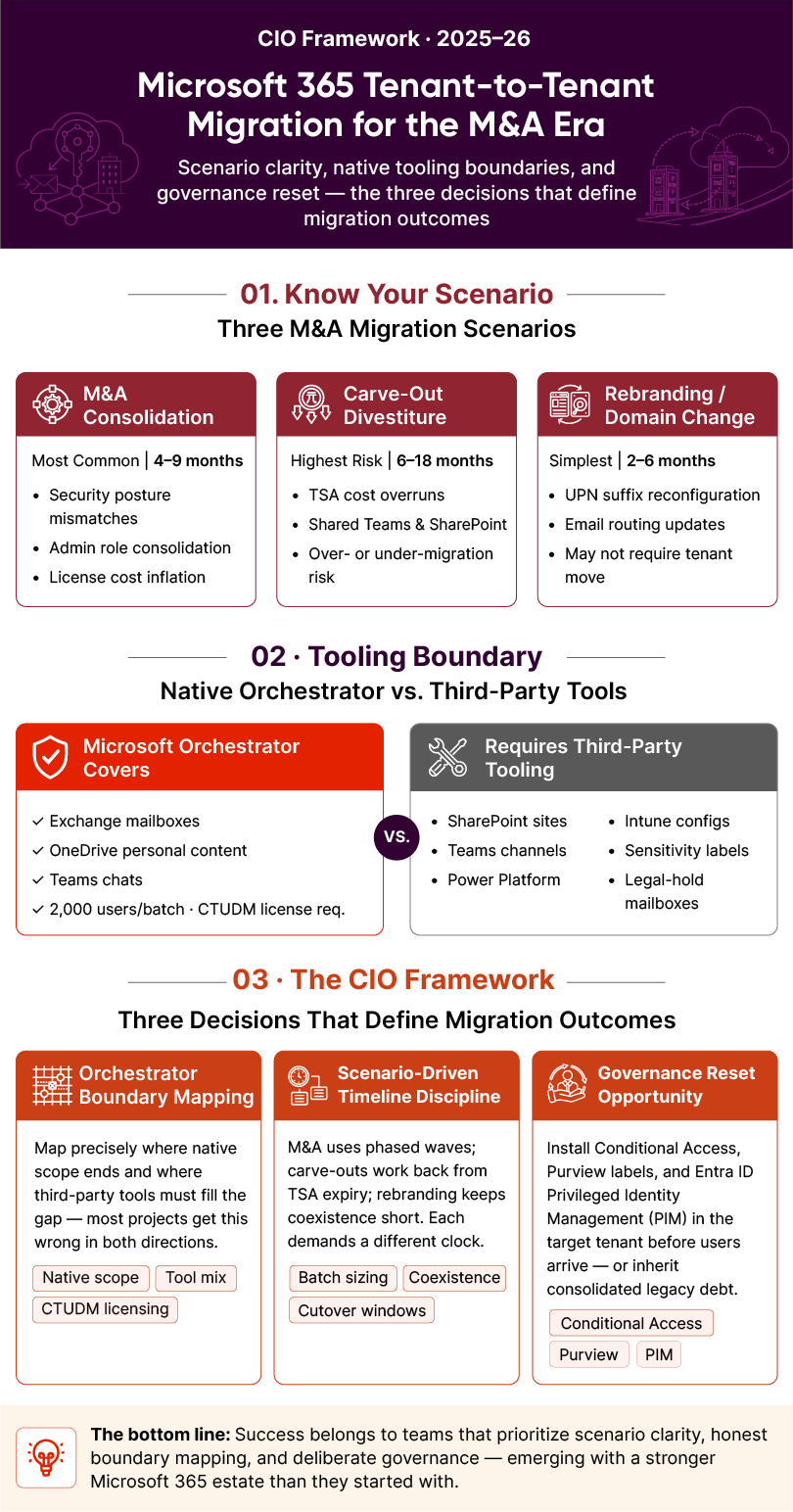
In 2026, a Microsoft 365 tenant-to-tenant migration comes down to three main decisions. Organizations that get them right build a stronger Microsoft 365 environment. Those that get them wrong consolidate years of configuration debt into a single tenant.
Decision 1: Where the Migration Orchestrator Covers You and Where It Doesn’t
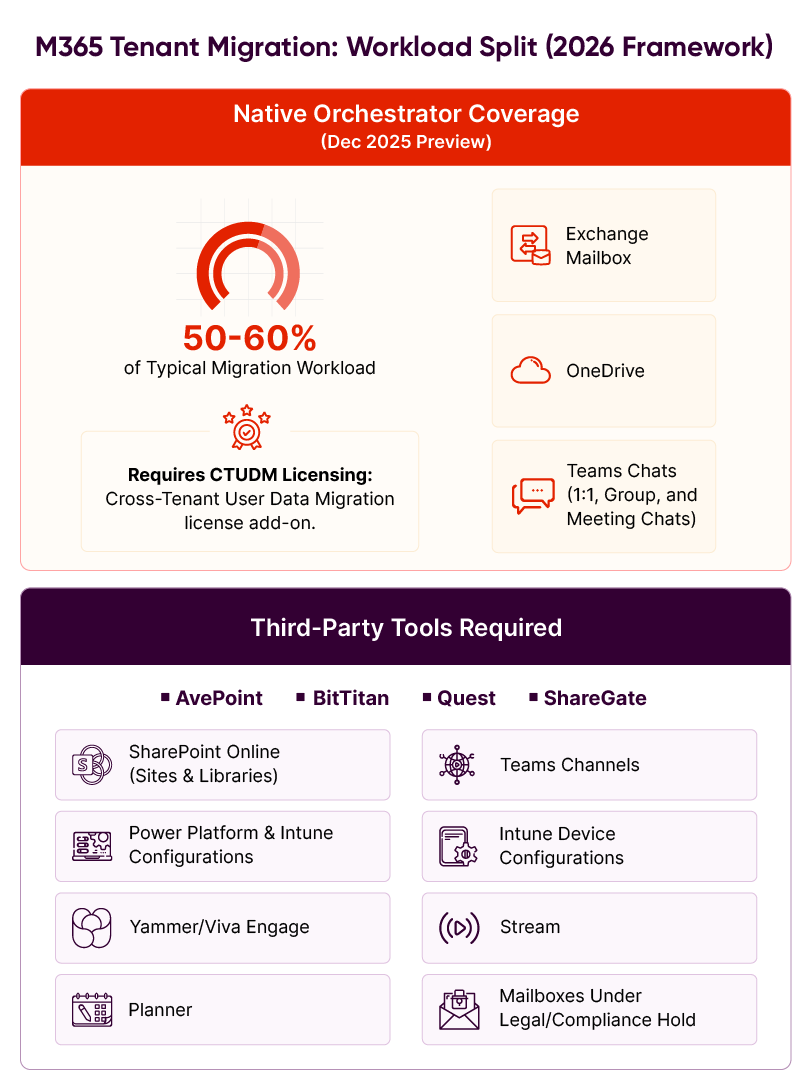
The Migration Orchestrator, released in Public Preview in December 2025, changed the rules for native tools. Exchange mailboxes, OneDrive personal content, and Teams chats can now be migrated through a single orchestration layer without third-party tools.
The Orchestrator supports batches of up to 2,000 users per migration request. However, its scope has clear limits:
- Outside Native Scope: SharePoint sites, Teams channels, and channel-connected content require third-party tools.
- Other Gaps: Power Platform automations, Intune device configurations, and sensitivity-labeled content are not covered.
- Compliance Blockers: Mailboxes under legal or compliance hold cannot migrate. Sensitivity labels must be removed before migration; they do not transfer between tenants.
Most organizations adopt a hybrid approach. The Orchestrator handles mailbox, OneDrive, and Teams chats, which usually make up 50-60% of a migration tool budget. Third-party platforms like Quest On Demand Migration, BitTitan MigrationWiz, ShareGate, and AvePoint handle SharePoint sites, Teams channels, Power Platform, and workloads where native scope falls short.
It is important to note that Cross-Tenant User Data Migration (CTUDM) requires a one-time per-user license fee for mail and OneDrive. Organizations must procure these licenses and third-party tools before the transition begins.
Decision 2: Timeline Discipline Based on Your Scenario
The migration timeline depends on the specific business scenario. M&A consolidation projects require four to nine months for populations exceeding 5,000 users. Carve-out divestiture projects operate under TSA boundaries and need six to eighteen months with hard end dates. Rebranding or domain change projects usually take two to six months.
Batch scheduling and cutover windows also change based on scenario requirements. M&A projects use phased waves with extended coexistence. Carve-outs work backward from TSA expiration dates, reserving the final 30 to 60 days for source tenant cleanup and decommissioning. Rebranding projects use short coexistence windows to reduce user disruption.
The governance reset timeline matters, too. In M&A scenarios, businesses must harden the target tenant before any users migrate. Carve-out projects build greenfield governance in parallel with identity provisioning. Rebranding projects usually inherit governance from the source and require very little reset work.
Decision 3: The Governance Reset Opportunity Most Projects Miss
Every tenant-to-tenant migration is a rare chance to build a Microsoft 365 environment from a clean slate. Most projects miss this opportunity. They treat migration as simple data movement and carry over old governance choices. This leads to configuration drift, retention gaps, license inflation, and identity sprawl.
A governance reset means making deliberate choices during the move:
- Conditional Access: Design for the target organization’s needs rather than replicating the source
- Purview Information Protection: Rebuild sensitivity labels, retention policies, and Data Loss Prevention (DLP) rules
- Entra ID Privileged Identity Management (PIM): Set up admin roles and just-in-time access
- App Governance: Purge legacy OAuth approvals and review integrated apps
- M365 License Optimization: Right-size your E3, E5, and F3 mix during the migration
- Tenant-level FinOps: Install cost telemetry and usage analytics as part of the cutover
This reset creates the difference between a migration that ends stronger and one that ends with legacy debt.
A 90-Day Pre-Migration Window: From Assessment to Cutover Plan
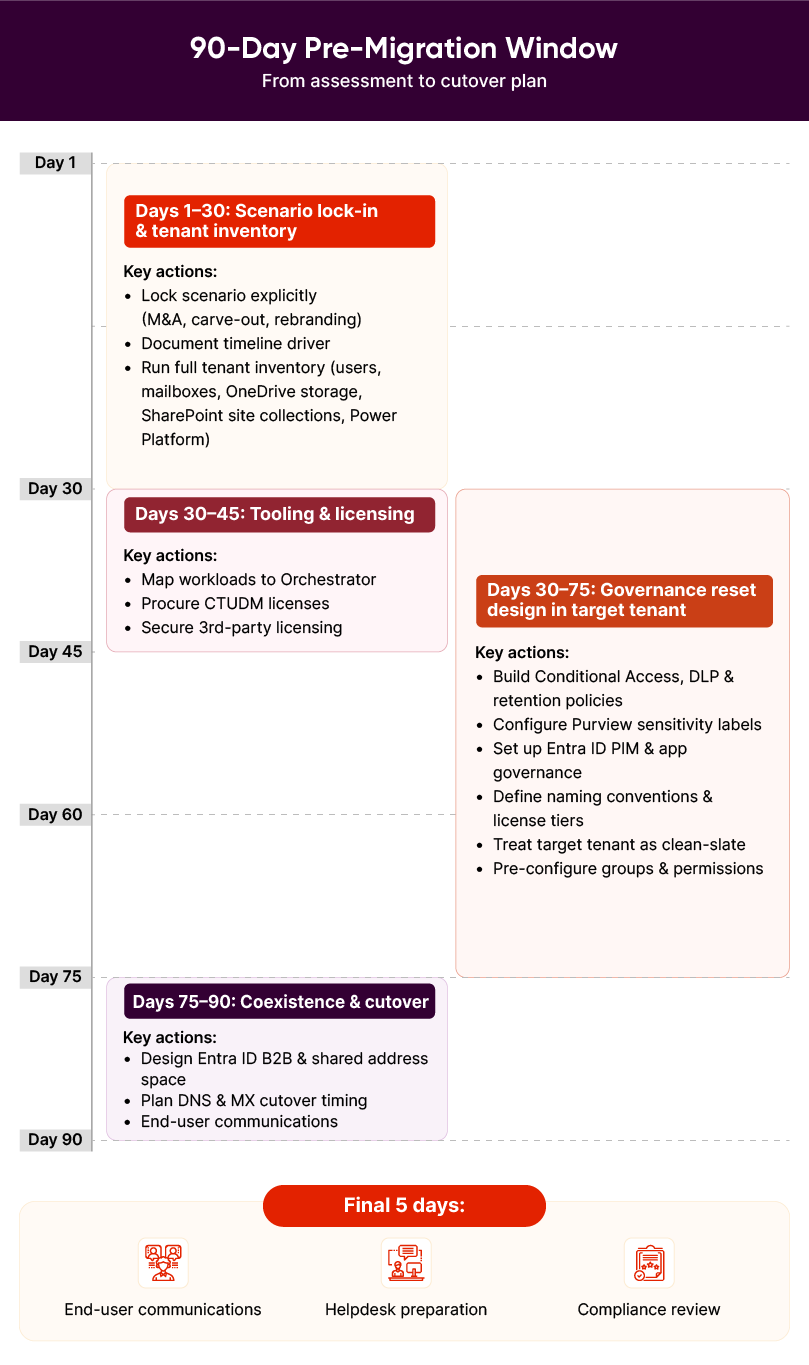
Most organizations skip the foundational work and jump straight to tool selection. They treat migration as a technical project instead of an architectural opportunity. This leads to budget overruns and target environments that inherit governance gaps from their source environments.
To succeed, project teams must complete four overlapping work streams during this period.
Days 1-30: Scenario Lock-In and Tenant Inventory
First, lock your scenario explicitly before any other decisions are made. M&A consolidation, carve-out divestiture, and rebranding each demand different approaches to risk management and governance.
Document your timeline driver clearly: deal close date, TSA expiration, or business-driven cutover target. This driver controls decisions about batch sizing, coexistence duration, and cutover windows.
Next, run a complete tenant inventory on both source and target environments. Capture user counts, mailbox sizes, OneDrive storage footprints, SharePoint site collections, and Power Platform environment inventories. This information helps decide which workloads fit the Microsoft Orchestrator.
Days 30-45: Tooling Decision and CTUDM Licensing
Map which workloads migrate through the Orchestrator, and which require third-party platforms.
Procure Cross-Tenant User Data Migration licenses immediately. CTUDM requires a per-user license as a one-time fee, and underestimating this cost early in the process may create budget overruns that can derail the project.
Also, secure third-party licensing for workloads that the Orchestrator does not cover. This typically includes SharePoint sites, Teams channels, and Power Platform workloads. These license purchases should be done together. Organizations that buy them one after another face delays when one licensing agreement stalls the entire migration.
Days 30-75: Governance Reset Design in the Target Tenant
Build security policies in the target tenant before the move. This includes setting up Conditional Access, Purview sensitivity labels, retention policies, DLP rules, Entra ID Privileged Identity Management, and app governance. Also, define naming conventions, license tier assignments by user role, and tenant-level FinOps telemetry.
Prepare permissions and group strategies in advance so new users land in a pre-configured, secure environment. Treat the target tenant as a ‘clean-slate’ opportunity. Organizations that waste this chance by simply copying source tenant settings end up with consolidated legacy problems instead of architectural improvements.
Days 75-90: Coexistence Design and Cutover Plan
Design how users will communicate during the Office 365 tenant-to-tenant migration window. Use Entra ID B2B so users can find each other across both tenants and set up a shared address space, so emails continue to reach the right person regardless of their location. Also, decide which user populations migrate together and in what order.
Next, plan DNS cutover sequences and MX record transitions with specific timing windows. Reserve the final five days for end-user communication, helpdesk positioning, and compliance review before execution begins.
How Damco Approaches Microsoft 365 Tenant-to-Tenant Migration for M&A
Damco built its migration practice around a simple premise: most organizations get the sequence wrong. They pick tools first, then try to fit their scenario to what the tools can handle. This backward approach explains why so many migrations drag on for months beyond schedule.
Here’s how Damco handles Office 365 tenant-to-tenant migration:
1. Scenario Definition Before Tool Selection
Scenario clarity drives everything else. M&A consolidation, carve-out divestiture, and rebranding each require a unique strategy. Migration experts at Damco lock the scenario before tool vendors enter the conversation. This ensures the project solves specific business problems instead of just moving data.
2. Boundary Mapping Between Native and Third-Party Tools
Most consultancies default to either native-only or third-party-only positions based on their partner relationships. At Damco, migration specialists map the workload split correctly for each specific scenario. That way, organizations get honest guidance on where native scope covers them and where it falls short, saving months of project time and avoiding tool coordination failures.
3. Governance Reset as Strategy, Not Afterthought
Damco treats M365 tenant-to-tenant migration as a chance to reset organizational governance. Their teams install security policies like Conditional Access, Purview labels, and Entra ID Privileged Identity Management in the target tenant before users arrive. This clean-slate approach fixes years of technical debt.
4. Strategic Positioning in the Migration Ecosystem
Damco does not compete with pure-play migration tool vendors. Where the work centers on licensing a platform and executing a data movement project, specialist tool vendors hold stronger positions.
Damco fits where the project requires scenario design, native and third-party tooling coordination, governance reset installation, and partner stack management. The goal is not just faster data movement. Organizations should emerge from a tenant-to-tenant migration with a stronger Microsoft 365 posture than they had before.
Final Thoughts
December 2025 changed the rules of tenant-to-tenant migration. Microsoft has given CIOs a new set of choices, but most businesses are not prepared to make them.
Success over the next 24 months will not belong to the teams that moved fastest to adopt the Orchestrator. Instead, the winners will be those who prioritize scenario clarity, honest boundary mapping, and governance.
In the end, smart leaders see migration windows as governance reset opportunities. They build clean landing zones and install deliberate security postures. By doing so, they emerge with a stronger, more efficient Microsoft 365 estate than they started with.
Frequently Asked Questions
The Microsoft 365 Cross-Tenant Orchestrated User Data Migration is a native Microsoft tool that bundles Exchange mailbox, OneDrive, and Teams migration into a single PowerShell-driven workflow. It was released in Public Preview on December 16, 2025. In 2026, it still remains in preview but is operational for organizations with Microsoft 365 E3/E5 on both source and target tenants, plus a per-user Cross-Tenant User Data Migration (CTUDM) add-on license.
The Orchestrator does not migrate SharePoint sites, Teams channels, or Power Platform automations like Power Apps and Power Automate. It also excludes Intune configurations, Planner tasks, and content with sensitivity labels. Furthermore, mailboxes under legal hold are blocked from this native process. These specific workloads still require third-party tools such as ShareGate, AvePoint, or Quest. Mapping these boundaries early helps prevent major gaps in your project and migration budget.
CTUDM is the Microsoft licensing add-on required per user to access native cross-tenant migration for mailboxes and OneDrive content. It involves a one-time per-user fee that businesses can assign to either the source or target account. Most enterprise migrations using the native Orchestrator require this license for every person being moved. While Teams chats do not currently require this extra fee, you must plan for CTUDM costs early to avoid unexpected budget overruns.
Yes, this is the most important governance decision in any migration. You should design Conditional Access, Purview labels, and DLP rules in the target tenant before the migration begins. Making deliberate choices now is much better than inheriting old defaults. Applying governance after users arrive creates security gaps. A proactive reset allows you to eliminate technical debt and start with a clean, secure environment that meets your business and compliance needs.
An O365 tenant-to-tenant migration assessment usually takes 30 to 45 days. It begins with scenario lock-in, followed by a full inventory of your source and target tenants. You must map the boundaries between native and third-party tools while designing your governance reset. Damco offers a structured Tenant Migration Readiness Assessment for this purpose. This service best fits CIOs who want a structured external view of their migration approach before committing to tooling and partner contracts.


