

Key Takeaways:
- Generative AI on Azure combines models, enterprise data, security, and monitoring.
- Choose Microsoft 365 Copilot, Copilot Studio, or Microsoft Foundry based on your business needs.
- Prepare identity controls, data permissions, and network security before deployment.
- Use retrieval-augmented generation to ground responses in enterprise data.
- Evaluate quality and safety, with human oversight for critical decisions.
- Optimize Azure costs by selecting models, managing tokens, and continuously monitoring usage.
Enterprise adoption of generative AI requires more than access to a capable model. Organizations must identify use cases that justify custom development, prepare their Azure environments, and establish controls for data access, evaluation, and production operations.
According to Stanford HAI’s 2025 AI Index Report1, private investment in generative AI reached $33.9 billion in 2024, an 18.7% increase from 2023. This growth reflects rising commercial investment in generative AI and enterprises’ need to turn that investment into practical, scalable applications.
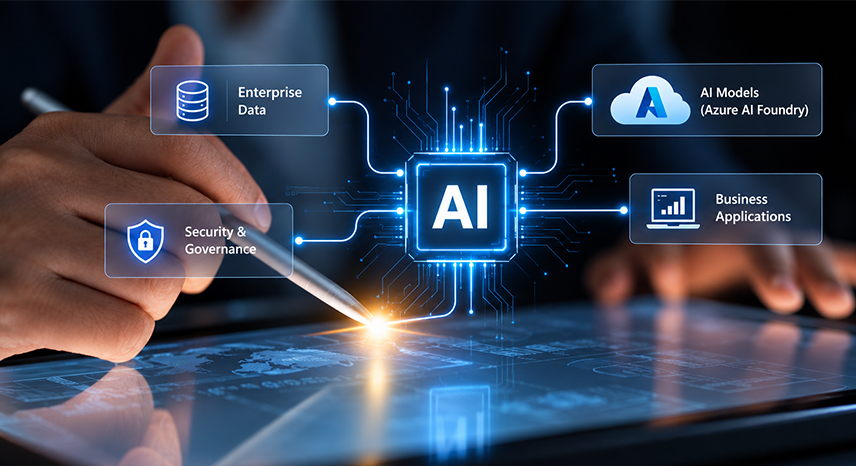
Implementing generative AI on Azure starts with the business requirement, not the model. This guide explains how to choose the right Microsoft platform, prepare for an Azure AI implementation, make critical architecture decisions, and operate applications securely at scale.
What Does Generative AI on Azure Include?
Generative AI on Azure enables enterprises to build applications that generate content, answer questions, summarize documents, and support business workflows. Enterprise implementation combines model access with data retrieval, application integration, security controls, evaluation, and ongoing monitoring.
However, adopting AI does not automatically translate into enterprise-wide implementation. McKinsey’s 2026 State of AI2 survey found that nearly nine in ten respondents report using AI regularly in at least one business. Yet, only 40 percent of respondents at large companies report scaling AI agents, and only 6 percent say AI generates at least 5 percent of EBIT. This gap highlights why enterprises need a structured approach to building, securing, and operating generative AI applications.
The main components include:
- Model selection and deployment to match business requirements.
- Enterprise data retrieval to ground responses in approved information.
- Application integration to connect AI with existing systems and workflows.
- Identity and network security to protect sensitive data and control access.
- Quality and safety evaluation to test accuracy, relevance, and reliability.
- Production monitoring to track performance, usage, and model changes.
Together, these components help organizations move from AI experimentation to secure, maintainable applications.
Note: Microsoft Foundry, formerly Azure AI Foundry and Azure AI Studio, provides a platform to access models and build AI applications. Foundry Models includes Microsoft and supported third-party models, including Azure OpenAI models.
Where Should an Enterprise Use Case Belong in the Microsoft Estate?
Choose the simplest Microsoft capability that meets the requirements before building a custom application. Microsoft 365 Copilot, Copilot Studio, and Microsoft Foundry serve different needs and involve different levels of engineering, flexibility, and operational responsibility.
| Option | Best Suited For | Main Trade-Off |
|---|---|---|
| Microsoft 365 Copilot | Productivity within supported Microsoft 365 applications | Limited to available capabilities and extension options |
| Copilot Studio and Power Platform | Low-code agents and business workflows | Requires connector, environment, and lifecycle governance |
| Microsoft Foundry on Azure | Custom applications, enterprise retrieval, and specialized integrations | Requires engineering, security, and ongoing operations |
| Custom models or infrastructure | Requirements that managed capabilities cannot meet | Greater development and maintenance responsibility |
When Should You Build on Azure?
Use Microsoft 365 Copilot for supported productivity tasks and assess Copilot Studio for low-code workflows. The latter should follow the organization’s Power Platform governance model.
Build on Azure when an application requires custom retrieval, specialized model selection, integration with core systems, or greater control over data flow. For example, an insurance assistant may retrieve policy clauses and claims records before drafting a response for a claims handler.
Custom models or dedicated infrastructure are justified only when managed options cannot meet documented requirements. Domain-specific knowledge alone does not automatically justify fine-tuning.
Azure AI vs AWS AI: Which Cloud AI Platform Fits Your Enterprise Best
Which Azure Components Support an Enterprise Generative AI Application?
An enterprise application combines models, retrieval, application logic, security, and monitoring. Select each component based on its role, rather than deploying features without a defined requirement.
“Azure must become the infrastructure for AI, while we build our AI platform and developer tools – spanning Azure AI Foundry, GitHub, and VS Code — on top of it.”
– Satya Nadella, Chairman and CEO of Microsoft
Azure AI Platform Map
| Requirement | Relevant Component | When to Use It |
|---|---|---|
| Model access | Microsoft Foundry Models, including Azure OpenAI models | To select and deploy supported models |
| Agent development | Microsoft Foundry Agent Service | For multi-step tasks involving tools and knowledge sources |
| Enterprise retrieval | Azure AI Search | To retrieve relevant information from approved sources |
| Speech, vision, and document processing | Relevant Foundry Tools | For specialized AI processing |
| Content filtering and prompt-attack detection | Azure AI Content Safety and supported Prompt Shields capabilities | To apply safety controls |
| Classical machine learning | Azure Machine Learning | For predictive models and training workflows |
| Evaluation and monitoring | Foundry evaluation capabilities and Azure monitoring services | To measure quality and operational performance |
Connect Components Around a Defined Workflow
For a policy assistant, Azure AI Search retrieves relevant documents, a model generates a grounded response, and the application enforces user permissions and records operational telemetry.
The model does not replace access controls. The application must ensure users retrieve only information they are authorized to see.
A single grounded model call may suffice for question-answering. Use an agent when the workflow requires multiple tools or coordinated actions.
What Must Be Ready Before an Azure AI Implementation?
An Azure AI implementation needs secure identity, controlled networking, governed data access, an appropriate landing zone, and cost controls. These foundations determine what the application can access and how it operates in production.
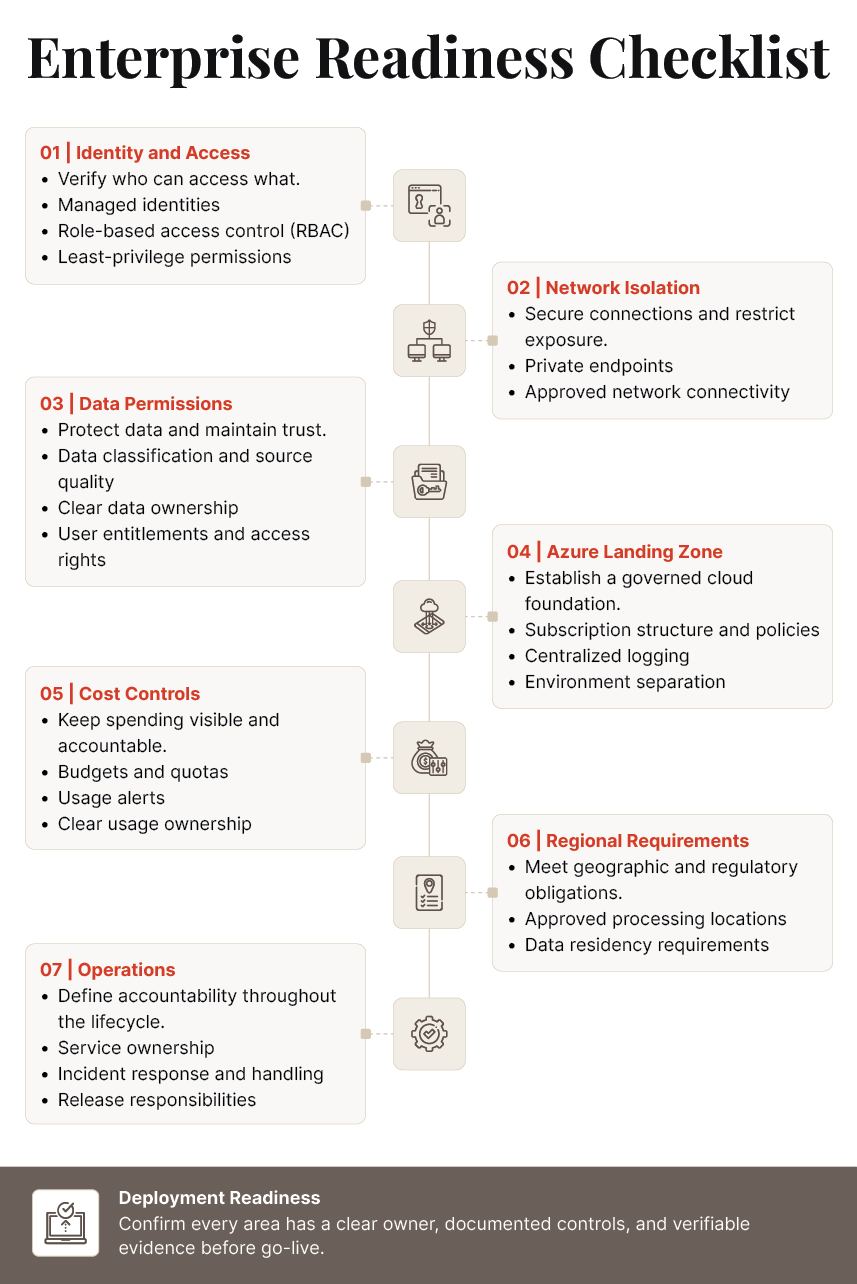
Use managed identities where supported, avoid embedding shared credentials in code, and enforce authorization throughout retrieval. Review network connectivity, data permissions, and logging before deploying the application.
Before development, confirm ownership, approved data sources, architecture, and acceptance criteria. An architecture and readiness review can identify gaps before they become production dependencies.
Which Architecture Decisions Matter Most for Generative AI on Azure?
Five decisions shape the application: grounding, model selection, deployment type, fine-tuning, and agent use. Base each choice on measurable requirements and evaluation results.
Decision 1: Ground Responses in Enterprise Data
Start with retrieval-augmented generation on Azure when applications need current business information. Azure AI Search supports keyword, vector, and hybrid retrieval, helping applications retrieve relevant documents and records.
Use retrieval when data changes frequently, answers need supporting evidence, or access varies by user. Evaluate retrieval relevance, freshness, permissions, and source attribution before launch.
Decision 2: Select the Model by Task
Choose models based on quality, latency, consumption, safety, and maintainability rather than brand alone.
| Criterion | What to Test |
|---|---|
| Quality | Accuracy, completeness, and consistency |
| Grounding | Alignment with retrieved evidence |
| Latency | Response time under expected demand |
| Cost | Token consumption and supporting services |
| Safety | Harmful outputs and inappropriate disclosure |
| Maintainability | Version availability and regression risk |
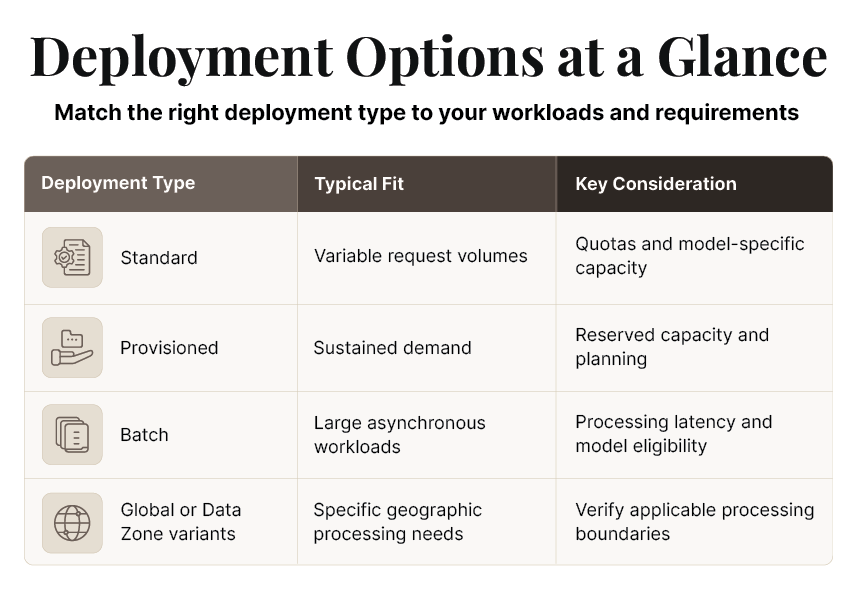
Decision 3: Select the Appropriate Deployment Type
Microsoft Foundry Models offers different deployment options, subject to model availability and service constraints.
Decision 4: Determine Whether Fine-Tuning Is Necessary
Fine-tuning may help achieve consistent output formats or specialized task behavior when prompting and retrieval fall short. It adds training, evaluation, versioning, and maintenance requirements.
Use retrieval for current company knowledge. Consider fine-tuning only when representative evaluations show a persistent behavior gap that justifies the additional effort.
Decision 5: Choose Between a Single Model Call and an Agent
A single grounded call often works for summarization, extraction, and document question-answering. An agent is more appropriate when a workflow must select tools, coordinate steps, or interact with multiple systems.
For example, summarizing a claim file may require one call. Retrieving claim details, checking policy information, and routing a case for review requires orchestration and explicit action permissions.
How Can You Build Enterprise AI Agents for Production?
How Should Enterprises Evaluate, Secure, and Govern Generative AI on Azure?
Enterprises should test application quality, apply safety controls, and retain human decision authority over consequential outcomes. Content filtering and prompt-attack detection reduce specific risks but cannot replace authorization or evaluation.
“AI is now infrastructure, and this infrastructure, just like the internet, just like electricity, needs factories.”
– Sid Nag, Founder and CEO of NVIDIA
1. Evaluate Before Launch
Build a test set of realistic questions, approved source documents, expected outcomes, and known failure cases. Measure:
- Retrieval relevance and source accuracy
- Answer quality and grounding
- Safety and appropriate refusal behavior
- Workflow execution and failure handling
Rerun evaluations whenever models, prompts, retrieval settings, or application logic change.
2. Apply Layered Safety Controls
Microsoft’s Azure AI Content Safety capabilities include content filtering and supported Prompt Shields functionality. Availability and configuration depend on the service and integration.
Apply input validation, restrict tool permissions, filter outputs, validate structured responses, and log relevant security events. Test prompt injection and data-exposure scenarios before release. Microsoft’s Prompt Shields documentation3 explains how the feature helps detect prompt injection attacks, including malicious instructions embedded in user prompts and documents.
3. Verify Data Handling and Retain Human Oversight
Microsoft states that prompts, completions, embeddings, and training data for Foundry Models sold by Azure are not used to train foundation models without permission or instruction. This commitment applies to the documented model category, not automatically to every third-party model or connected service.
Generative systems can draft, summarize, and flag issues. People should decide matters involving money, coverage, care, or rights. For example, a claims assistant may summarize evidence, but an authorized claims professional should decide whether to approve, reject, or escalate a claim.
Refer to our enterprise AI governance pillar for decision rights and governance controls.
How Should Enterprises Operate Generative AI on Azure After Launch?
Production operations require quality monitoring, capacity planning, model lifecycle management, and controlled changes. Initial evaluation is not enough because data, usage patterns, dependencies, and model versions can change.
I. Monitor Quality and Performance
Track answer accuracy, retrieval relevance, safety events, latency, failures, throughput, token usage, and user feedback. Assign owners to alerts and recurring failures.
II. Control Model and Configuration Changes
Review model lifecycle notices and test replacement versions before deployment. Version prompts, retrieval settings, safety policies, and tool permissions.
Rerun acceptance tests after material changes. A replacement model should meet the application’s quality, security, and business requirements before release.
III. Prepare for Incidents and Feedback
Define responses to unsafe outputs, access failures, quota exhaustion, and service outages. Depending on the application, recovery may involve reverting to a configuration, turning off a tool, or switching to manual processing.
Feed recurring failures into the evaluation dataset. Test fixes before release rather than relying on unreviewed prompt changes.
What Determines the Cost of Generative AI on Azure?
The cost of generative AI on Azure depends on model consumption, deployment type, request volume, retrieval, infrastructure, and engineering. A reliable estimate requires workload discovery and current Microsoft pricing.
The Main Cost Drivers
| Cost Driver | What Influences It |
|---|---|
| Tokens | Prompt length, response length, and conversation history |
| Model choice | Model-specific rates and consumption |
| Deployment type | Standard, provisioned, or supported batch options |
| Request volume | Demand, peak concurrency, and repeated calls |
| Retrieval and storage | Search requests, indexing, and stored content |
| Networking | Private connectivity and supporting infrastructure |
| Monitoring | Telemetry volume and retention |
| Engineering | Integration, evaluation, security, and maintenance |
Estimate and Control Costs
Effective Azure cost optimization starts with modeling expected requests, token consumption, peak demand, and retrieval volume. Include supporting services and engineering in the estimate.
Configure budgets, quotas, and alerts before scaling. Review cost alongside quality because reducing context or response length can also reduce answer accuracy.
What Are the Current Azure OpenAI Token Rates?
Microsoft Foundry charges for model inference based on the selected model, input and output tokens, and deployment type. For short-context requests using Global Standard, GPT-6.1 Sol costs $2 per million input tokens4, $0.10 per million cached input tokens, and $10 per million output tokens. GPT-6 Sol has the same input and output rates, with cached input at $0.20 per million tokens. GPT-6 Astra costs $10 per million input tokens, $1 per million cached input tokens, and $50 per million output tokens.
These are reference rates. Actual costs may vary by region, context, and deployment type.
Configure budgets, quotas, and alerts before scaling. Review cost alongside quality because reducing context or response length can also reduce answer accuracy.
How Does Damco Implement Generative AI on Azure?
Implementing generative AI on Azure requires the right use case, a secure cloud environment, and a clear plan for deployment and ongoing management. Damco helps enterprises assess their requirements, choose suitable Azure capabilities, and plan implementation around business objectives.
Assess, Build, and Validate
- Assess: Determine whether Microsoft 365 Copilot, Copilot Studio, or a custom Azure application fits the use case.
- Prepare: Review identity, network connectivity, data permissions, landing-zone controls, and cost management.
- Build: Select models and retrieval patterns against defined acceptance criteria. Introduce agents only where orchestration is necessary.
- Operate: Establish monitoring, model lifecycle reviews, incident response, and ownership.
Organizations exploring Azure AI services can use this approach to plan their implementation and identify the expertise required. For help evaluating potential partners, read our guide to top Azure consulting companies.
With a structured implementation approach, enterprises can align their Azure AI investments with business priorities while accounting for security, scalability, and long-term operational requirements.
References:
Frequently Asked Questions
Generative AI on Azure uses models and supporting services to generate content, answer questions, summarize information, and support workflows. Microsoft Foundry provides a platform to work with models and build AI applications, while Azure AI Search retrieves enterprise information for grounded responses. Production applications also require access controls, evaluation, safety measures, and monitoring.
Microsoft 365 Copilot supports productivity tasks in Microsoft 365. Copilot Studio supports low-code agents and workflows, while Microsoft Foundry supports custom AI applications and specialized engineering requirements on Azure. Choose based on integration needs, data access, and required control. Assess existing capabilities before committing to a custom build.
You need an approved use case, clear ownership, authorized data sources, secure identity and networking, and a governed Azure environment. Define regional requirements, cost controls, evaluation criteria, and production responsibilities. Microsoft's Cloud Adoption Framework and Well-Architected guidance provide starting points for readiness assessment.
Use retrieval when applications need current company information, document-based answers, or evidence from approved sources. Fine-tuning may help when prompting and retrieval cannot consistently achieve the required task behavior or output format. Evaluate both approaches against quality, maintenance, and operational requirements before choosing.
Costs depend on model selection, tokens, request volume, deployment type, retrieval, storage, networking, and monitoring. Engineering and ongoing maintenance also affect total cost of ownership. Estimate consumption using representative workloads and verify rates through Microsoft's current pricing documentation. Set budgets, quotas, and alerts before scaling.


