

Executive Summary:
- Start with the process, not the technology.
- Identify bottlenecks and standardize business rules before automating.
- Prioritize processes based on effort, risk, feasibility, and business value.
- Measure cycle time, errors, exceptions, manual effort, and cost.
- Build governance into automation and continuously improve workflows.
- Evaluate Power Automate solutions based on measurable business outcomes.
Operational excellence depends on more than automating individual tasks. Enterprises need processes that are consistent, measurable, efficient, and adaptable as business conditions change. Microsoft Power Automate services support this objective by connecting applications, orchestrating approvals, automating repetitive work, and providing process intelligence to identify where improvements are needed.
For leaders, the business question is therefore not simply how many workflows can be automated. It is which processes should change, what business outcome should improve, and how should that improvement be measured over time?

Microsoft’s 2025 Work Trend Index1 found that 53% of leaders said productivity must increase, while 80% of the global workforce reported lacking the time or energy to keep up with work demands. The same research found that 46% of leaders said their organizations were already using agents to fully automate workflows or processes.
This shift makes workflow design increasingly important. Automating an inefficient process can simply make inefficiency happen faster.
What Does Operational Excellence Mean in the Context of Workflow Automation?
Operational excellence means creating processes that consistently deliver the required business outcome with minimal waste, avoidable variation, and manual intervention. Automation becomes valuable when it improves measurable operating performance rather than simply replacing a manual task with a digital one.
For an enterprise, this typically means improving:
| Operational Objective | What Power Automate Can Support |
|---|---|
| Process Consistency | Standardized workflow logic and business rules |
| Reduced Manual Intervention | Automated task execution and routing |
| Faster Cycle Times | Automated triggers, approvals, and handoffs |
| Fewer Errors | Validation, rule-based processing, and system updates |
| Better Visibility | Run history, monitoring, process analytics, and reporting |
| Continuous Improvement | Process mining, performance data, and iterative optimization |
The distinction matters at the executive level. A workflow that saves five minutes per transaction may have limited value if it introduces compliance risk or creates another manual handoff. A workflow that reduces approval delays across thousands of transactions can have a much larger operational impact.
Where Does Power Automate Fit into an Operational Excellence Strategy?
Power Automate sits at the workflow orchestration layer. It can connect applications and services, execute business rules, route work, trigger notifications, and automate tasks across cloud and desktop environments.
Microsoft2 describes Power Automate as a platform spanning cloud flows, desktop RPA, process mining, and integration with Copilot and Copilot Studio.
“Everyone, not just developers, can now automate the repetitive work with Power Automate.”
– Satya Nadella, Chairperson and CEO, Microsoft
I. Repetitive Tasks
Routine activities such as data entry, file processing, record updates, and notifications can be automated when the underlying rules are stable.
II. Approvals
Approval workflows can route requests to the appropriate decision-makers, apply conditions, escalate overdue actions, and record outcomes.
III. Data Movement
Power Automate can move information between Microsoft applications, enterprise systems, and third-party services. Microsoft3 currently documents more than 1,000 connectors across Power Automate, Power Apps, Azure Logic Apps, and Copilot Studio, with custom connectors available for APIs that do not have prebuilt connectivity.
IV. Cross-Team Handoffs
Automation can trigger the next activity when one team completes its portion of a process. This reduces dependency on email, spreadsheets, and informal follow-ups.
V. Exception Handling
Well-designed automation should not attempt to eliminate every human decision. It should identify exceptions and route them to the appropriate person while allowing predictable cases to continue automatically.
VI. Cross-System Workflows
Enterprise processes often span CRM, ERP, collaboration, document management, databases, and line-of-business applications. Microsoft Power Automate integration can help orchestrate these interactions when standard connectors or custom APIs are appropriate.
What is a Six-Step Framework for Improving Processes with Power Automate?
Enterprises should treat automation as a process-improvement discipline rather than a flow-building exercise. A six-step framework helps business and technology leaders determine what to automate, how to redesign it, and how to prove the resulting value.
1. Identify Process Bottlenecks
Start with measurable friction.
Look for:
- Long processing times
- Repeated manual data entry
- Approval queues
- Duplicate work
- Frequent exceptions
- Spreadsheet-dependent processes
- Delayed handoffs SLA breaches
- High transaction volumes
Process mining can strengthen this assessment by showing how work actually moves through an organization instead of relying entirely on stakeholder descriptions.
2. Map the Current-State Workflow
Document the process from trigger to outcome.
Capture:
- Inputs and outputs
- Systems involved
- Decision points
- Manual activities
- Approvals
- Handoffs
- Exceptions
- Rework
- Ownership
This creates a baseline against which the automated process can be evaluated.
3. Prioritize Processes for Automation
Not every process deserves automation. A useful prioritization model considers:
| Factor | Question to Ask |
|---|---|
| Volume | How frequently does the process occur? |
| Effort | How much human time does it consume? |
| Variability | Are the rules sufficiently predictable? |
| Error exposure | What happens when a manual error occurs? |
| Business impact | Does the process affect revenue, customers, compliance, or cash flow? |
| Integration feasibility | Can the required systems be connected? |
| Change frequency | How often are the underlying rules likely to change? |
| ROI | Can the expected benefit justify implementation and operating costs? |
High-volume, rules-driven processes with measurable business impact are often stronger candidates than processes dominated by judgment and constantly changing requirements.
4. Standardize Rules Before Automating
Automation should not become a mechanism for encoding inconsistent practices.
Before building a flow, define:
- Decision rules
- Required data
- Approval authority
- Exception conditions
- Escalation paths
- Service-level expectations
- Ownership
- Audit requirements
This is where process redesign can create more value than automation alone.
5. Build Automation Around Business Outcomes
Instead of defining success as “the workflow runs successfully,” define the desired operating result.
For example:
Reduce purchase-order approval cycle time from three business days to one.
The workflow design can then be evaluated against that target.
This approach also helps Power Automate experts and internal automation teams determine which architecture, connectors, controls, and exception-handling mechanisms are actually required.
6. Measure and Continuously Optimize
Automation is an operating capability, not a one-time deployment.
Monitor:
- Flow execution
- Failures
- Processing time
- Exceptions Adoption
- Business outcomes
- Cost and time savings
Microsoft4 has expanded Power Automate’s monitoring and measurement capabilities. Its 2025 release updates included Automation Center performance monitoring and functionality for quantifying time and money savings from automations.
Which Operational Metrics Should Automation Improve?
Teams should measure automation against operational KPIs rather than workflow counts. The right metric depends on the process, but the following measures provide a useful starting point.
| Metric | What It Reveals | Example Target |
|---|---|---|
| Process Cycle Time | Total elapsed time from start to completion | Reduce approval cycle from 3 days to 1 |
| Processing Time | Actual work time required | Reduce manual handling per transaction |
| Error Rate | Frequency of incorrect processing | Reduce avoidable data-entry errors |
| SLA Compliance | Whether work is completed within agreed limits | Increase cases completed within SLA |
| Approval Turnaround | Time spent waiting for decisions | Reduce approval queue time |
| Manual Touchpoints | Number of human interventions | Remove unnecessary handoffs |
| Exception Rate | Share of transactions requiring intervention | Reduce avoidable exceptions |
| Automation Adoption | How consistently teams use the workflow | Increase usage across target teams |
| Cost per Transaction | Operating cost of each transaction | Reduce cost without increasing risk |
The important point is causality. If a workflow is automated but cycle time does not improve, the bottleneck may sit outside the workflow itself. The organization may need to redesign the approval structure, data model, policy, or ownership model.
How Can Process Mining Strengthen Continuous Process Improvement?
Process mining changes the starting point from “what employees say happens” to “what the process data shows is happening.” That distinction becomes important when processes span multiple systems, teams, and transaction types.
“Automating processes doesn’t just save time and cut costs- it can revolutionize how your business operates.”
– Sangya Singh, Vice President, AI Product and Strategy, Microsoft
Microsoft’s current Power Automate capabilities5 include process mining and object-centric process mining. Object-centric process mining can analyze relationships between interconnected business objects such as orders, invoices, deliveries, and payments instead of forcing every event into a single case structure.
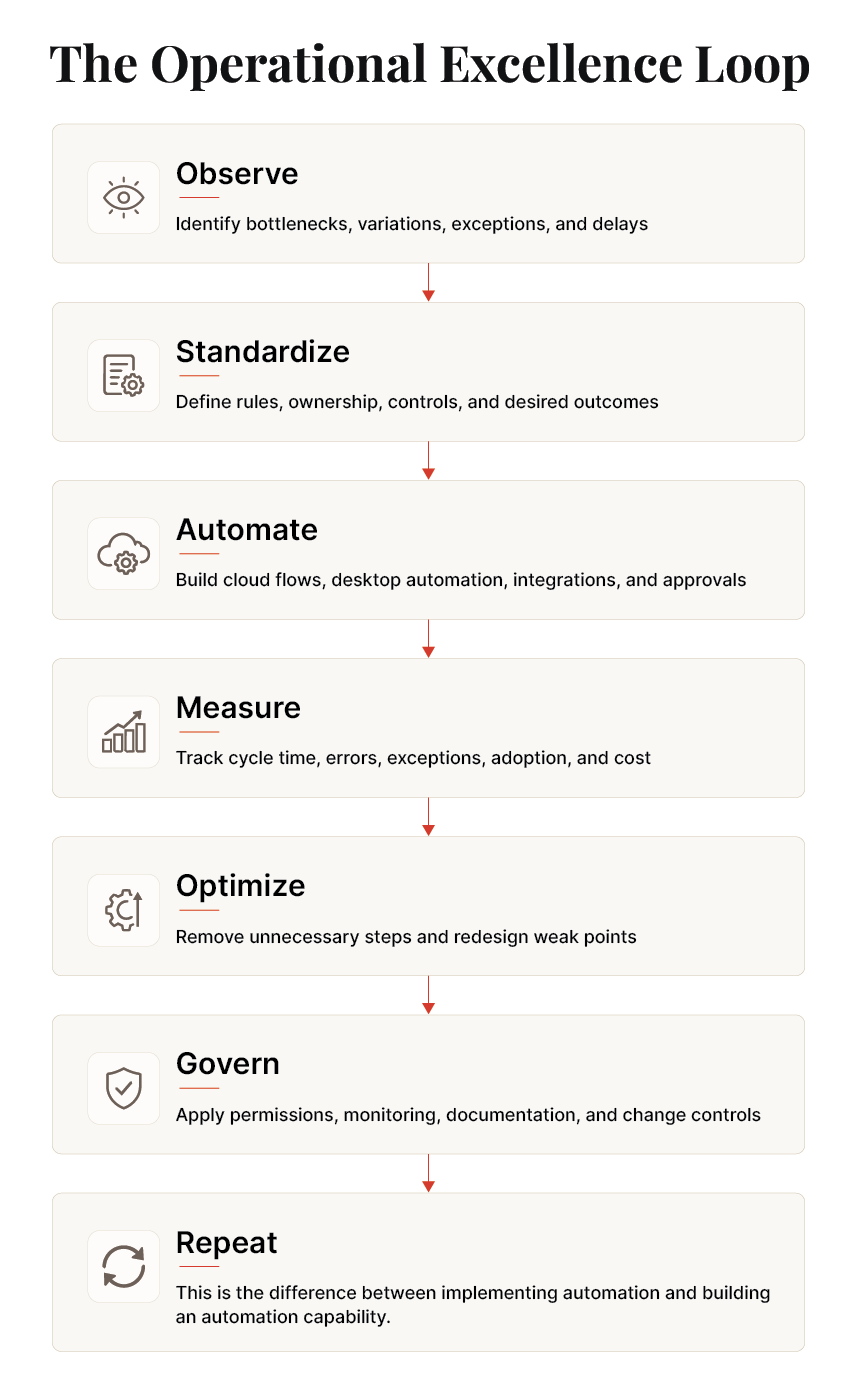
This creates a continuous improvement loop.
What is the Difference Between Automating a Bad Process and Optimizing It First?
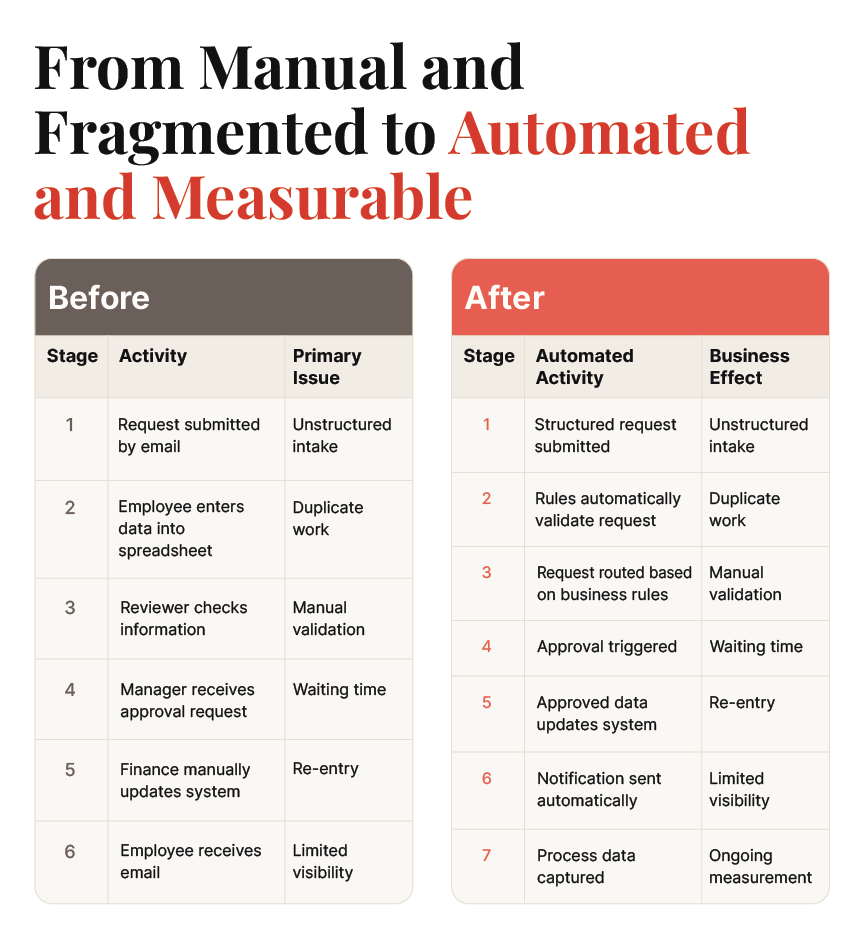
Automating an inefficient process does not automatically make it efficient. If the original process contains unnecessary approvals, duplicate data entry, unclear ownership, or redundant checks, automation can simply embed those inefficiencies into a digital workflow.
Consider an expense approval process:
| Before Optimization | After Process Redesign |
|---|---|
| Employee submits request | Request submitted |
| Email sent to finance | Automated validation |
| Finance manually enters data into spreadsheet | Policy-based routing |
| Finance reviews request | Appropriate approval |
| Manager approves | Automated ERP update |
| Finance manually updates ERP | Employee notification |
| Employee receives confirmation email | Performance reporting |
| Multiple manual touchpoints | Automated, measurable workflow |
What Changed?
The redesigned process does more than automate existing steps. It removes unnecessary work and assigns automation to predictable activities.
- Manual data entry → Automated data capture: Information does not need to be entered into multiple systems.
- Generic review → Automated validation: Rules can identify complete, compliant requests before human review.
- Fixed approval path → Policy-based routing: Requests can follow different paths based on value, risk, or business rules.
- Manual system updates → Automated synchronization: Approved transactions can update the ERP without another human touchpoint.
- Email follow-ups → Automated notifications: Stakeholders receive status updates without manual intervention.
- Limited visibility → Performance reporting: Process data can be used to monitor cycle time, exceptions, and bottlenecks.
The principle is simple: optimize the process first, then automate the steps that remain. This is also where Microsoft Power Automate solutions can support broader process improvement by connecting redesigned workflows with the systems and business rules they depend on.
Deloitte’s 2026 State of AI in the Enterprise6 research reinforces the importance of process redesign. Among 3,235 business and technology leaders surveyed across 24 countries, 30% said their organizations were redesigning key processes around AI, while 37% were still using AI at a surface level with little or no change to existing processes.
How Can Enterprises Govern Power Automate at Scale?
Governance becomes increasingly important as automation expands from individual workflows to an enterprise-wide operating capability. Power Automate services can support organizations as they establish consistent approaches to workflow development, integration, monitoring, and maintenance. The objective is to enable business-led automation without creating uncontrolled data access, duplicated workflows, orphaned processes, or compliance exposure.
Key governance areas include:
| Governance Area | Enterprise Consideration |
|---|---|
| Ownership | Assign a business and technical owner to critical flows |
| Permissions | Apply least-privilege access to systems and data |
| Environment Strategy | Separate development, testing, and production workloads where appropriate |
| Data Protection | Define which connectors and data sources can interact |
| Documentation | Record purpose, dependencies, owners, and exception logic |
| Monitoring | Track failures, performance, usage, and operational health |
| Change Management | Test and document material workflow changes |
| Citizen Development | Establish standards, review processes, and escalation paths |
| Lifecycle Management | Retire obsolete flows and update critical dependencies |
For organizations connecting Power Automate with ERP, CRM, data, and other enterprise applications, Power Automate integration also support the design and management of these cross-system workflows.
Microsoft’s current governance guidance7 emphasizes structured use-case prioritization, environment strategy, data governance, documentation, and maintenance. Microsoft also notes that the Power Platform admin center is becoming the central experience for governance, monitoring, and insights as native capabilities replace some functions previously provided through the CoE Starter Kit.
What Does an Optimized Approval Process Look Like?
Approval workflows are a practical example of how Microsoft Power Automate solutions improve operational performance without eliminating human decision-making.
How Microsoft Power Automate Addresses Key Automation Challenges
When is Power Automate Not the Right Automation Approach?
Power Automate is not automatically the correct answer for every process. A disciplined automation strategy includes deciding when not to automate with the platform.
Consider another approach when:
-
The Business Logic Is Highly Complex
Processes involving extensive computational logic, advanced optimization, or highly specialized application behavior may require custom software or other platforms.
-
Transaction Volumes Exceed Practical Workflow Requirements
Extremely high-volume workloads may require architectures specifically designed for large-scale event processing, integration, or data engineering.
-
Required Systems Lack Suitable Integration Options
A process may depend on systems that have restrictive APIs, unstable interfaces, or technical constraints that make Power Automate integration uneconomical.
The process requires substantial custom application development.
If the real requirement is a new enterprise application rather than workflow orchestration, Power Apps, custom development, Azure services, or another application architecture may be more appropriate.
-
The Business Case is Weak
A process that occurs infrequently, consumes little human effort, or carries significant implementation complexity may not justify automation.
The decision should therefore consider business value, technical feasibility, risk, maintainability, and total cost of ownership.
Conclusion
In the modern business landscape, the pursuit of achieving operational excellence is not merely a choice but a necessity for CTOs, CIOs, and other key decision-makers. In this pursuit, Power Automate acts as a strategic lever that allows organizations to not only navigate the challenges of today but also unlock the opportunities of tomorrow. As you weigh the advantages offered by this workflow automation tool, remember that the path to achieving significant cost savings, increased productivity, improved efficiency, and competitive advantage lies in automation guided by expert consulting.
References:
Frequently Asked Questions
Power Automate can reduce manual work by automating repetitive tasks, approvals, notifications, data entry, and handoffs between systems. Power Automate solutions can also connect business applications, helping teams reduce delays, errors, and unnecessary manual touchpoints.
Start with processes that are repetitive, rules-based, high-volume, and time-consuming. Microsoft Power Automate services can help assess process bottlenecks, manual steps, error rates, and integration needs before deciding which workflows are suitable for automation.
Compare performance before and after automation using measures such as processing time, cycle time, manual effort, error rates, transaction costs, and SLA compliance. Power Automate services can help organizations define the right metrics and establish a baseline before automation begins.
Signs include a growing number of disconnected workflows, repeated automation failures, complex integrations, unclear ownership, limited monitoring, and increasing governance requirements. At this stage, Microsoft Power Automate agency can help review the automation environment and determine whether the organization needs a more structured approach.
Organizations can scale by establishing common standards for workflow design, security, permissions, monitoring, documentation, and ownership. Microsoft Power Automate integration can also help connect workflows across business applications, while Power Automate solutions can expand based on business priorities and measurable outcomes.


